Agency Social Media Management: The Complete Playbook
Written by: Tim Eisenhauer
Last updated:

The easiest way to keep your social media profiles active.
Learn more about Apaya →
Every agency runs the same machine. Win a client, onboard them, produce their content, get it approved, publish it, prove it worked, protect the margin, repeat times the whole roster. The agencies that scale aren’t running a different machine; they’ve just systematized more of its parts.
This playbook is the whole machine in order. We’ve published deep guides and free templates for every stage, plus the agency platform they plug into; this page organizes all of it so you can start wherever your operation currently leaks.
Key takeaways.
- Agency social media management is the same five in-house jobs, multiplied by every client on the roster; the multiplication is what makes systems decide the outcome.
- Hand production runs 11 to 17 hours per client per month before scheduling, reporting, or account management touches the clock.
- The two structural choices that compound hardest: a platform billed on the roster instead of headcount, and an approval process with one named approver and a deadline.
- Every stage has a free template: proposal, contract, onboarding workbook, approval tracker, and client report deck, all ungated, all linked below.
- Fix stages in order of pain, not in order of appearance; the machine improves one leak at a time.
What is agency social media management?
Agency social media management is running social as a service across client brands: production in each client’s voice, client approval before publishing, scheduled delivery, and monthly proof, multiplied by every account on the roster. The multiplication is the whole problem. An in-house marketer who loses two hours to a messy approval loses two hours; an agency with twenty clients loses a workweek. Content creation alone runs 11 to 17 hours per client per month done by hand, which is why the margin math, not the marketing, is what decides how many clients an agency can carry.
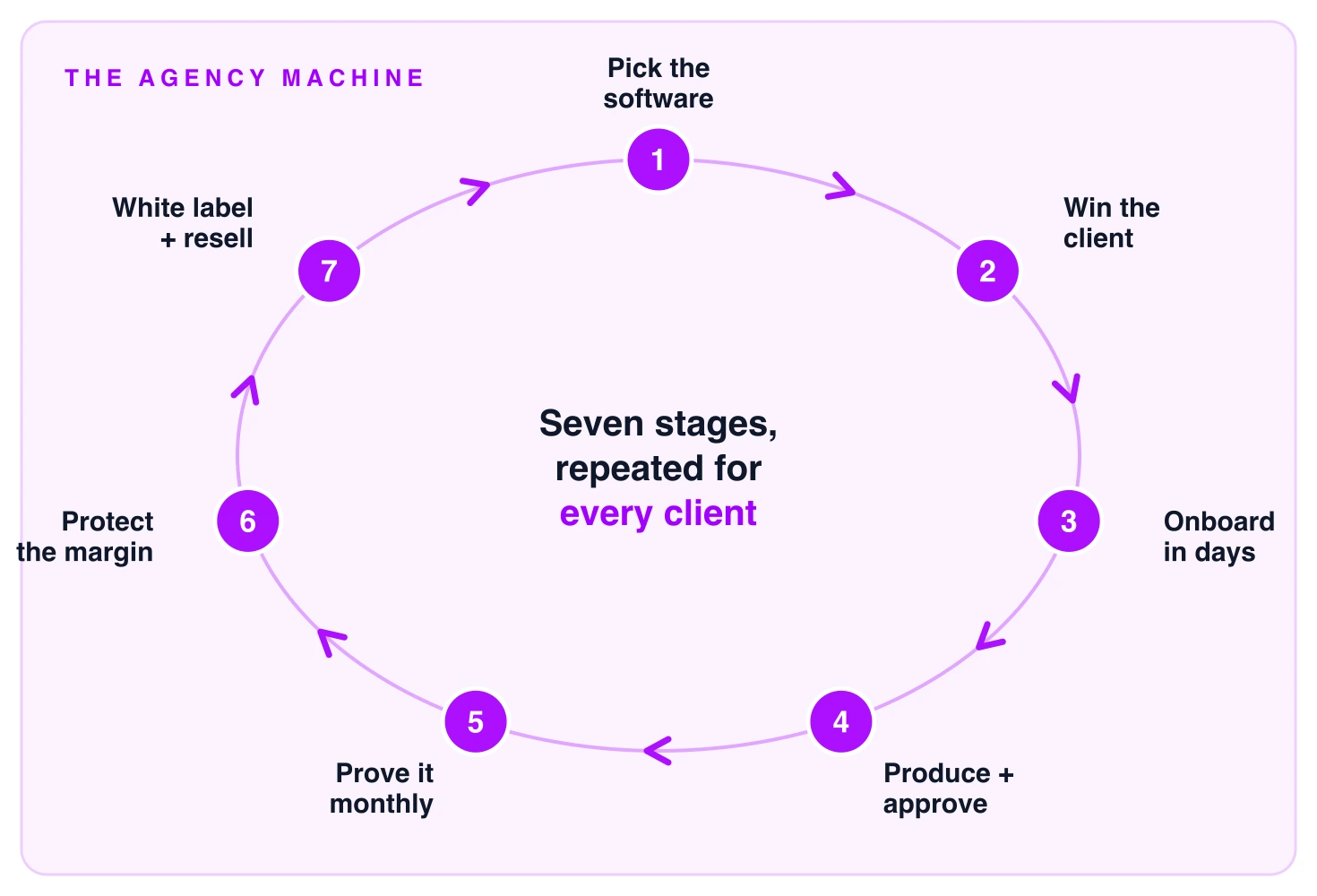
Each stage below names the leak it fixes and links the full guide. Read top to bottom if you’re building the operation; jump to the stage that hurts if you’re fixing one. The whole machine, compressed:
| Stage | The leak | The fix | The number |
|---|---|---|---|
| 1. Software | A seat meter that punishes hiring | Billing that tracks the roster, not headcount | A five-seat premium suite runs about $1,000/month before any work exists |
| 2. Winning clients | Scope agreed verbally, priced vaguely | Proposal and contract with scope, caps, and exit in writing | Two revision rounds is the working cap |
| 3. Onboarding | Weeks lost waiting on access and answers | Delegated access plus an intake that feeds production | First calendar in days, not the weeks standard playbooks plan for |
| 4. Production and approvals | Hand production, plus posts stalling in review | Batch AI production, one approver of record, one clock | 11 to 17 hours per client per month by hand |
| 5. Reporting | Proof assembled by hand, or not at all | One standard template, assembly automated | Three to five hand-built hours per client per month |
| 6. Margin | Headcount scaling at the same rate as revenue | Capacity from systems; run your numbers | Roughly $4,320 per client per year in production labor at 8 hrs/mo |
| 7. White label | The vendor’s brand on your work | Rebrand the platform and reports; resell per brand | A flat per-brand rate keeps tool cost tracking revenue |
Step 1: pick the software the whole machine runs on.
The platform decision shapes every downstream stage: which pricing meter you feed as the roster grows, whether production lives inside the system or stays on payroll, and what your clients experience at approval time. The meter matters most. A five-seat team on a premium per-seat suite clears about $1,000 a month before a single post exists, and the bill grows every time you hire; roster-priced platforms track revenue instead, so each new client carries a fixed, predictable tool cost. Two comparisons cover the field:
- Best social media management software for agencies: eleven platforms compared on billing unit, approvals, reporting, inbox, and how far each carries content production, with public pricing and a disclosed Apaya conflict.
- Best white label social media software: the same decision for agencies that need their own brand on the platform and reports, ranked by what’s rebrandable and what’s underneath.
Step 2: win the client on paper that protects you later.
The proposal sells the engagement, the contract makes its promises enforceable, and the pricing decides whether the client is worth having. Plenty of agencies run on a handshake and a monthly invoice, and it holds until the first dispute; whatever depth of paper you choose, the parts that end friendships get written down: scope by name, a revision cap (two consolidated rounds is the working standard), the price and its due date, and the exit. Five guides, in the order you’ll use them:
- Social media proposal template: every section written out: the summary clients read first, scope, deliverables, approval process, reporting cadence, and pricing.
- Social media management contract: clause by clause, from the minimal month-to-month one-pager to the full agreement, with a fill-in-the-blanks Word template.
- How much to charge for social media management: rate benchmarks by pricing model, and the renewal math for raising rates without losing clients.
- What a monthly package includes: the standard package pieces, typical costs, and the exclusions that separate a real package from a vague promise.
- Agency pricing and margin protection: the five pricing models and the four places retainers quietly leak.
Step 3: onboard in days, while the enthusiasm is still alive.
The standard playbooks plan onboarding in weeks, mostly spent waiting: for access, for questionnaire answers, for first drafts. New-client enthusiasm has a shorter half-life than that, so the operating goal is a first calendar in front of the client within days. Two rules get you there: access moves through platform delegation (Meta partner access, LinkedIn Page roles, X delegation), never shared passwords, and the intake answers feed production directly instead of retiring into a filed PDF.
- Social media client onboarding: the complete process: intake questionnaire, the platform-by-platform access checklist (no passwords, ever), the agency-led workshop, and the 30-day sequence, packaged as a free onboarding workbook.
- How to manage client social media at scale: the multi-client operating model onboarding feeds into, written for rosters of twenty accounts and up.
Step 4: produce in batches, approve in a queue.
Production is where agency margins go to die, and the fix has two halves: make the content faster, and stop it stalling in review. The stakes, in hours: creating content by hand runs 11 to 17 hours per client per month before scheduling or reporting touches the clock, and a 20-post batch that needs five hours of approval-chasing burns roughly $250 of account-manager time at a $45 loaded rate. Both halves have to shrink, because fixing one just moves the queue.
The production half:
- AI social media automation for agencies: the operating manual: what AI production changes, what your senior team stops doing, and why per-brand pricing beats per-seat for agencies.
- AI versus manual content creation: the cost comparison with real hour counts per client, not vendor hand-waving.
- Automate Facebook posts for agency clients: end-to-end automation on the platform most local-business clients still live on.
The control half:
- Content approval workflow: stages, roles, decision states, and risk-based routing, with a free tracker for Excel or Google Sheets.
- Approval workflows for social media agencies: the client sign-off version, including how to handle every client type from hands-off to regulated.
- Managing social media for multiple brands: the portfolio case: one shared system, separate brand voices, per-brand approvals.
All of it runs through client approval workflows in Apaya, where the queue, the approver, and the publishing are one system.
Step 5: prove the work every month, or lose the retainer quietly.
Clients rarely churn because results were bad; they churn because nobody made the value legible, month after month. Hand-built, a decent client report takes three to five hours of pulling, pasting, and formatting; at ten clients that’s a workweek every month spent proving the other work happened. The report also carries more weight than it looks like it should: it’s the one artifact where the client re-decides the retainer every single month.
- Social media report template: the 13-slide client-facing structure, downloadable as an editable deck and a data workbook with a completed example inside.
- White label social media reports: your agency’s brand on every report, and the working rules for what belongs inside one.
- Client reporting that prevents churn: the retention mechanics: what clients read, what they forward to their boss, and what makes them renew.
- Social media statistics: 70 sourced, dated numbers to cite in reports and pitches without an evening of hunting.
The assembly itself is what agency reporting and analytics automates: performance by post, campaign, account, and brand, gathered in one place.
Step 6: protect the margin while the roster grows.
Growth breaks agencies through capacity, not demand: the roster grows until the team can’t produce for one more client, and hiring resets the margin you just earned. Put a number on the ceiling: at eight production hours per client per month and a $45 loaded rate, every client carries about $4,320 a year in production labor. Systems move that number; headcount multiplies it.
- Scale a social media agency without hiring: the core argument: capacity has to come from systems, because headcount scales cost at the same rate as revenue.
- How to scale social media content production: the production-side playbook for more volume at flat cost.
- Social media content production capacity: what a content team can produce by hand, in numbers you can check against your own.
- Agency capacity calculator: your roster, your team, your rates; about a minute to see how many clients your current people could carry.
Step 7: put your brand on the whole thing.
The endgame for many agencies is white label: clients see your brand on the platform, the reports, and the results, while the production system runs underneath. One economic rule governs the stage: when the platform charges a flat rate per brand, your tool cost tracks the roster, which is what makes reselling a margin business instead of a pass-through.
- White label social media management guide: the complete picture: what’s rebrandable, the per-client economics, and how to position it.
- How to white label Apaya: the setup walkthrough, surface by surface, from logos to sign-in to invitations.
- White label social media services: productizing the offer: what agencies sell under their own name and how they package it.
- White label social listening: the premium-tier add-on that closes bigger retainers.
- How social media reseller programs work: the wholesale-to-retail economics, client by client.
- The Apaya reseller program: ours: flat per-brand rates, white label included on Supernova.
- White-label platform: the platform layer under all of it, and exactly which surfaces carry your brand.
- How to start a social media management business: and if you’re at client zero, the whole journey starts here.
Every free template and download in one place.
- Proposal template (written out in the guide)
- Contract template (.docx)
- Client onboarding workbook (.docx)
- Content approval tracker (.xlsx)
- Client report deck (.pptx) and data workbook (.xlsx)
- The AI-Native Social Media Agency report (the strategy layer behind this playbook)
All ungated. No email required for any of them.
Frequently asked questions about agency social media management.
What is agency social media management?
Running social media as a service for client brands: production in each client’s voice, client approval, scheduled publishing, and monthly reporting, multiplied across the roster. The multiplication is what makes systems matter; every process runs per client.
How do agencies manage social media for multiple clients?
One platform, one workspace per client brand, each with its own voice, assets, calendar, approver, and analytics. Batch production per client, approval in a queue instead of email, automatic publishing after approval, and centralized monthly reporting.
What templates does a social media agency need?
Five cover the lifecycle: proposal, contract, onboarding questionnaire with access checklist, approval workflow tracker, and client report. Every one of them is linked above as a free, ungated download.
How do agencies use AI for social media management?
AI production with human judgment: the system learns each client’s brand from their website and assets, turns briefs into batches of ready-to-review posts in the client’s voice and visual identity, and the agency team reviews and approves everything before it publishes. Creation hours become review hours; accountability stays human.
The machine is buildable in order.
Nobody fixes all seven stages in a week, and nobody needs to. Pick the stage currently costing you the most, use its guide and template, and move to the next one when it stops hurting. The through-line is the same at every stage: define the system, put it in software, and stop paying senior people to do what a process should do. That’s the whole playbook, and the agency platform is where it runs.
See how agencies run Apaya → Start Your Free Trial →
Try it for 3 days • $0 today • Cancel anytime

apaya.com
The AI-Native Social Media Agency.
How to take on more clients without hiring more content people.
Free report
The AI-Native Social Media Agency.
How to take on more clients without hiring more content people. An 18-minute read.
The easiest way to keep your social media profiles active.
Apaya writes your posts, designs your graphics, and publishes everywhere — automatically.