YouTube Shorts scheduler
YouTube Shorts scheduler that creates the videos, too.
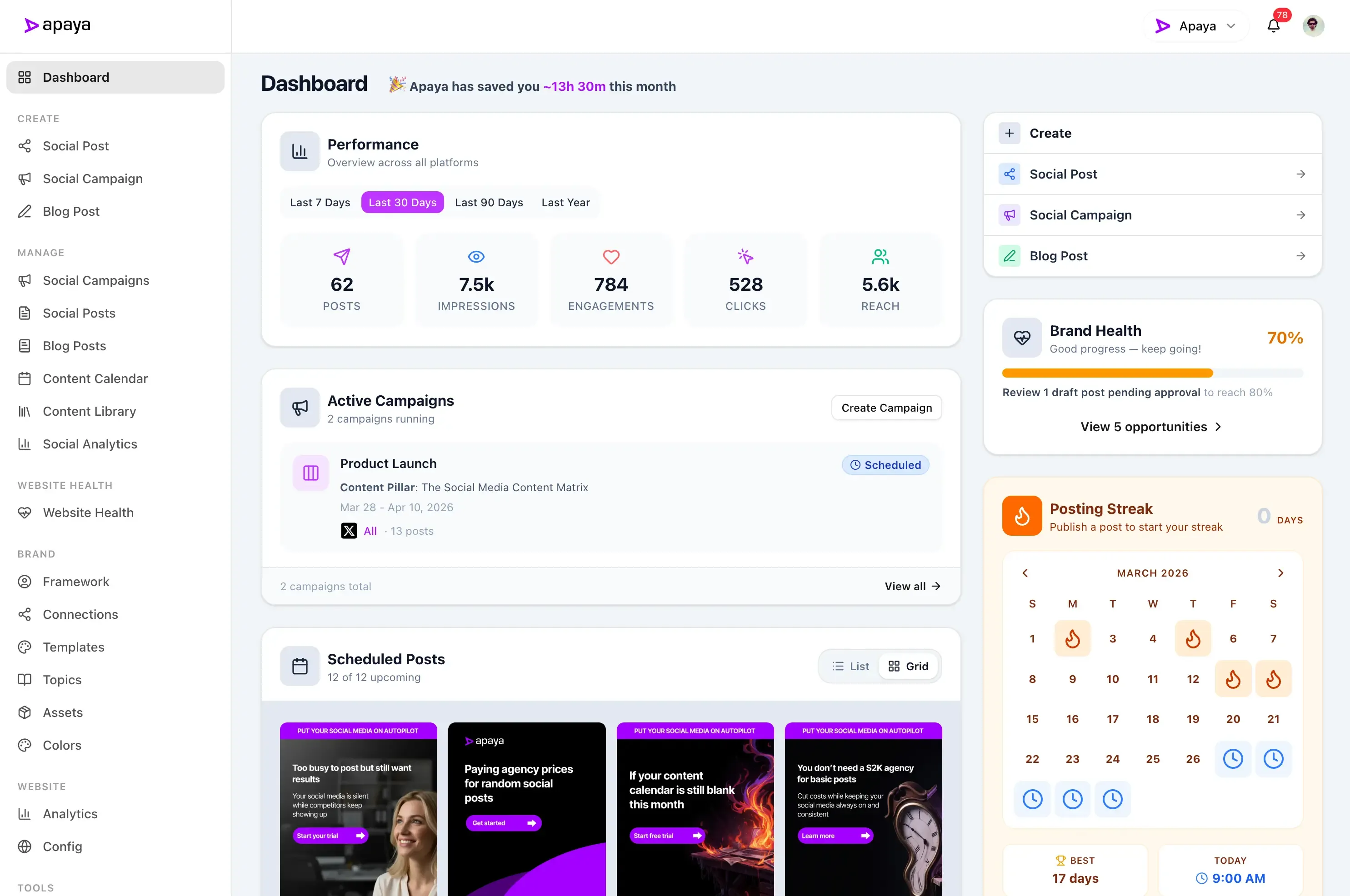
Apaya is a YouTube Shorts scheduler that turns your business information into short, branded videos with animated text and designs. It writes the captions and publishes to YouTube on your schedule. Create a video in Apaya or upload your own, then schedule YouTube Shorts alongside your other accounts.
Benefits
Create branded videos.
AI writes the on-screen text and turns it into an animated video using your brand.
Upload your own footage.
Use videos you already have and prepare their social media captions in Apaya.
Schedule and publish.
Choose when your Shorts go live and let Apaya handle the upload.
Keep one calendar.
Plan YouTube alongside your other social media accounts.
"Apaya saves us time every day. Being able to generate the social media content we need in minutes is a game changer."
 Abhisek Sharma Owner at SCP Technologies
Keeping a YouTube channel active takes production time most businesses do not have.
Keeping YouTube active means coming up with an idea, making the video, writing the description, and getting it published. That is a lot of production work for one more social media account.
Give Apaya a brief, topic, or page from your website. It creates a short video using animated text and branded designs, writes the social media caption, and handles scheduled publishing. You can also start with your own footage.
Everything the YouTube Shorts scheduler handles, from AI video to published Short.
Connect your YouTube channel, let Apaya create the video, and choose when it goes live. You can also upload your own footage and schedule YouTube Shorts through the same publishing workflow.
Your channel
Bring your YouTube channel into Apaya.
- Connect with the Google account that manages your channel
- Keep each brand connected to the right YouTube channel
- Manage YouTube alongside your other social media accounts
Connect your channel once in Brand Framework, under Social Connections. From there, your YouTube videos become part of the content you manage in Apaya. Agencies can keep a different channel connected for each client brand.
Connect your accounts to start publishing.
AI video creation
Apaya creates the video for you.
- Start with a brief, topic, website content, or webpage URL
- AI writes the on-screen text and social media caption
- Apaya creates a short video with animated text and branded designs using a video template
Open Create Reel and choose Apaya Generated. Give Apaya the business information you want to share, and it turns that input into a branded, animated video. It also writes the caption and hashtags used for the YouTube description. Have footage ready? Choose Upload My Own instead and prepare its caption in the same workspace. Explore Apaya's AI social media content creation tools.
Generate a short video or upload your own.
AI writes the text and builds an animated, branded video.
Use footage you already have and add the caption.
Publishing settings
Set the YouTube title and visibility before each Short publishes.
- Write a title that tells viewers what the video covers
- Choose Public, Unlisted, or Private visibility
- Save the YouTube settings with your scheduled post
Set the title and visibility before the video goes live. Apaya also collects YouTube's audience and altered-content choices, so the publishing details are ready when it is time to upload.
Choose how this video appears on your channel.
Scheduling
Schedule YouTube Shorts in advance on the same calendar as your other posts.
- Publish now or choose a future date and time
- Prepare your video posts when you have time
- See YouTube and your other social media posts on one calendar
Once the video and YouTube settings are ready, the YouTube Shorts scheduler handles the upload at the scheduled time. Use the same social media calendar you use for the rest of your accounts.
This week, all platforms
Publishing status
Know when your Short is published.
- Follow the YouTube status on the post
- Open the published video from its View link
- Retry a failed YouTube delivery without reposting successful destinations
Check the YouTube publishing status in the same place you manage the post. Once it is live, open the video from Apaya to see it on your channel. Your other selected platforms have their own publishing status, too.
Retry one platform without reposting the ones that succeeded.
Create videos without filming every update.
Turn a service explanation, product message, or business tip into a short, branded video. Apaya writes the text and animates it using a video template, so you have something ready to publish without recording new footage.
Your own footage works too.
Upload a product demo, a look at your recent work, or a team introduction. Prepare its social media caption and schedule it for YouTube. You can also select other connected platforms that support the video.
Keep your business visible on your channel.
Share product explanations, service updates, team introductions, and recent work. Give people useful videos to watch when they visit your YouTube channel.
Keep client channels organized.
Agencies can connect the correct YouTube channel inside each client brand. The video content, publishing choices, and schedule stay with that brand. Explore Apaya for agencies.
Built for businesses that want to schedule YouTube Shorts without a production schedule.
Turn your services, offers, and business tips into short, branded videos. Add your own footage whenever you have something to show.
Whether you run a small business or manage client accounts, Apaya handles video creation, social media captions, scheduling, and YouTube publishing in one place.
Get Started TodayTry it for 3 days • $0 today • Cancel anytime
Get started with Apaya.
Plans from $55/month. Start with a 3-day free trial — cancel anytime.
- AI content generation in your brand voice
- Automated scheduling and publishing
- Brand framework + social analytics
- Choose review or automatic publishing for each campaign
Self-serve plans
From $55/mo
Billed annually. Monthly billing available.
Start Your Free TrialTry it for 3 days • $0 today • Cancel anytime
See all plans and compare →Frequently Asked Questions
Can I publish YouTube Shorts with Apaya?
Can Apaya generate videos for YouTube Shorts?
What kind of videos does Apaya create?
Do I have to upload my own video?
Can I send an image or text-only post to YouTube?
What becomes the YouTube title and description?
Can I choose who can watch the video?
Can I schedule YouTube Shorts in advance?
Can I publish the same video to other social media accounts?
Can different brands use different YouTube channels?
Does Apaya show YouTube analytics?
Create and schedule your next YouTube Short with Apaya.
Turn a business idea into a branded video, then put it on your publishing schedule.
Start Your Free TrialTry it for 3 days • $0 today • Cancel anytime