How to Post from Facebook to Instagram at the Same Time
Written by: Tim Eisenhauer
Last updated:

The easiest way to keep your social media profiles active.
Learn more about Apaya →
How do you post from Facebook to Instagram at the same time?
Three ways, all real: turn on Meta’s built-in cross-sharing so a Facebook Page post also publishes to your linked Instagram, compose once in Meta Business Suite with both platforms checked, or use a tool that takes one brief and writes each platform its own adapted post. The first two are free and duplicate; the third one adapts. This guide covers all three with the setup steps, the fixes for the “why won’t it share” cases, and the adapted version shown in screenshots.
The adapted version
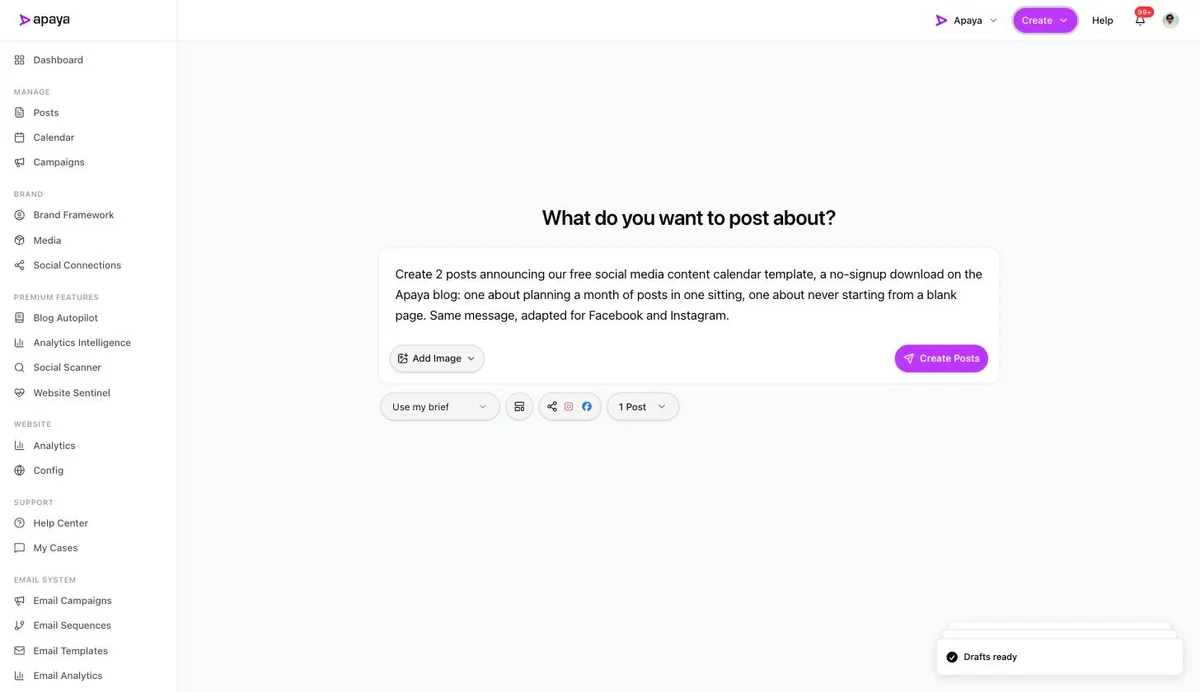
In Apaya, one brief with both platforms checked returns separate Facebook and Instagram posts, each written and designed for its feed, published together with your approval. From $55/mo. Shown below.
Method 1: Meta’s built-in cross-sharing
The setup, step by step:
- Link the accounts. For personal profiles, open Settings, then Accounts Center, and add the Instagram account so both live in one center. For business assets, do the equivalent in Meta Business Suite’s settings so the Page and the Instagram professional account sit in the same business portfolio. The full linking walkthrough covers all three connection paths and the errors that block them.
- Turn on sharing. In Accounts Center, open the sharing options between your profiles and enable sharing from Facebook to Instagram. The setting is per-direction: Facebook-to-Instagram and Instagram-to-Facebook toggle separately.
- Post with media. Compose from your Page as normal. When the post qualifies, the share-to-Instagram option appears; leave it on and one post publishes to both feeds.
Once linked, this is the zero-effort option, and its failure cases are the most-asked questions in this SERP. The fixes:
- Accounts not linked, or linked in different portfolios. The cause of most “why won’t it share” cases. Both accounts must sit in the same Accounts Center or business portfolio; relink and the toggle appears.
- No image or video. Instagram requires media. Text-only posts and link-preview posts have nothing Instagram will accept, so they never cross. Attach a photo and the option returns.
- Unsupported post type. Events, polls, some shared posts, and multi-link posts stay on Facebook. Repost the content as a photo or video post and it crosses.
- Wrong Instagram account type. Business cross-posting expects an Instagram professional account (free to switch) connected to the Page.
- Missing page permissions. If you manage the Page through Business Manager, your role needs content permissions on both assets, or the composer hides the option.
What crosses and what doesn’t, in one look:
| Post type | Crosses to Instagram? |
|---|---|
| Photo post | Yes |
| Video post | Yes, within Instagram’s length limits |
| Text-only | No, nothing to cross |
| Link post with preview | No, attach a photo instead |
| Story | Yes, via the story sharing setting |
| Event, poll | No |
Method 2: Meta Business Suite, both boxes
Business Suite (business.facebook.com) is the free answer that covers scheduling too:
- Open Business Suite and pick the business that holds both accounts.
- Click Create post. Both platform icons appear at the top of the composer; check Facebook and Instagram.
- Write once, attach the media, and use the preview toggle to see how each feed renders it.
- Publish now or pick Schedule and set the date and time.
- Manage everything after that from the Planner, the calendar view that also covers stories.
If your entire need is “same post, both platforms, on a calendar, free,” the article ends here for you, with two limits worth knowing: both platforms get identical content, and every word and image is still yours to produce. On busy weeks, the second limit is the one that shows.
Method 3: One brief, two adapted posts
The duplication methods share a flaw: Facebook and Instagram are different rooms, and the same caption reads differently in each. Hashtag blocks look native on Instagram and spammy on Facebook; link behavior differs; tone lands differently. Here’s the version where each platform gets its own post, in Apaya, captured live.
Write the brief once and check both platforms in the picker; the share icon carries both badges:
A minute later, the drafts come back tagged “Post to: 2 platforms,” each with its own caption and graphic, review controls per post, and one Approve & Schedule for the set:
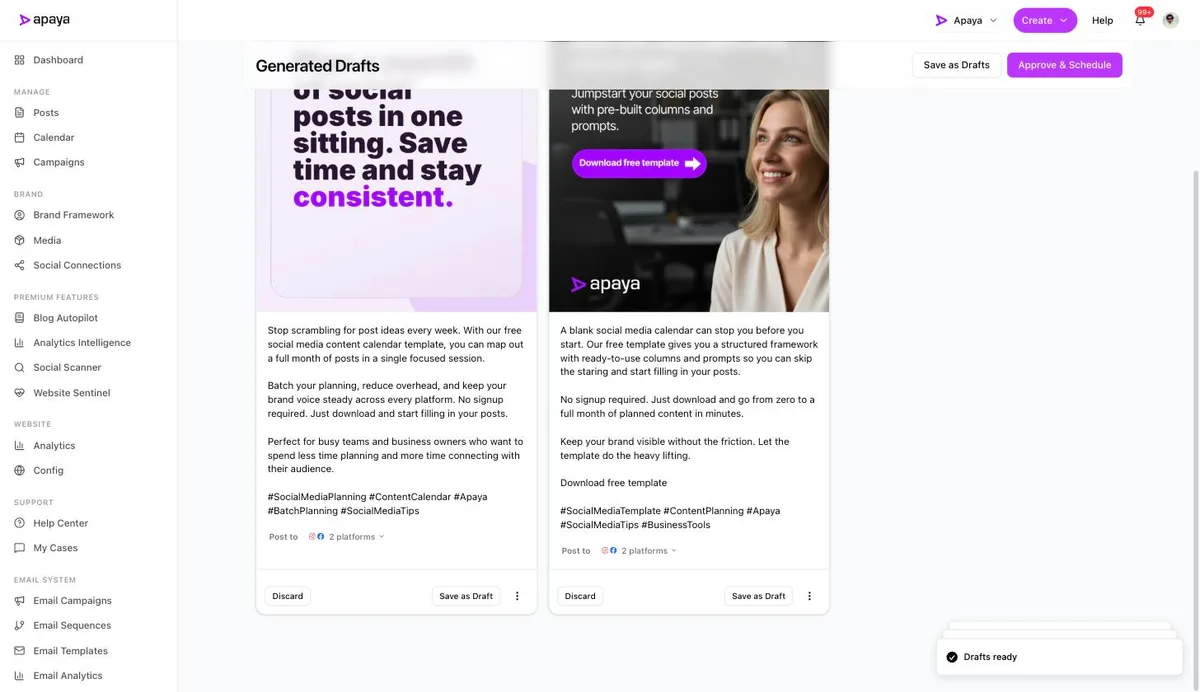
Same idea in, per-platform posts out, published together. That’s cross-posting without the copy-paste voice, and it extends past the Meta pair: the same picker adds LinkedIn and X to the run, which turns “post from Facebook to Instagram” into “post to everything at once” without extra work.
Which method fits
| Your situation | Method |
|---|---|
| Occasional posts, both feeds, zero budget | Built-in cross-sharing from the Page |
| Regular schedule, same content both places, free | Business Suite with both boxes |
| Each platform should sound native, creation is the chore | One brief, adapted posts |
What else people ask
Do cross-posted posts perform worse on Instagram?
Duplicated ones can, for a mundane reason: Facebook-formatted captions (links in the text, no hashtags, longer paragraphs) read as off-platform on Instagram. The Instagram engagement data doesn’t penalize the method, it grades the result. Adapted posts remove the mismatch.
Can I schedule cross-posts in advance?
All three methods schedule: Business Suite has its Planner, and the adapted flow lands everything on one calendar at optimal times per platform. The full scheduling method comparison is in that guide.
Does this work for stories and reels?
Meta’s native tools cross-share stories between Facebook and Instagram, and reels sharing depends on the compose surface. The walkthrough above covers feed posts; formats beyond that are their own creation paths.
What about posting Instagram-first to Facebook?
Same Accounts Center settings, opposite toggle: Instagram’s sharing settings can auto-share your posts to the linked Page. The direction matters mostly for where your better caption gets written; whichever platform you compose for natively tends to read best there.
Do I need Business Suite, or can I do all this from the phone apps?
The Accounts Center toggles and the Page composer’s share option all work from the apps, so occasional cross-posting needs nothing else. Business Suite earns its place when scheduling enters the picture: the Planner, the both-boxes composer, and story scheduling are desktop-grade tools the apps only partly mirror.
Will the same caption hurt me on one platform?
It reads worst in two spots: hashtag blocks look native on Instagram and like clutter on Facebook, and links are tappable on Facebook but dead text in an Instagram caption. If you use the duplication methods, write the caption Instagram-first and put links in your Facebook comments or your bio; if that juggling gets old, that’s the adapted method’s whole pitch.
One idea, both feeds, no copy-paste
Your customers check Facebook and Instagram in different moods, and both feeds need to look alive. Link the accounts and the free methods keep them in sync; brief the idea once and the adapted method keeps them native. Either way, posting to both should never again be two jobs, and the full automation guide covers what happens when you stop writing the input too.
Sources
- Meta Accounts Center and Business Suite cross-sharing documentation, verified July 2026
- Apaya product screenshots captured live from my.apaya.com, July 2026
- Rival IQ (Quid) and Socialinsider 2026 benchmark data, as documented in our platform deep dives
The easiest way to keep your social media profiles active.
Apaya writes the posts, designs the graphics, and publishes them for you. You approve.
See how Apaya worksThe easiest way to keep your social media profiles active.
Apaya writes your posts, designs your graphics, and publishes everywhere — automatically.