Automate LinkedIn Posts: The Allowed Ways, With Screenshots
Written by: Tim Eisenhauer
Last updated:
The easiest way to keep your social media profiles active.
Learn more about Apaya →
Can you automate LinkedIn posts?
Yes, and it matters how, because “LinkedIn automation” names two different things. Automating your own posts through the native scheduler or official API tools is allowed and ordinary. Automating connection requests, DMs, and engagement through browser bots is what LinkedIn bans and bans accounts for. Everything below is the first kind: three levels of posting automation, ending with the full flow shown in screenshots, on the one major platform where the engagement data still points up.
The short version
Apaya writes LinkedIn posts in your brand voice, designs the visuals, and publishes on schedule to your company page, with your approval first. From $55/mo. The walkthrough below shows it.
Why LinkedIn is the platform worth automating
The 2026 benchmark data makes the case: LinkedIn engagement is up 8% year over year by impressions while every other major platform falls, document posts earn 7.00% against text posts’ declining 3.95%, and the industry spread is the narrowest in social media, so the platform doesn’t punish your niche. For anything B2B-adjacent, the marginal post earns more here than anywhere, and the businesses that win are the ones still posting in March. That’s a consistency problem, which is an automation problem.
Level 1: LinkedIn’s native scheduler
When composing a post, the clock icon next to the Post button opens the scheduler: pick a date and time up to three months out, and the post publishes itself. It works on personal profiles and on company pages when you compose as the page from its admin view, and your pending posts are listed in the composer’s scheduled-posts view where you can edit or delete them until they go live. Free, official, and fine for the occasional planned post. Its limits: one post at a time, no calendar overview, no cross-platform anything, and the writing is all yours. The queue-of-one.
The document post problem
The format data has a cruel joke in it: the winning LinkedIn format is the one nobody has time to make. A document post is a multi-page PDF or image set, which means six to ten pages of layout, consistent design, and export, per post, in a design tool, weekly. That production cost is why feeds default to the declining text post, and it’s the gap automation closes on this platform. The material is rarely the problem: every checklist, price explainer, and how-to-choose guide your business owns is a document post waiting to be paginated, and the 30-idea list marks ten of them. What’s missing is the production line: one idea in, branded pages out, no design session. Grade any LinkedIn automation on exactly that: whether the visual output arrives finished or arrives as homework.
Level 2: Scheduling tools
The Buffer-and-Hootsuite layer adds the calendar, the queue, and multi-platform publishing; the full comparison covers the field. Same boundary as every platform: a scheduler distributes finished posts, and LinkedIn posts are the most labor-intensive in social media to finish, because the format that wins (documents, carousels, structured breakdowns) is the format that takes longest to produce by hand.
Level 3: Full automation, brief to published page
Here’s the flow in Apaya, captured live from our account.
1. Brief it and pick LinkedIn. One setup step precedes everything: connect the accounts under Social Connections, which for a company page means you must be a page admin, and the connection runs through LinkedIn’s official authorization screen. From there, write what you want in plain language. In the platform picker, LinkedIn Business publishes to your company page; LinkedIn Personal covers a profile. We briefed three posts: an engagement-trend insight, a document-format takeaway, and a template announcement.
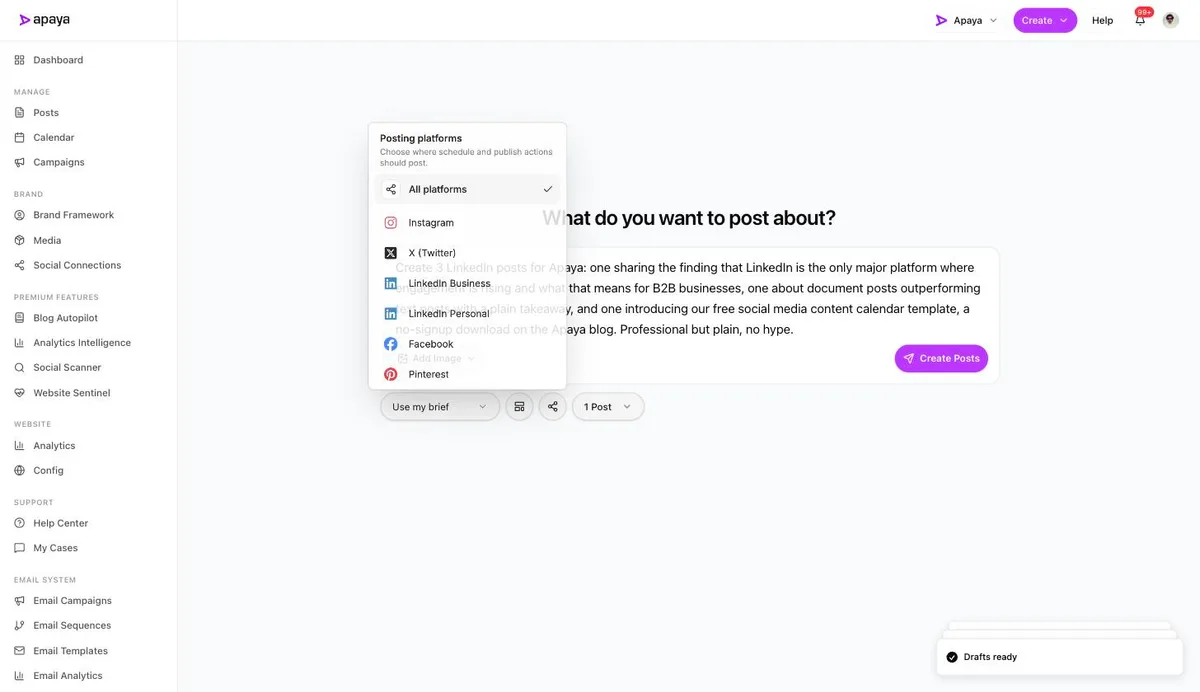
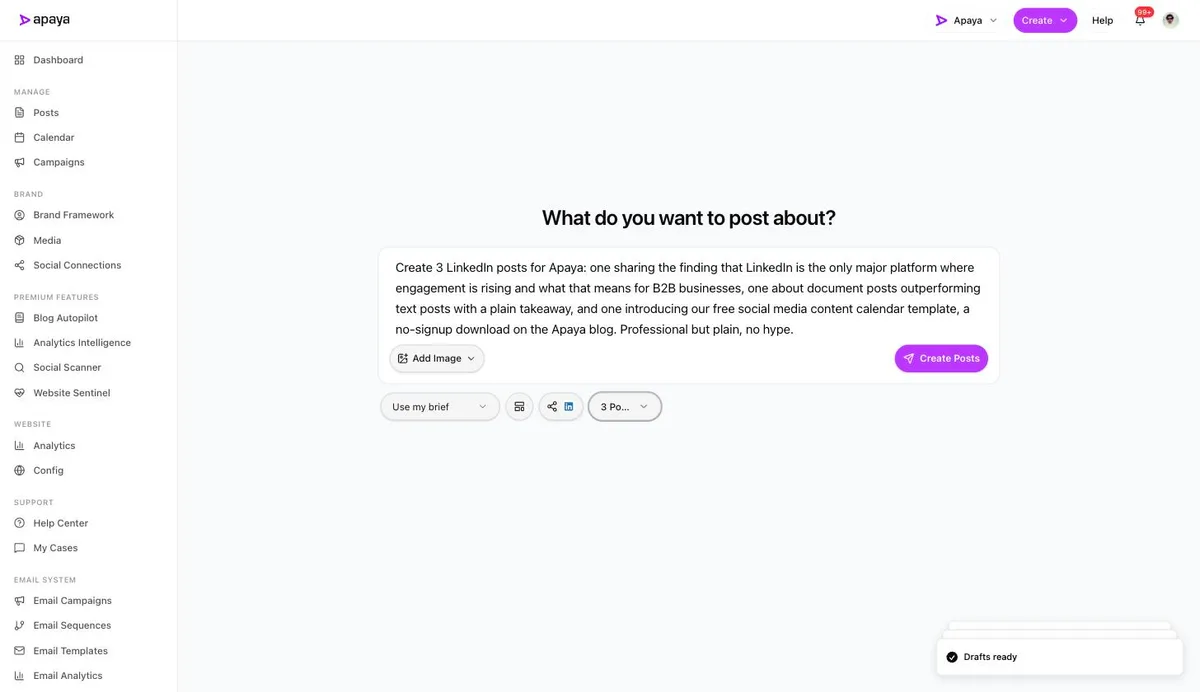
2. Set the run and create. LinkedIn badged on the share icon, three posts selected, one click.
3. Review what comes back. A minute later, three finished LinkedIn posts: professional captions in our voice, designed graphics, keep-edit-discard controls per post, and Approve & Schedule for everything you keep.
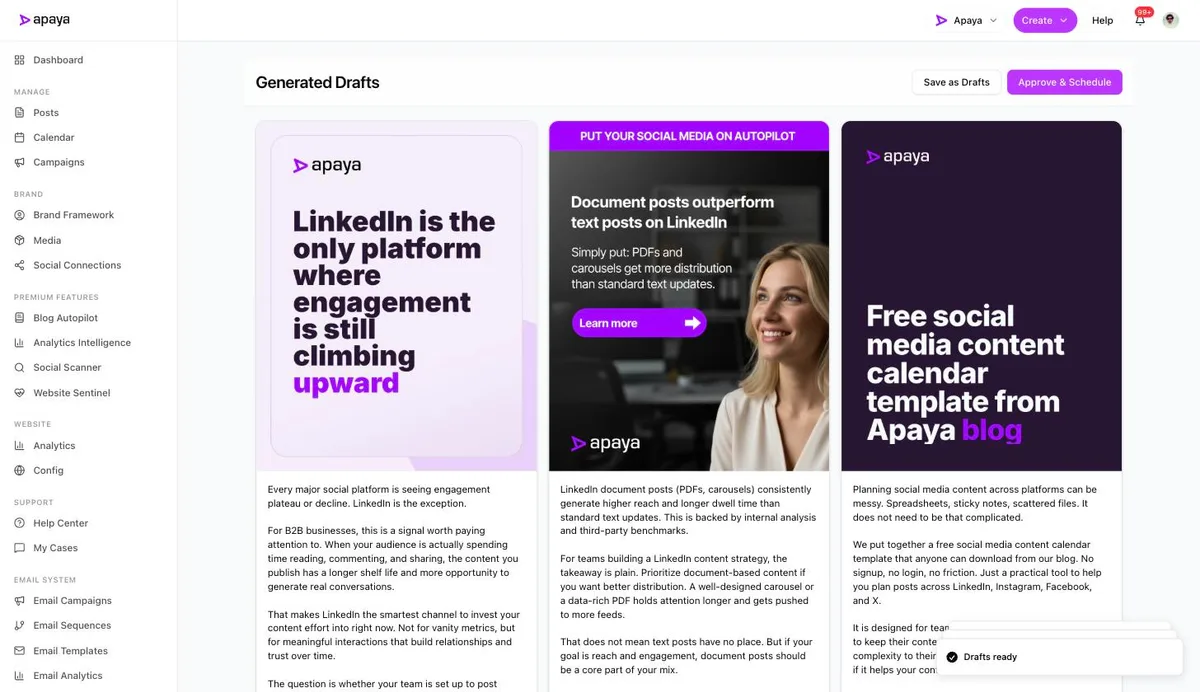
Those three drafts came back arguing the exact case this section opened with, engagement climbing and documents outperforming, because the brief said so and the system did the assembling. That’s the division of labor: you decide what the page says, the software does the producing and publishing, and the two-posts-a-week cadence stops depending on anyone’s Tuesday night.
The line you should not cross
Connection-request bots, auto-DM sequences, profile-scraping tools, and engagement pods are the “LinkedIn automation” that gets accounts restricted, and half the search results for this topic are selling them anyway. The distinction is simple: automating what your page publishes is business tooling; automating how you touch other people’s accounts is what the platform polices. Post automation, run through official channels with human approval, has none of that exposure.
What to feed it
The 30 LinkedIn post ideas ranked by the format data are built to be briefs: document-style breakdowns first, image sets second, plain opinions for the human layer. And if the material already exists on your site, one pasted URL turns a page into posts. The founder’s personal takes stay human; the page’s baseline runs itself.
What else people ask
Company page or personal profile automation?
Automate the page, keep the profile personal. Pages are what buyers check for legitimacy and where consistent presence pays; profiles are where founders-beat-logos, and a founder’s voice is the one thing automation shouldn’t wear. The pairing outperforms either alone.
Is profile automation against LinkedIn’s rules?
Publishing through the official API is supported for both pages and member posts, which is how legitimate tools work. What LinkedIn’s user agreement prohibits is the browser-extension category: scrapers, auto-connectors, and bots that puppet your logged-in session, and enforcement there is real. The test is boring but reliable: if the tool asked for your password instead of an official authorization screen, it’s on the wrong side of the line.
Can it publish documents and carousels?
The flow above produces image posts with designed graphics; document-style multi-page posts are the format the data crowns, and the practical route today is generating the pages as images. Grade any tool on whether the output needs reassembly; finished-and-scheduled is the bar.
What does LinkedIn automation cost?
Posting automation runs $55 to $183 a month at current pricing, against the other rungs: schedulers at $19 to $99 that leave the writing, or the hours a week that producing LinkedIn-grade content by hand takes. The gray-zone outreach bots cost more than their subscription when the account gets flagged.
How do I measure whether it’s working?
Impressions trend, profile visits, and inbound messages against your own baseline, not against vendor averages. LinkedIn’s native page analytics are decent; the win condition is a page that looks alive and credible when a buyer checks, which is the check that precedes every B2B deal.
The rising platform rewards the steady page
One platform’s engagement points up, its winning format is the most work to make, and its buyers check your page before they call you. That’s the exact combination automation is for. Set the cadence, keep your approval on everything, and let the only rising feed in social media be the one your business never lets go quiet.
Sources
- Socialinsider 2026 LinkedIn benchmarks (1.3M posts), as documented in our LinkedIn deep dive, cited unlinked
- LinkedIn native scheduling and API partner documentation, verified July 2026
- Apaya product screenshots captured live from my.apaya.com, July 2026
The easiest way to keep your social media profiles active.
Apaya writes the posts, designs the graphics, and publishes them for you. You approve.
See how Apaya worksThe easiest way to keep your social media profiles active.
Apaya writes your posts, designs your graphics, and publishes everywhere — automatically.