How to Add a Link to an Instagram Post or Story: Every Way That Works
Written by: Tim Eisenhauer
Last updated:

The easiest way to keep your social media profiles active.
Learn more about Apaya →
Can you put a clickable link in an Instagram post?
No. Instagram does not make links inside a feed caption tappable. Paste a URL into a caption and it sits there as gray text nobody can click. Instagram only makes a link clickable in four places: your profile bio, a Story link sticker, a direct message, and the shareable URL that points to a post. So for a business, the useful question is not “how do I add a link.” It is “which link goes where.” A dentist wants a booking link, a restaurant wants reservations, a contractor wants a quote form, and each one has a home.
The short version
Instagram only makes links clickable in a few places, and your bio link is the one that is always on. Apaya writes, designs, and schedules the feed that keeps that one link worth tapping, all from a single brief. From $55/mo. The walkthrough below covers the native steps first, then the Apaya version.
Why Instagram captions cannot have clickable links
This is the part every “7 ways” listicle buries, and it explains everything else. Instagram strips clickability from feed captions on purpose. Hashtags and @mentions turn blue and tappable. A URL does not. It is a design choice that keeps people inside the app instead of bouncing out on every post.
That single rule is why “link in bio” became a phrase people say out loud. Your bio is one of the few spots Instagram lets you place a working link, so the whole system routes through it: the caption tells people where to go, the bio holds the link, and a Story sticker covers the moments you need a link tied to one specific post.
Once you accept that, the job stops being “add a link” and becomes “keep the right link in the right place.” Here is where each one lives.
Which link goes where for your business
Match the destination to the placement. A link is worth adding only when the post earned it, so start with what the reader is meant to do, then pick the spot.
| What you are driving to | Where the clickable link goes |
|---|---|
| A dentist taking new patients | Bio link to the booking page, plus “book in bio” in captions |
| A restaurant pushing reservations | Bio link to the reservations page, Story link sticker for tonight’s specials |
| A contractor collecting leads | Bio link to the quote form, shareable post URL to text a prospect a finished job |
| An online shop with several products | Up to five bio links, or a link-in-bio page with one button per product line |
| Any single campaign this week | Bio link swapped to the campaign, every caption pointing at it |
The mistake I see most is a business with one great destination and a bio link pointed at a homepage from three years ago. Fix that first. If you are ever short on the posts that earn the click in the first place, our list of 40 things to post on Instagram for businesses is built to give the link a reason to exist.
Your Instagram bio link: the one link that is always clickable
This is the workhorse. It shows up on your profile, it is tappable from every visit, and it is the destination “link in bio” refers to. Here is how to set it and stretch it.
- Open your profile and tap Edit profile.
- Tap Links, then Add external link.
- Paste the URL and give it a display title, like “Book an appointment” or “See the menu.”
- Save. It now appears on your profile as a tappable button.
Instagram lets you add up to five links here, stacked behind your main one. That covers a shop with a few product lines or a service business with a booking page and a menu. When five is not enough, or you want to see which destination people tap, use a link-in-bio landing page. It gives you one URL that holds as many buttons as you want and counts clicks per button. Tools like Linktree and Beacons do this, and most website builders now include a simple version.
One thing almost nobody sets up: tracking. You get one bio link, so you cannot tell which post drove a click unless you tag the link. Add UTM parameters to the URL, for example utm_source=instagram&utm_campaign=fall-menu, so your website analytics separates Instagram traffic from the rest. A link-in-bio page adds per-link counts on top of that.
How to add a link to an Instagram Story with the link sticker
This is the biggest change for small businesses, and the one worth knowing cold. The Story link sticker is now available to every account. The old 10,000-follower rule, and the swipe-up it powered, are gone. Any business account can put a tappable link on a Story today.
Here is the flow:
- Create a Story: a photo, a video, or a plain colored background.
- Tap the sticker icon at the top of the screen.
- Choose the Link sticker.
- Paste your URL.
- Tap Customize sticker text to replace the raw link with words, like “Book now” or “Order online.”
- Place the sticker, then post the Story.
A restaurant drops a Story of tonight’s special with a “Reserve a table” sticker. A contractor posts a finished deck with a “Get a quote” sticker. A dentist runs a “Now accepting new patients” Story with a booking sticker. Each one is a tappable link tied to a single piece of content, which a caption can never be. Run these when your audience is on the app, which our guide to the best time to post on Instagram covers in detail.
Links in DMs and the link-in-bio caption CTA
Two smaller placements that close a lot of loops.
-
Links in direct messages: A link pasted into a DM is clickable. When someone comments “how do I book,” reply in their DMs with the direct link instead of telling them to hunt through your profile. It is the fastest path from interest to action.
-
The link-in-bio caption CTA: Since the caption link is not clickable, the caption’s job is to point. End posts with “link in bio,” “book in bio,” or “menu in bio,” and keep the bio link aimed at whatever that batch of posts is about. The caption and the bio have to agree, or you send people to a link that no longer matches the post.
How to get a shareable link to an Instagram post
This is a different question that gets mixed into the same searches: not putting a link in a post, but getting a link to one. You want the post’s URL so you can share it in an email, a text, or on another platform.
Open the post, tap the three dots in the top corner, and choose Copy link. That copies the post’s own URL. Paste it wherever you need it. A contractor can text a prospect a link to a finished-job post. A restaurant can drop a link to a review-worthy dish into an email newsletter. It is the cleanest way to move an Instagram post off Instagram.
A note on new Instagram link features
Instagram keeps testing link options. You may see a new one show up in your app on Reels, on certain post formats, or as a profile add-on. If it appears, use it. But do not build your lead flow around a feature that may or may not be in your account this month, because these roll out to some accounts long before others.
The four placements above (bio link, Story sticker, DMs, and the shareable post URL) are the ones every business account has right now. Build on those, and treat anything new as a bonus when it lands.
The same job in Apaya
Everything above is the native app, and it works. The catch for a business is upkeep. You get one bio link, so the smart play is to keep it pointed at whatever you are currently posting about, and to keep posting so that one link always has a fresh feed behind it. A bio link over a page that went silent three weeks ago converts like a dead phone line. That upkeep is a scheduling and content job, which is where a tool earns its keep.
Here is the plain framing of the category. A scheduler like Hootsuite or Buffer organizes posts you still have to write and design. Apaya does that scheduling too, and adds the part those tools skip: it writes and designs the posts from one brief. Same calendar and publishing, plus a content production layer on top.
You connect your own accounts once. Instagram connects through Meta, and connecting a Facebook Page to Apaya requires you to be an admin of that Page, so line that access up before you start. Here is the flow, captured live.
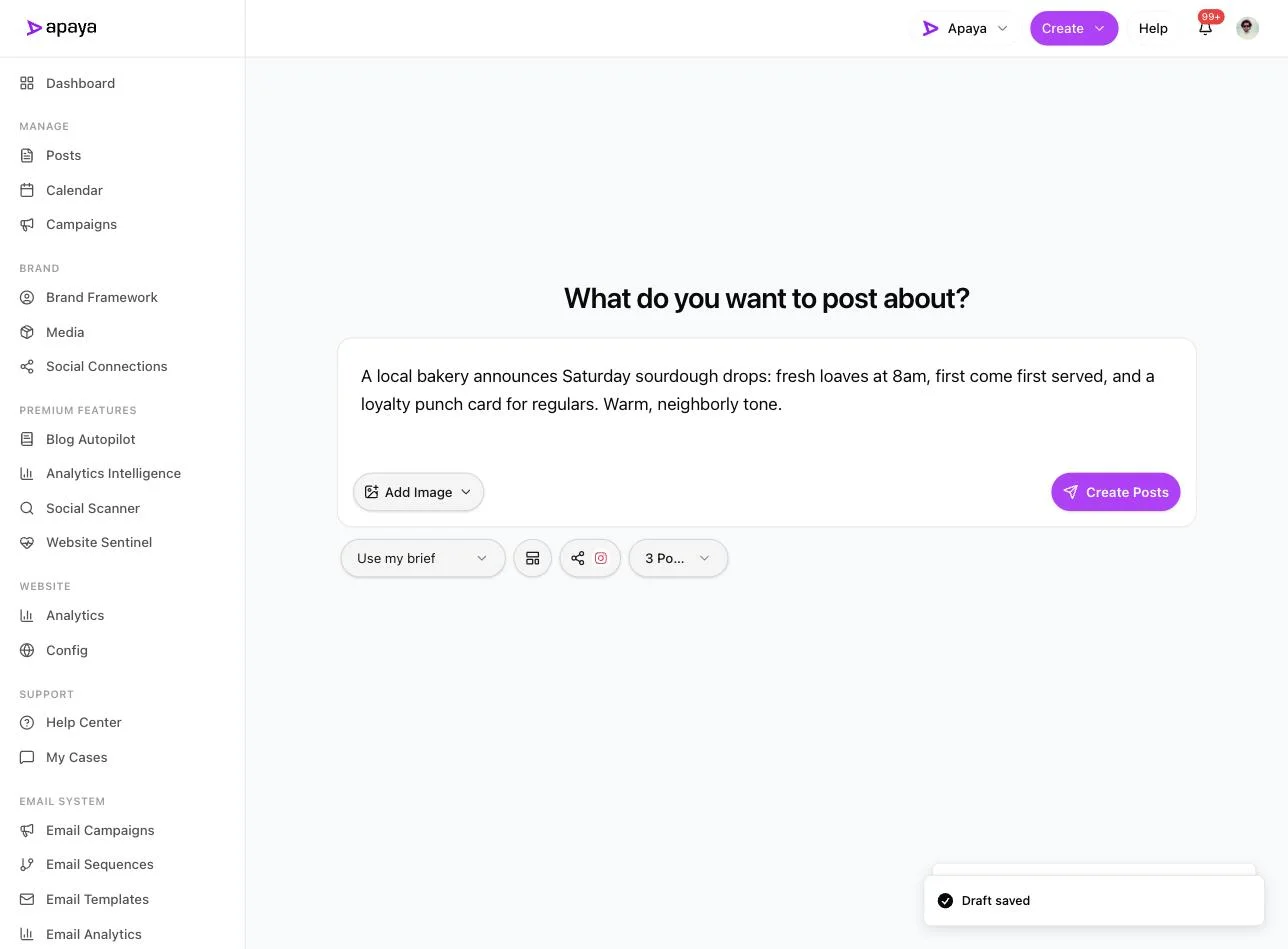
1. Write a brief and pick Instagram. Tell it what you are posting about and choose how many posts. Here is a real one: a bakery announcing a weekend sourdough drop, three posts, Instagram selected.
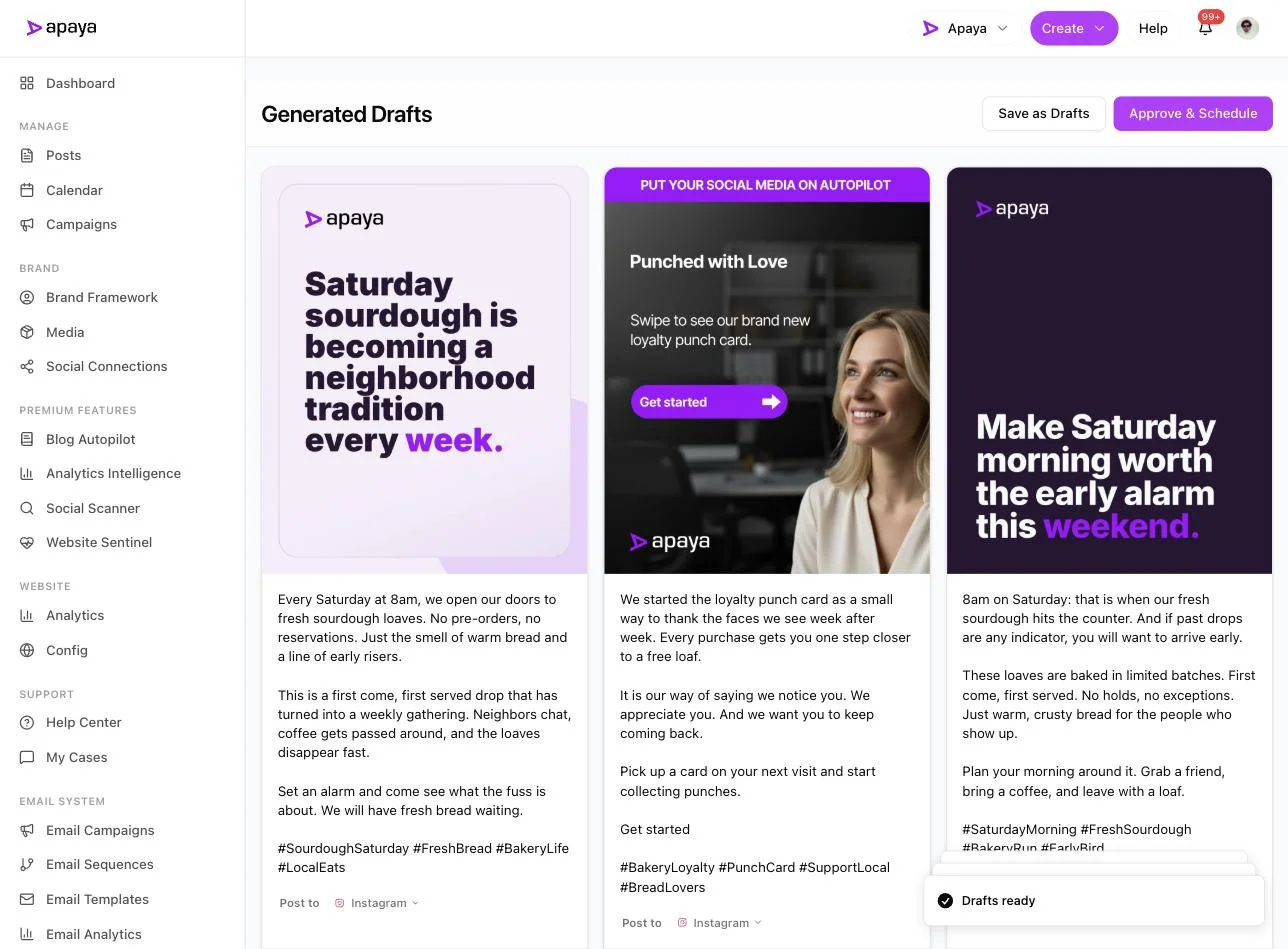
2. Review the drafts. About a minute later you get finished posts back: captions and matching designs, each badged for Instagram, with Save as Drafts and Approve & Schedule controls. The caption is yours to edit, which is where your standing CTA lives. Drop “order in bio” or “book in bio” into each one, pointed at the bio link you are running this week.
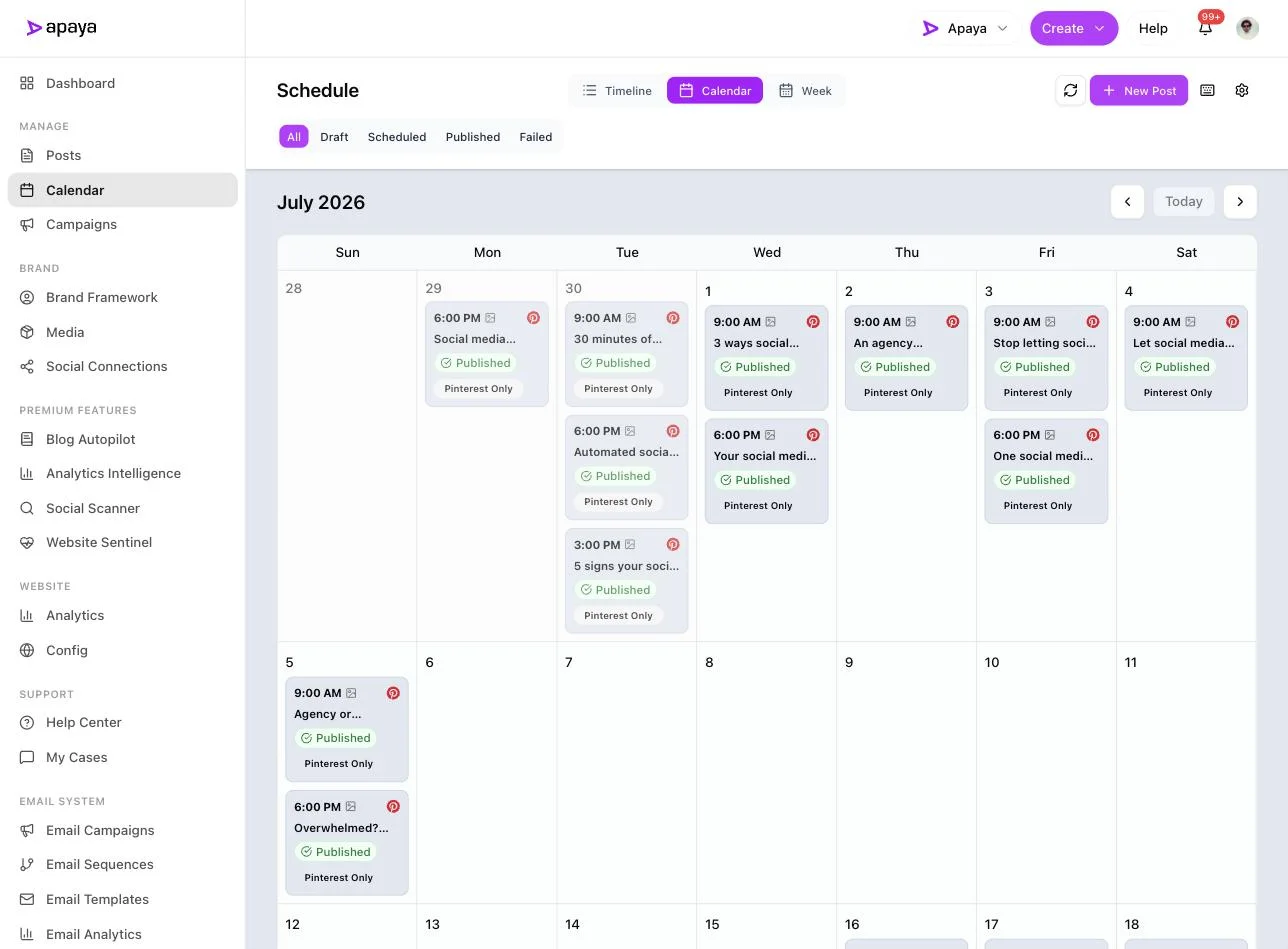
3. Schedule the set. Approve and the posts drop onto the calendar at sensible times. A month planned in one sitting means your one bio link always has a current feed behind it instead of a profile that went quiet. The full method breakdown is in our guide to scheduling Instagram posts.
4. Watch the upkeep shrink. This account’s dashboard shows about 50 hours saved in a month and a running posting streak. That is the trade: batch the posts, keep the streak, and swapping the bio link becomes a ten-second job instead of the thing you forgot to do.
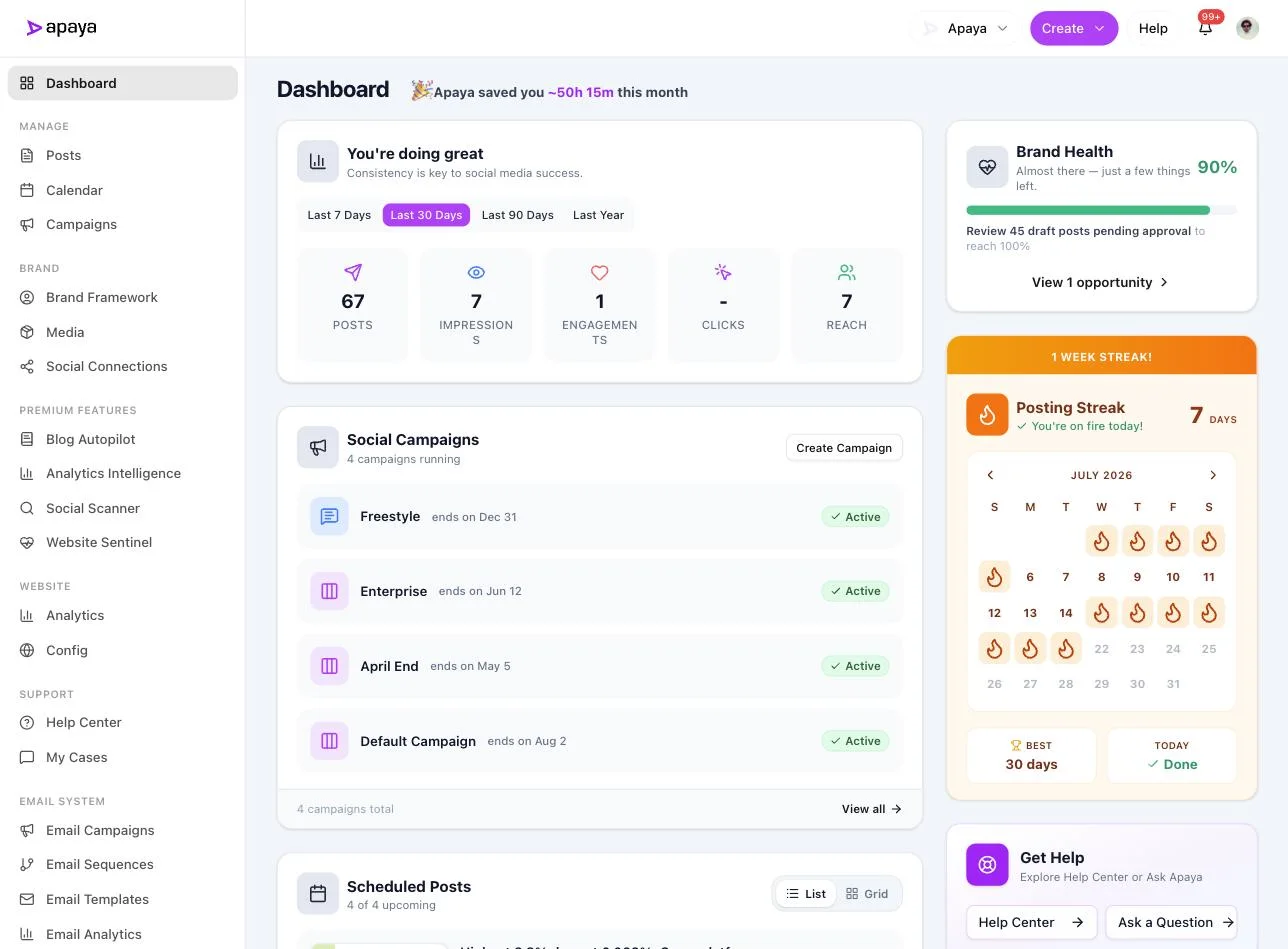
One boundary worth stating plainly: the Story link sticker itself still gets added inside the Instagram app. That step stays native. Apaya’s job is the feed and the cadence underneath it, so that when you post a Story with a link sticker, there is a live account behind the tap.
What you get: time back and a feed behind your one link
Frame the benefit on the two things you control, not on numbers no tool can promise you.
-
Time back through batching. Write a month of captions and designs in one sitting instead of logging in every day to post and reword the same call to action. That is the difference between social media as a daily chore and a weekly review.
-
Consistency behind the link. Your bio link is only as good as the feed it sits above. A steady stream of posts keeps the one clickable link you get from pointing at a stale profile. Consistency is the variable you own.
-
A CTA that matches the destination. When every caption in a batch carries the same “link in bio” instruction and the bio holds the matching link, the message and the click line up. No more captions pointing at a link you swapped out last week.
For the fuller picture of hands-off Instagram publishing, our AI Instagram automation guide walks the whole workflow, and current pricing starts at $55/mo.
Common questions about Instagram links
Can you put a clickable link in an Instagram post caption?
No. Instagram does not make links in a feed caption tappable. The URL shows as plain text and nobody can click it. Put the destination in your bio, which is clickable, and point the caption at it with “link in bio.” For a tappable link on a specific piece of content, use a Story link sticker.
Do you need 10,000 followers to add a link to your Instagram Story?
No, not anymore. The old rule tied Story links to 10,000 followers or a verified account through the swipe-up. Instagram replaced swipe-up with the link sticker and opened it to every account. Any business account can add a tappable link to a Story today.
How do you get a shareable URL for your own Instagram post?
Open the post, tap the three dots in the top corner, and choose Copy link. That copies the post’s URL, which you can paste into an email, a text, or another platform. This is a link to the post, which is a different thing from a link inside it.
How many links can you put in your Instagram bio?
Up to five, stacked behind your main bio link. If you need more, or you want to track clicks per destination, a link-in-bio landing page gives you one URL that holds as many buttons as you want.
How do you track clicks on your Instagram bio link?
Add UTM parameters to the link, for example utm_source=instagram&utm_campaign=fall-menu, so your website analytics separates Instagram traffic from the rest. A link-in-bio page adds per-link click counts on top.
Related Instagram guides
- How to Schedule Instagram Posts: Every Method Compared for scheduling the feed that backs your bio link.
- What to Post on Instagram: 40 Ideas for Businesses for content worth clicking a link for.
- Best Time to Post on Instagram for timing the Stories that hold your link sticker.
- AI Instagram Automation for the full auto-posting workflow.
- How to Post on Instagram as a Business for setting up the business account these features need.
- Link Instagram to a Facebook Page for connecting the two accounts before you start.
Sources
- Instagram Help Center: bio links, Story link sticker, and copying a post URL, verified in-app July 2026
- Instagram announcement on expanding Story sharing links to everyone, 2022
- Apaya product screenshots captured live from my.apaya.com, July 2026
The easiest way to keep your social media profiles active.
Apaya writes the posts, designs the graphics, and publishes them for you. You approve.
See how Apaya worksThe easiest way to keep your social media profiles active.
Apaya writes your posts, designs your graphics, and publishes everywhere — automatically.