How to Automate Facebook Posts: Every Method, With Screenshots
Written by: Tim Eisenhauer
Last updated:

The easiest way to keep your social media profiles active.
Learn more about Apaya →
Can you automate Facebook posts?
Yes, at three levels: free scheduling in Meta Business Suite, third-party schedulers that organize a queue, and full automation where the posts get written, designed, scheduled, and published for you with your approval. The search results for this question are a Make forum thread, Reddit workflows, and a GitHub bot repo, which tells you how few real answers exist. This guide covers all three levels with the trade-offs stated, then shows level three end to end with screenshots from a real account, including the part agencies ask about: running many pages at once.
The short version
Apaya is level three: it learns your business from your website, writes and designs the Facebook posts, schedules and publishes them, and you approve everything first. From $55/mo. The walkthrough below shows the whole flow.
Level 1: Free scheduling in Meta Business Suite
The answer to “does Facebook have a post scheduler” is yes: Meta Business Suite at business.facebook.com. The working loop:
- Open Business Suite, pick your business, and click Create post.
- Check Facebook (and Instagram, if you want both at once).
- Write the post, attach media, and preview per platform.
- Choose Schedule, pick the date and time, or take the suggested active-hours slot.
- Manage the month from the Planner, the calendar view where scheduled posts drag between days.
A real calendar, stories included, at no cost. Set the posts up weekly or monthly from your desk and the publishing happens on time without you.
The boundary is what free means here: Business Suite automates the timing and nothing else. Every caption is still yours to write, every graphic yours to make, every idea yours to think of. That production work runs 8 to 12 hours a month for a consistent page, and it’s the part that kills consistency when the business gets busy, which the batching workflow helps with but does not remove.
Level 2: Third-party schedulers
The Buffer-and-Hootsuite category adds what Business Suite lacks: multiple platforms beyond Meta on one calendar, a queue, team features, and increasingly an AI assistant for caption drafts. The full tool comparison covers who fits which. The boundary is the same one it’s been for fifteen years: a scheduler schedules. Your queue is still hungry every week, and an empty queue posts nothing. If you want the queue and the writing handled in one place, the Facebook post scheduler page shows that version of this category.
Level 3: Full automation, brief to published
This is the level where the production happens for you. Here’s the entire flow in Apaya, captured live, not mocked up.
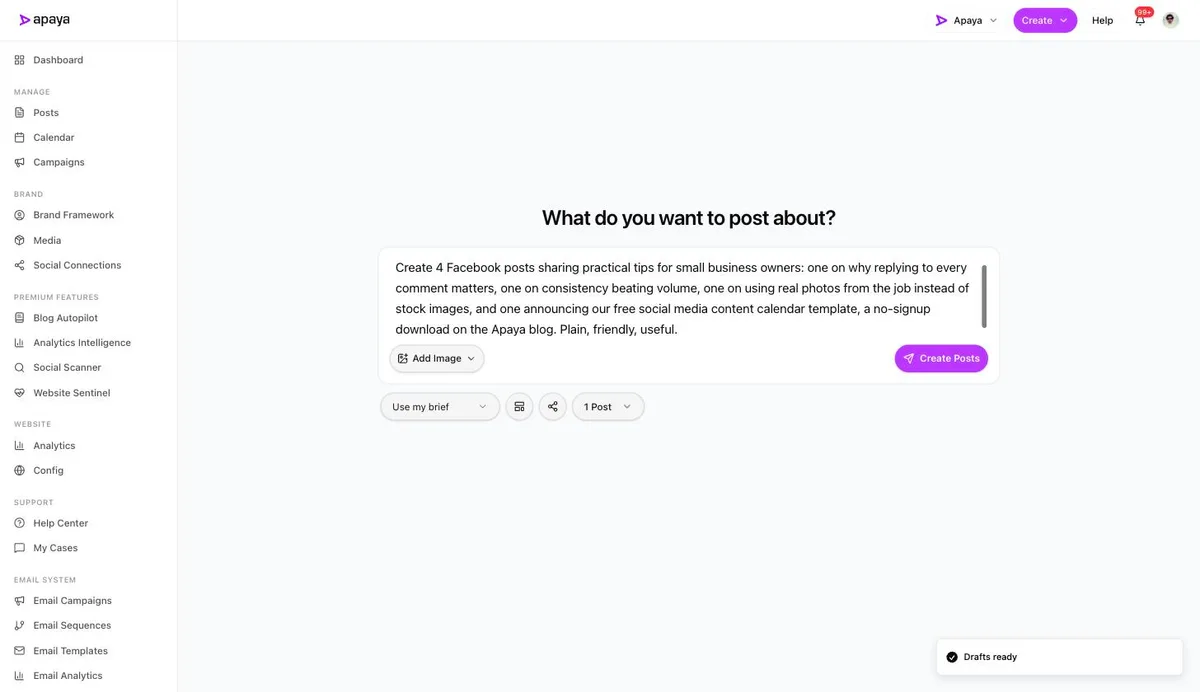
1. Tell it what to post about. From any screen, Create, then “What do you want to post about?” Write a plain-language brief: a topic, a campaign, your website content, or a pasted URL. Here’s a real one, four posts of practical tips plus a template announcement:
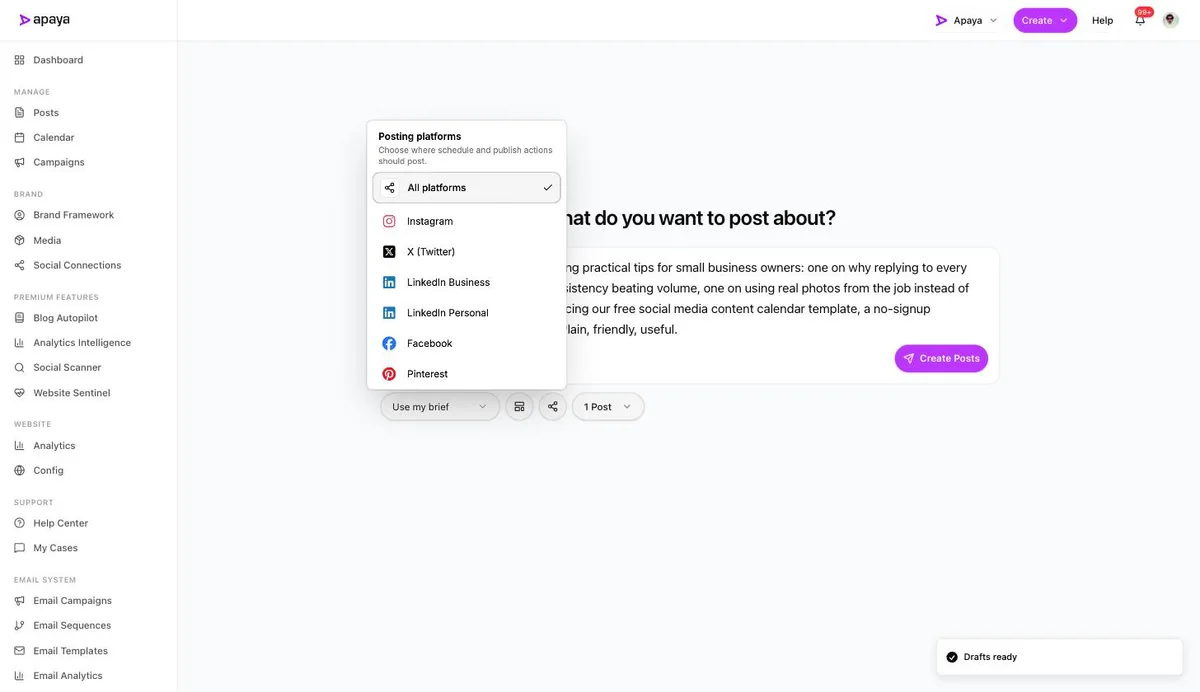
2. Pick Facebook. The share icon opens the platform picker. Choose Facebook alone, or add the other platforms and each post gets adapted per platform instead of cross-pasted.
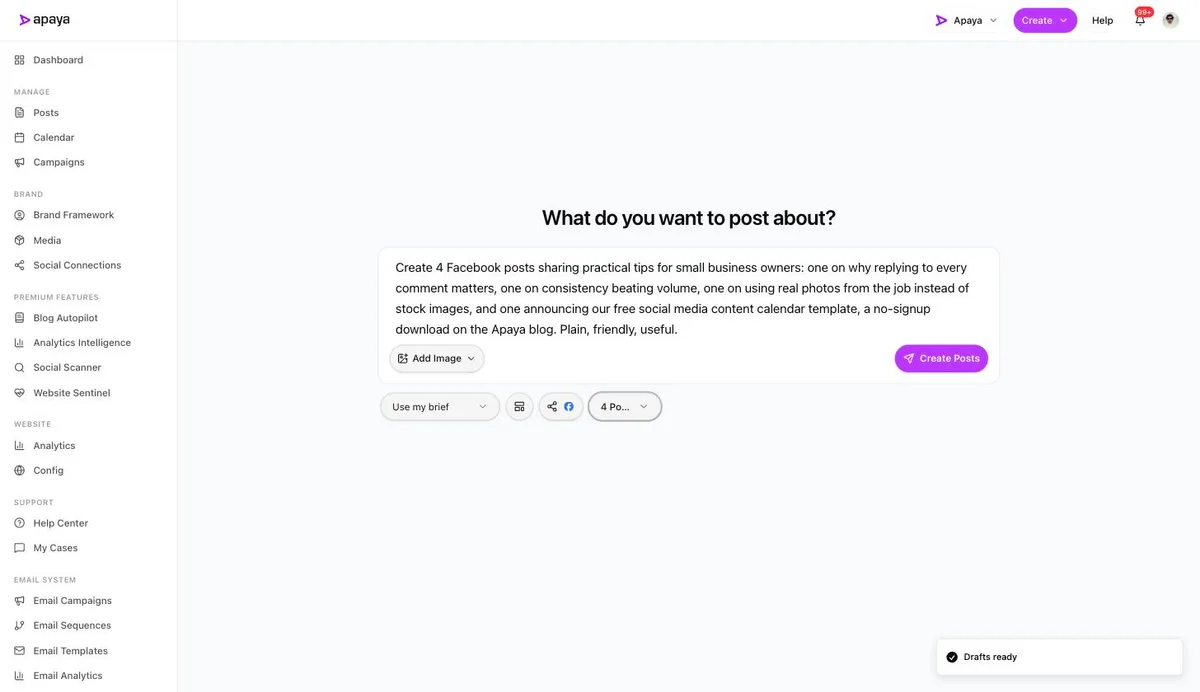
3. Choose how many posts and create. One to six per run. Brief in, Facebook badged on the share icon, four posts selected:
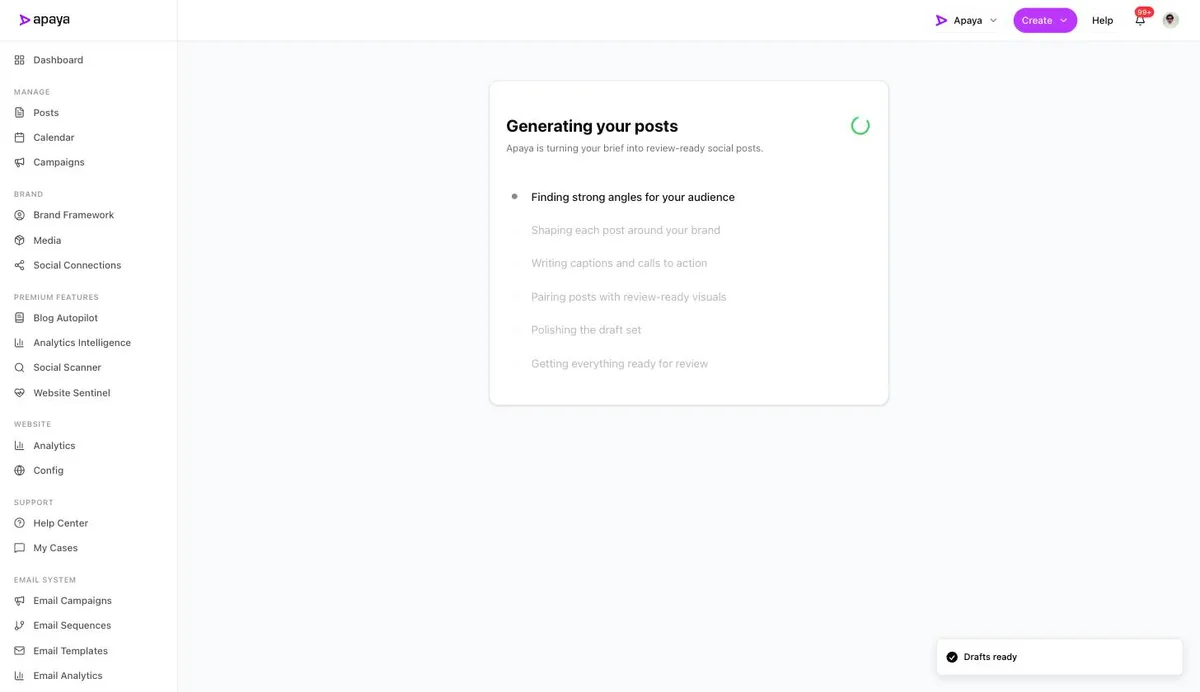
4. Wait about a minute. The system finds angles for your audience, writes each caption in your brand voice, and designs a matching graphic for every post.
5. Review the drafts. Four finished Facebook posts come back: captions, hashtags, and branded graphics. This is the run from the brief above, exactly as it returned:
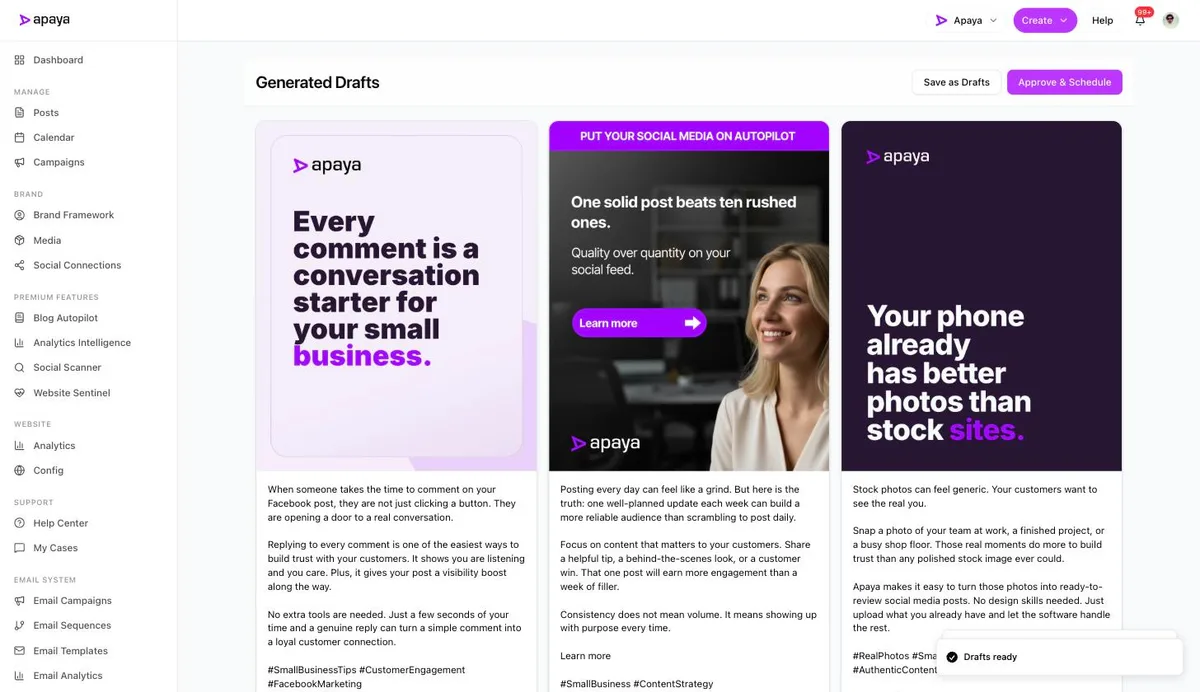
6. Approve and schedule, or save as drafts. One button sends everything you kept to the calendar at optimal times. Each post also has its own keep, edit, or discard controls, so nothing publishes without your sign-off. From there, your Posts library shows everything in one place, drafts through published:
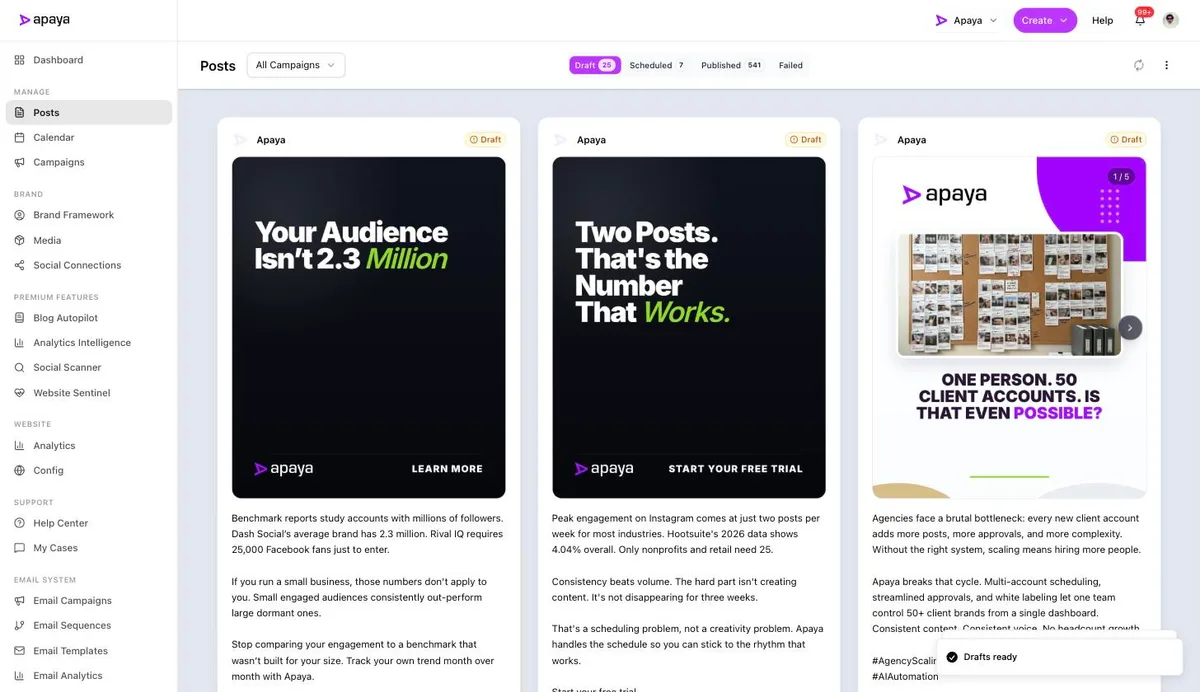
That’s the whole job: a one-line brief in, a reviewed week of Facebook out, on a page that publishes 500-plus posts without anyone copying and pasting. What to feed the brief is the easy part once you see the shape; our 45 Facebook post ideas and its 30-day calendar are built to be briefs.
For agencies: automating client pages
The most-searched version of this question is agencies asking how to automate posts across client pages, so here’s the setup that scales, part by part.
Access, done right. Request partner access through Business Manager, or have the client assign you a Page role, and never touch a shared password. The client keeps ownership, you can be added and removed cleanly, and nobody’s personal login is a single point of failure. Any workflow that starts with “send me your Facebook password” ends badly for both sides.
Voice, per client. Automation is only usable at scale if each client’s content sounds like that client, which is what per-brand voice learning exists for. The tell that an agency skipped this is visible from orbit: twenty pages posting the same caption skeleton with the nouns swapped, which reads as spam to followers and to the platform’s duplicate detection.
Approvals, out of email. Clients sign off before publishing, and the difference between an email chain and a built-in approval workflow is roughly a day per client per month. The client sees their own calendar, approves or comments per post, and approved content publishes itself.
The weekly loop, concretely. What one operator running dozens of pages does with this stack: Monday, generate each client’s week from their standing brief, ten minutes per client. Tuesday, clients approve on their calendars, with a nudge to the slow ones. Wednesday through Sunday, publishing runs itself while the operator handles comments, revisions, and the two clients with a launch that week. The agency stack page covers the multi-client and white-label mechanics, including reporting that goes out under your logo.
What you should not automate
Comments, messages, reviews, and groups. The conversation layer is where Facebook still pays a human premium, and automated replies read as robotic in the exact place people expect a person. Group posting bots are how pages get flagged as spam, and fake-engagement automation is how they get restricted. The clean split: automate the production and publishing, which nobody checking your page can tell or cares about, and spend the recovered hours on the replies, which everyone can tell.
Which level fits
| Your situation | Level |
|---|---|
| A few posts a month, content comes easy | Business Suite, free |
| Content exists, multiple platforms to feed | A third-party scheduler |
| The writing and designing is the bottleneck | Full automation |
| Many client pages | Full automation with approvals and roles |
What else people ask
Can I automate posting to Facebook Groups?
Mostly no, and be suspicious of tools that promise it. The official API doesn’t support third-party posting to groups the way it does pages, which is why group-posting tools tend to be browser bots, the category that violates platform rules and gets accounts restricted. Groups reward personal participation; automate your page, show up in groups as a human.
Can I automate posting the same content to Facebook and Instagram?
Yes, natively in Business Suite for the Meta pair, or at level three by checking both in the platform picker from step 2, which adapts the caption per platform instead of duplicating it. The full Facebook-to-Instagram guide covers every method and the why-won’t-it-share fixes. The full cross-posting method comparison is in our Instagram scheduling guide.
Does automated content perform worse on Facebook?
Scheduled and API-published posts are not penalized, and the benchmark data shows the variable that moves results is consistency, not publish method. What performs worse is generic content, whatever publishes it, which is why brand-voice learning matters more than the scheduler.
How often should an automated page post?
Two to four times a week, the same as a manual page, because the audience doesn’t grade you on effort. Automation changes who does the work, not what the right cadence is.
What does full automation cost?
$55 to $183 a month at current pricing, against 8 to 12 hours a month of production time or the other rungs of the cost ladder, from free-plus-your-hours to agency retainers.
Set it up once, approve weekly
Every level above beats posting from memory. Free scheduling fixes the timing, schedulers fix the organization, and full automation fixes the part that was eating your evenings: making the posts. Pick your level, set it up once, and let Facebook become a thing you approve instead of a thing you do.
Sources
- Meta Business Suite scheduling documentation, verified in-product July 2026
- Apaya product screenshots captured live from my.apaya.com, July 2026
- Rival IQ (Quid) and Socialinsider 2026 benchmark data, as documented in our Facebook benchmarks deep dive
The easiest way to keep your social media profiles active.
Apaya writes the posts, designs the graphics, and publishes them for you. You approve.
See how Apaya worksThe easiest way to keep your social media profiles active.
Apaya writes your posts, designs your graphics, and publishes everywhere — automatically.