Best Social Media Scheduler for 2026: 7 Tools Compared
Written by: Tim Eisenhauer
Last updated:

The easiest way to keep your social media profiles active.
Learn more about Apaya →
What Is the Best Social Media Scheduler?
The best social media scheduler in 2026 depends on one question: do you want a tool that publishes the posts you make, or a tool that makes the posts too? If you only need publishing, Buffer is the simplest, Publer is the cheapest, and Metricool has the best free plan. If the content itself is your bottleneck, Apaya is the scheduler that fills its own calendar: it creates the posts, then schedules and publishes them.
Here is the short version:
| Tool | Best for | Starting price | The catch |
|---|---|---|---|
| Apaya | A calendar that fills itself with on-brand posts | $55/mo | You give up some manual control |
| Buffer | The simplest queue workflow | Free; paid $6-$12 per channel/mo | Per-channel pricing adds up |
| Metricool | Best free plan, scheduling + analytics | Free; paid from $22/mo | Content creation is still on you |
| Publer | Cheapest paid scheduler | Free; paid from $12/mo | Lighter analytics depth |
| Later | Visual Instagram-first planning | $25/mo | Post limits on lower tiers |
| FeedHive | Scheduling with AI writing help | $19/mo | AI assists, you still drive |
| SocialBee | Evergreen category recycling | $29/mo | Real setup work upfront |
Every scheduler on this list moves posts from a queue to a platform on time. The differences that matter are what fills the queue, what the free plans hide, and how the pricing scales. That is what the rest of this guide covers. For the category-level view of why schedulers and AI platforms are splitting apart, see AI social media tools vs scheduling tools.
The Thing Nobody Tells You About Schedulers
A scheduler solves the smallest part of the job. Posting takes minutes. Deciding what to post, writing it, and designing it takes hours, and the scheduler does none of that. The queue is always hungry, and an empty queue publishes nothing.
So before you compare feature grids, decide which problem you are hiring for. If content creation is easy for you and you only need reliable publishing, a $12 to $29 scheduler is the right buy, and several below are excellent. If the reason your accounts go quiet is that the posts never get made, no queue will fix it. That is a content problem, and it needs a content-creating system, not a nicer calendar.
1. Apaya: Best Scheduler That Fills Itself
Apaya is a scheduler plus the thing every other scheduler is missing: the content.
It learns your brand from your website, creates complete posts with captions and branded graphics, picks posting times from your audience’s behavior, and publishes to Instagram, Facebook, LinkedIn, X, and TikTok. The calendar stays full 14 days ahead without you feeding it.
Start Your Free Trial → Try it for 3 days • $0 today • Cancel anytime
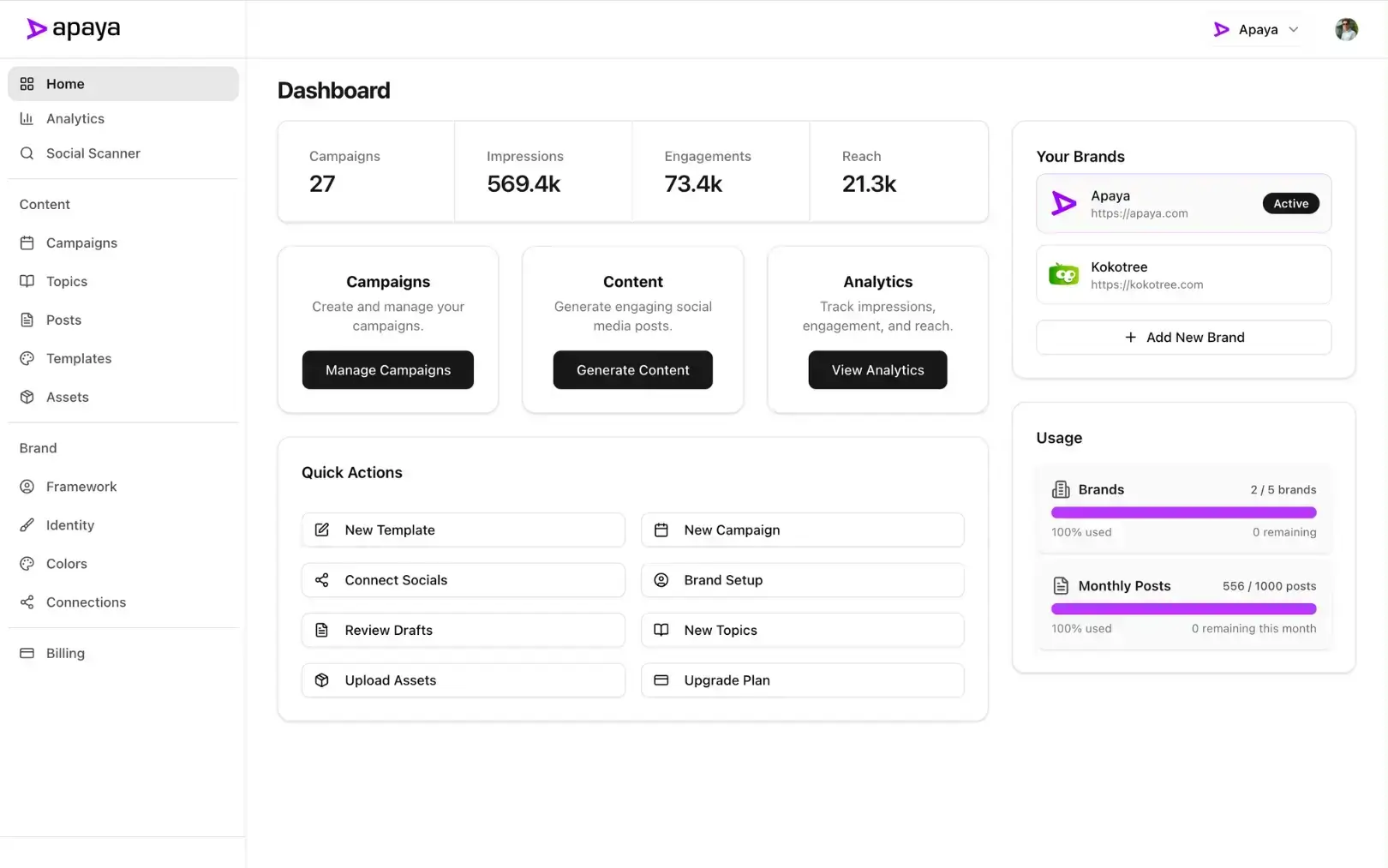
Who it’s for: Business owners and teams whose real problem is that the posts never get made. The AI scheduling tool page covers the timing engine; the AI agent page covers what runs on its own. For per-platform detail, see the Facebook post scheduler and Instagram post scheduler pages.
Pricing posture: $55 to $183 per month billed annually, unlimited posts on every plan. See pricing.
The limitation: If you want to hand-craft every post and only need a publishing pipe, you are paying for creation you will not use. Buy one of the queues below instead.
2. Buffer: Best Simple Queue
Buffer is the reference point for the whole category: connect channels, fill the queue, posts go out. The free plan (3 channels, 10 scheduled posts each) is enough to test the workflow, and the interface stays out of your way.
Who it’s for: Solo users and small teams with a handful of channels who write their own posts.
Pricing posture: Free plan; paid runs $6 to $12 per channel per month, so a 6-channel setup lands between $36 and $72.
The limitation: Per-channel pricing punishes growth, and the queue does nothing about content. Full head-to-head: Apaya vs Buffer, or the full Buffer alternatives roundup.
3. Metricool: Best Free Social Media Scheduler
Metricool’s free plan is the most usable on this list: 1 brand, 5 social profiles, and basic analytics without a card. Paid plans stay aggressive ($22 for 5 brands and 25 profiles with unlimited scheduling), and the analytics depth beats most schedulers at twice the price.
Who it’s for: Budget-conscious users who want scheduling and reporting in one place, and anyone who wants the most usable free plan in the category.
Pricing posture: Free; Starter $22/month; Advanced $54/month.
The limitation: It schedules and measures; it does not create. The hidden cost is your production time. Full head-to-head: Apaya vs Metricool.
4. Publer: Cheapest Paid Scheduler
Publer’s Professional plan at $12 per month covers 10 social accounts, which is the best paid-tier math in the category. Bulk scheduling, recycling, and a workspace system are all there, with AI caption credits as an add-on.
Who it’s for: Anyone whose requirement is “schedule to many accounts for the least money.”
Pricing posture: Free for 3 accounts; Professional $12/month for 10; Business $21/month for 25.
The limitation: Analytics run shallow, and the AI captions are metered add-ons. Full head-to-head: Apaya vs Publer.
5. Later: Best Visual Planner for Instagram
Later grew up as an Instagram tool and its visual planner still leads: drag posts onto a grid preview, plan Stories and Reels, and use Linkin.bio for the profile link. If your feed’s look is the product, planning visually matters.
Who it’s for: Instagram-first brands where grid aesthetics drive the workflow.
Pricing posture: Starter $25/month (1 social set, 30 posts per profile); Growth $45/month; Advanced $80/month.
The limitation: Post limits on lower tiers, and “social set” pricing gets confusing as you add platforms. Full head-to-head: Apaya vs Later.
6. FeedHive: Best Scheduler With AI Writing Help
FeedHive keeps the queue workflow and adds AI post writing, hashtag suggestions, and performance predictions. It is the natural upgrade when you like scheduling manually but want help filling the boxes.
Who it’s for: Creators posting daily who want AI assistance without changing workflows.
Pricing posture: Creator $19/month (4 accounts); AI features unlock at the $29 Brand tier; scales to $299 Agency.
The limitation: The AI is an assistant. Topics, prompts, and approvals stay your job. Full head-to-head: Apaya vs FeedHive.
7. SocialBee: Best for Evergreen Recycling
SocialBee schedules by category: stock your tips, promos, and questions, and it rotates through them indefinitely. A stocked library means the calendar never empties, which is the closest a manual tool gets to automation.
Who it’s for: Small businesses with a bank of evergreen content worth repeating.
Pricing posture: $29 to $99/month standard; agency tiers from $179.
The limitation: Setup is real work, and empty categories mean an empty feed. Full head-to-head: Apaya vs SocialBee.
Best Free Social Media Scheduler
Three free plans are worth using: Metricool (1 brand, 5 profiles, the most complete), Buffer (3 channels, 10 posts each, the simplest), and Publer (3 accounts). Free plans are legitimate for low volume; just price your own hours before calling them free. Writing and designing five posts a week at even $30 an hour is roughly $650 a month of labor propping up a $0 subscription.
Cheapest Social Media Scheduler
Publer at $12 per month for 10 accounts wins on sticker price, with Make-style credit add-ons for AI captions. Metricool at $22 is the best value once analytics matter. Buffer can be cheapest at 1 or 2 channels and among the priciest at 10; do the per-channel math before committing.
Best AI Social Media Scheduler
Two different answers depending on what “AI” should do. If AI means help me write faster inside a queue, FeedHive is the pick. If AI means fill the calendar without me, that is Apaya: brand learning, content generation, best-time scheduling, and publishing in one loop, with approvals in your hands. The AI scheduling deep dive explains why timing intelligence alone stopped being enough.
How to Choose
- Content creation is your bottleneck: Apaya. Nothing else on this list makes the posts.
- You have a few channels and simple needs: Buffer, or Metricool if you want analytics too.
- Lowest cost for many accounts: Publer.
- Instagram aesthetics drive everything: Later.
- You like scheduling but want AI help: FeedHive.
- You have evergreen content to recycle: SocialBee.
Then run the whole math: subscription plus your hours. The cost breakdown covers the labor line most comparisons skip.
Frequently Asked Questions About Social Media Schedulers
What is the best social media scheduler overall?
For pure scheduling, Metricool offers the most complete package for the money, and Buffer is the simplest. For scheduling plus the content itself, Apaya, since it creates, schedules, and publishes on its own.
What is the best free social media scheduler?
Metricool’s free plan: 1 brand, 5 profiles, with analytics included. Buffer’s free plan is simpler but caps at 10 scheduled posts per channel.
What is the best social media scheduler for small business?
If someone in the business enjoys making content, Metricool or Buffer keeps costs minimal. If nobody has the hours, an automated system pays for itself in labor: that is the case Apaya was built for, and the small business page walks through it.
Do schedulers post to every platform?
The tools above cover the core set: Instagram, Facebook, LinkedIn, X, TikTok, and in most cases Pinterest and Google Business Profile. Niche platforms vary by tool; check the specific integration before buying.
Pick the Queue, or Retire the Queue
Six of these tools are better queues. One removes the queue from your week. Decide whether your problem is publishing or producing, and choose accordingly.
Start Your Free Trial → Compare Plans →
Try it for 3 days • $0 today • Cancel anytime
The easiest way to keep your social media profiles active.
Apaya writes the posts, designs the graphics, and publishes them for you. You approve.
See how Apaya worksThe easiest way to keep your social media profiles active.
Apaya writes your posts, designs your graphics, and publishes everywhere — automatically.