How to Collab Post on Instagram: Step-by-Step for Businesses
Written by: Tim Eisenhauer
Last updated:

The easiest way to keep your social media profiles active.
Learn more about Apaya →
How do you make a collab post on Instagram?
To make a collab post on Instagram, you invite the partner account while you are creating the post, not after it is live. Build your photo, carousel, or reel as normal, and on the final screen tap Tag people, then Invite collaborator. Search the partner’s handle, select it, and share. The post lands in their requests. When they accept, one post appears on both profiles and in both audiences’ feeds, with both handles in the header. The catch every business hits: you cannot add a collaborator to a post that is already published. That one is delete and repost.
The short version
The collab invite is a native step. The work around it, the run of cross-promotion posts both partners publish, is what eats the week. Apaya writes and designs that whole series from one brief and schedules the cadence so both accounts stay in sync. From $55/mo. The walkthrough below covers the native method and the Apaya flow.
What a collab post is, in business terms
A collab post, which Instagram calls a co-authored post, is one post shared by two accounts at once. Instead of the neighboring brewery reposting your restaurant’s photo to its story, the two of you publish the same post together. It sits on both grids, carries both names, and appears in front of both follower lists from a single upload. For a local partnership, that is the difference between “we tagged each other” and “we ran this together.”
Think restaurant and local brewery, dentist and a youth sports team, a contractor and the supplier or realtor who sends referrals, a salon and the boutique next door. Anywhere two businesses share customers but not a storefront, the collab post is the mechanic that puts one piece of content in front of both audiences.
Set both accounts up first
Two things to check before you start:
-
Professional accounts on both sides. Set each business up as a professional account, Business or Creator, under Settings, then Account type. It is the right setup for a business anyway: it unlocks post insights and lets you schedule content through a tool. Our guide to posting from an Instagram business account covers the switch.
-
Both partners ready to accept. A collab is a two-way handshake. The invite you send sits in the partner’s requests until someone on their end taps accept, so line up who is watching that inbox before you post.
Invite a collaborator, step by step
-
Start a new post. Tap the plus icon and pick a feed post, carousel, or reel. Choose the media and edit it the way you normally would.
-
Get to the final screen. Move through until you reach the screen with the caption box, Tag people, Add location, and Add music.
-
Tap Tag people. On a feed post or carousel, tap the photo, then look for Invite collaborator. On a reel, Tag people and Invite collaborator sit in the same options list.
-
Search the partner’s handle. Type their username, select the right account, and confirm. Instagram lets you invite more than one collaborator, so a three-way partnership works too.
-
Share the post. It publishes to your grid right away and shows as pending on the partner’s side until they accept.
-
The partner accepts. They get a request in their notifications and in the requests area of their profile. Once they tap accept, both names appear in the header and the post shows on both grids.
A collab can be a single photo, a carousel, or a reel. Reels are where a lot of partnership content lives now, so if the plan is a co-authored reel, the reel posting steps are the same up to the Tag people screen, where you add the collaborator before sharing.
Can you add a collaborator after posting?
No, and this is the question the search results bury. There is no button to add a co-author to a post that is already live. The invite exists only on the Tag people screen during creation, so once you tap share without it, that post can never become a collab.
The fix is not elegant, but it is quick: delete the post and repost it as a collab from the start. Before you delete, copy the caption and re-save the image or video so the repost takes a couple of minutes instead of a rebuild. You lose the likes and comments the original picked up, which is the real cost, so it is worth getting the invite right on the first upload.
Why is the Invite collaborator button missing?
If you cannot find Invite collaborator, run through these in order:
-
You already posted. The most common cause. Invites happen during creation only, never after.
-
Your app is out of date. Update Instagram from the App Store or Play Store and restart it.
-
You are editing, not creating. The option shows on a new post, not when you open the edit screen of an existing one.
-
A privacy or tagging setting is blocking it. The account you are inviting may have tagging or collab requests restricted, or a new or limited account may not have the feature yet.
Work top to bottom and one of these is almost always the answer.
Does a collab count as a post by both accounts?
Once accepted, it is one post that lives on two profiles. It shows on both grids, carries both handles in the header, and appears in both audiences’ feeds. Likes, comments, and views collect on the single shared post rather than being split into two copies. For a partnership, that is the point: both businesses are working one piece of content, and neither has to repost or reword the other’s version.
Run the partnership as a scheduled series
Here is where most guides stop and most partnerships fizzle. A single co-authored post is a fine start, but a cross-promotion that carries weight runs as a series: a teaser on both accounts, the co-authored announcement, a behind-the-scenes look, the shared offer, and a recap. One button press is an event. A planned run is a campaign.
That is a content problem before it is a scheduling problem. Someone has to write five to ten posts, design them so both brands look right, and put them on a calendar that keeps two businesses in sync. Deciding what goes in the run is its own task, and our list of what to post on Instagram is built to fill it. Timing the cadence is another, and the best time to post on Instagram guide covers when to slot each piece. Scheduling the whole thing so it publishes without daily babysitting is what the Instagram scheduling guide walks through.
The same partnership series in Apaya
The native collab invite stays where it is, in the Instagram composer, on that one co-authored post. Everything around it, the run of cross-promotion content each account posts, is what a scheduler plus a content layer handles. Here is that flow in Apaya, captured from a live account.
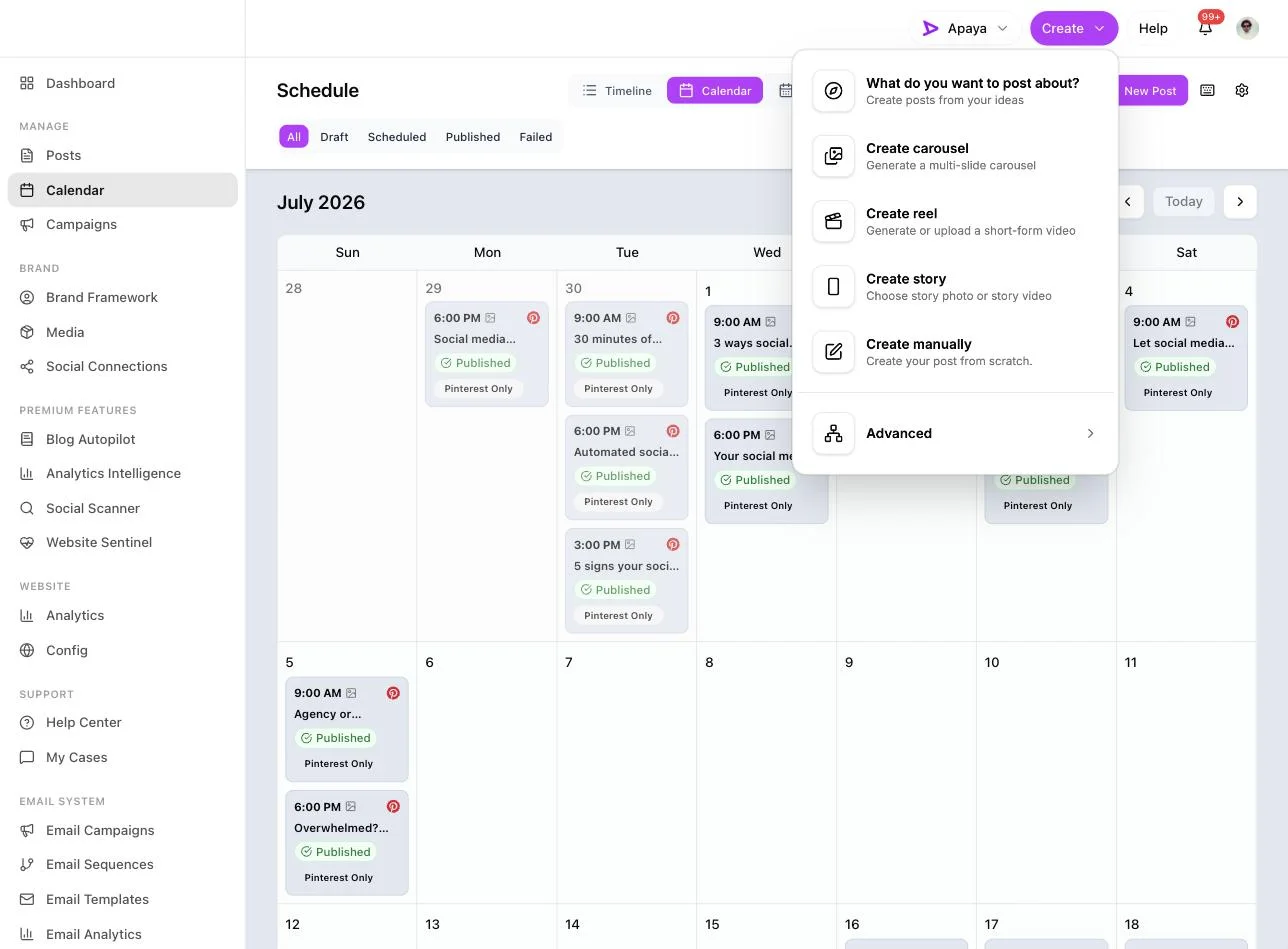
1. Tell it about the partnership. From any screen, open Create. You get one box, “What do you want to post about?”, and a choice of formats: a carousel, a reel, a story, or a standard set of posts. One brief can produce any of them.
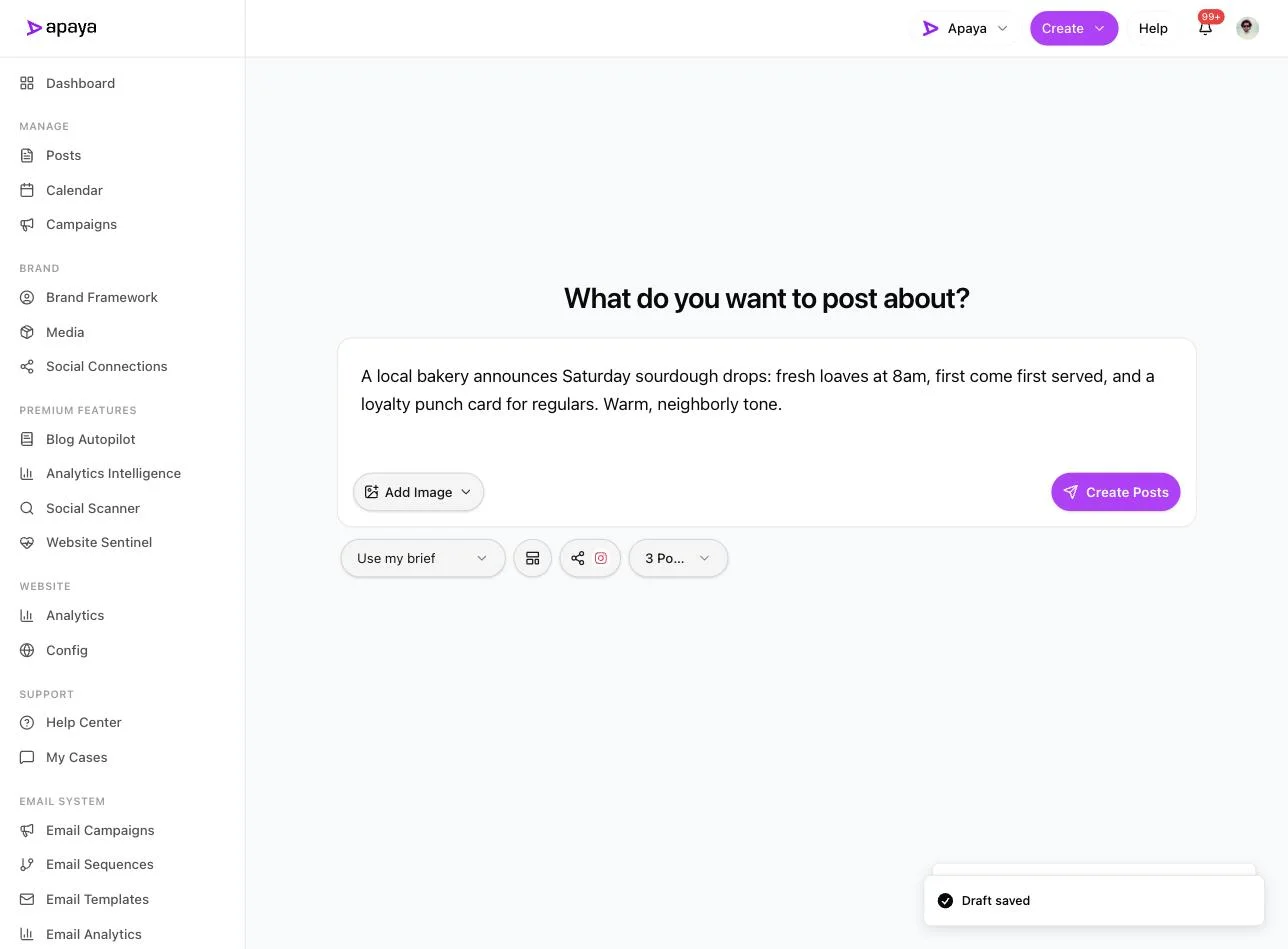
2. Write the brief and pick Instagram. Describe the partnership and how many posts you want in the run. This is a real one: a bakery’s sourdough drop, three posts, with Instagram selected as the platform.
3. Review the batch. About a minute later the posts come back written and designed, each with its own caption and branded graphic. You keep, edit, or discard each one, then save as drafts or schedule.
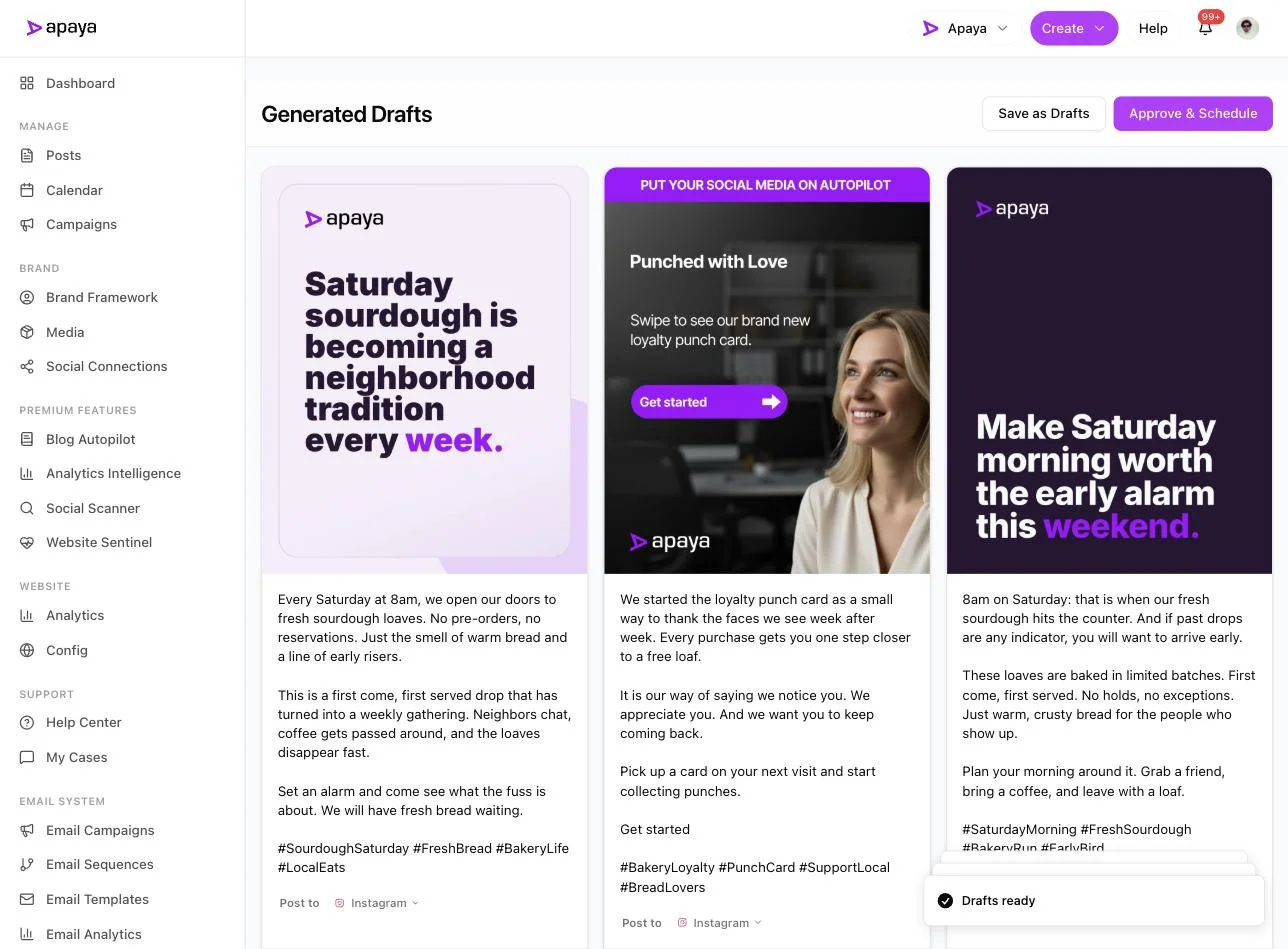
4. Schedule the cadence. Approved posts drop onto the calendar so the run publishes on its own. This is where you space the series across the weeks of the partnership and keep both accounts on the same rhythm.
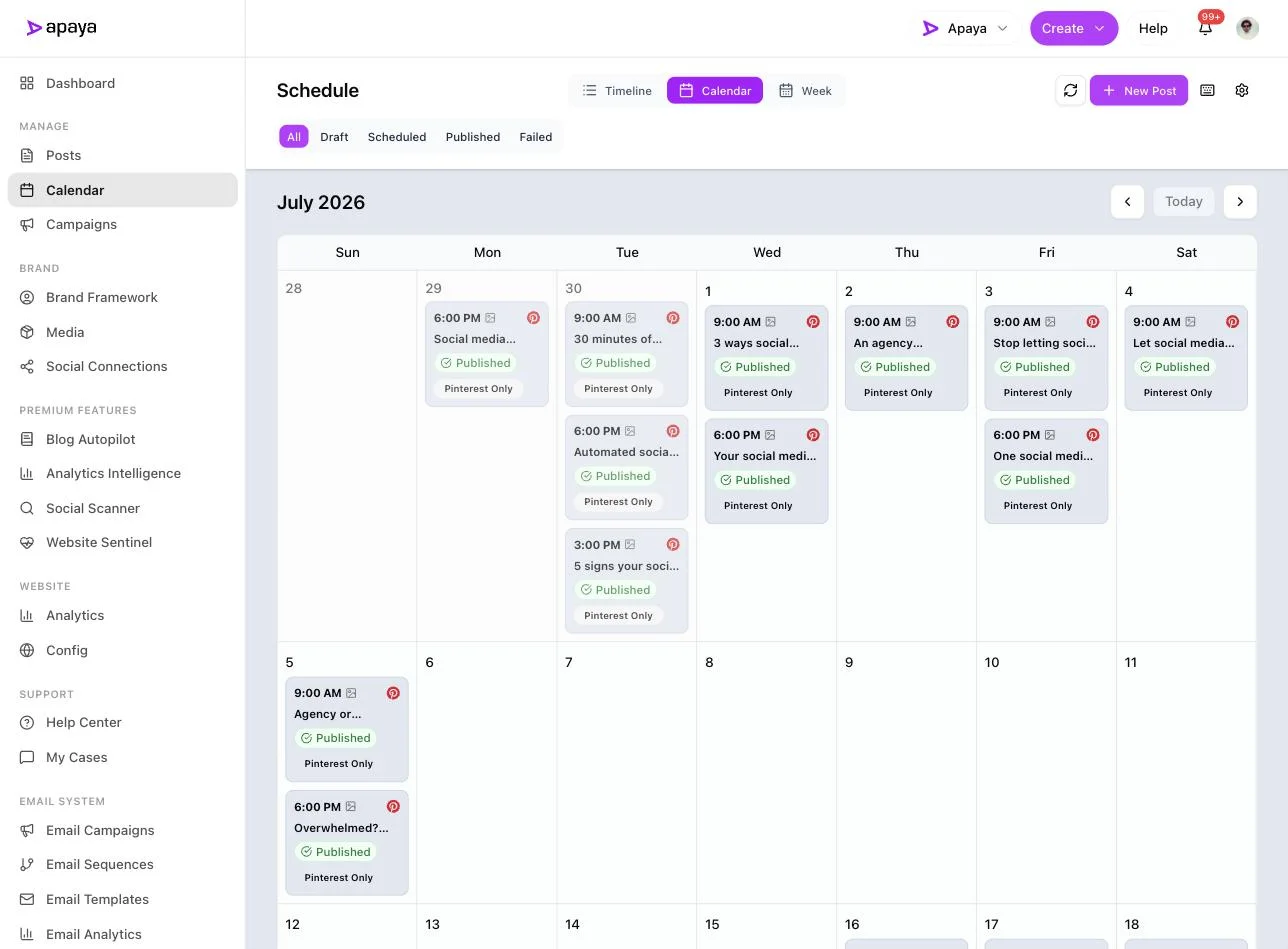
One brief in, a designed and scheduled run of partnership posts out. The co-authored hero post still gets its collaborator invited in the Instagram composer, the native way described above. Apaya covers the ten posts around it so you are not writing each one from a blank screen.
Why run a partnership through Apaya
A scheduler is half the job. Hootsuite and Buffer organize content on a calendar, which is useful, but the content still has to exist before it can be scheduled. For a one-off post that is fine. For a partnership series across two accounts, “the content still has to exist” is the whole problem: someone is writing and designing ten posts every time you run a promotion with a new partner.
Apaya does the scheduling part those tools do and adds the part they leave to you: it writes and designs the posts, carousels, reels, and stories from one brief. For a cross-promotion program, that changes the math in two places.
-
Time saved. You brief the partnership once and get the run back written and designed, instead of building each post from a blank screen. The native collab invite is still a manual step on the hero post, and the ten posts around it are produced for you.
-
Consistency across both accounts. A partnership works only if both sides keep posting on schedule. When the content is generated and queued in advance, the run does not stall because one owner got busy, and both calendars stay on the same cadence. If you want a reference point for what a normal Instagram posting rhythm looks like, our Instagram benchmark data sets the context.
Everything approves before it publishes, so nothing goes out in your brand’s name or your partner’s without a sign-off. From $55/mo at current pricing.
Common questions about Instagram collab posts
Can you add a collaborator to an Instagram post after posting?
No. The Invite collaborator button lives on the Tag people screen during creation, and there is no way to add a co-author to a post that is already live. If a post is up and you want it to be a collab, delete it and repost as a collab from the start. Copy the caption and re-save the media first so the repost takes two minutes.
Why can’t I add a collaborator on Instagram?
Usually one of four things: you are trying after the post went live, your Instagram app needs an update, you are editing an existing post instead of creating a new one, or the account you are inviting has a tagging or privacy setting that blocks collab requests. Update the app, start a fresh post, and invite from the Tag people screen before you share.
Does an Instagram collab post count as a post by both accounts?
Once the invite is accepted, it is one post that lives on both profiles. It shows both handles in the header, appears on both grids, and shows in both audiences’ feeds. Likes, comments, and views sit on the single shared post rather than being counted twice, so both partners work the same piece of content instead of two copies.
Do you need a business account to make a collab post on Instagram?
The invite feature reaches beyond professional accounts, but for a business you want a professional account, Business or Creator, on both sides. That is what gives you post insights and lets you schedule the surrounding content through a tool. Set both partners up as professional accounts before the partnership starts.
Can you schedule an Instagram collab post in advance?
The collaborator invite is added in the Instagram composer when you build the co-authored post, so that one signature post is created there. What you can plan and schedule ahead is the rest of the run: the teasers, the announcement, and the follow-ups each account posts on its own. That surrounding series is the part a tool like Apaya produces and schedules.
Related guides
-
How to schedule Instagram posts for putting the partnership series on a calendar that runs itself.
-
What to post on Instagram for filling the run with content both brands can use.
-
Best time to post on Instagram for timing each piece in the series.
-
Instagram benchmarks for context on posting cadence and what normal looks like.
-
How to post from Facebook to Instagram for running the same partnership across both platforms.
Sources
- Instagram collab post and Invite collaborator flow, verified in-app July 2026
- Apaya product screenshots captured live from my.apaya.com, July 2026
The easiest way to keep your social media profiles active.
Apaya writes the posts, designs the graphics, and publishes them for you. You approve.
See how Apaya worksThe easiest way to keep your social media profiles active.
Apaya writes your posts, designs your graphics, and publishes everywhere — automatically.