Social media roles and permissions with role-based access control.
Apaya Enterprise gives teams a tenant-scoped workspace with role-based access control, brand-level user invitations, and billing gated to tenant admins, so a company can manage social media access without sharing passwords for the social accounts themselves. Each customer tenant contains its own brands, users, campaigns, posts, assets, and analytics. Users can sign in with a Google account, including Google Workspace accounts, and enterprise SAML or Okta requirements can be scoped during rollout. Apaya itself is not currently SOC 2 certified; it runs on SOC 2 Type II-certified cloud infrastructure and supports security review materials such as information security, incident response, encryption, disaster recovery, records retention, SDLC, subprocessors, DPA, and custom MSA documentation.
Most companies still run social access on a shared password in a spreadsheet. The intern who left in March can still post as the brand, and the only way to remove access is to change the password and re-share it with everyone else.
Apaya Enterprise replaces that with roles and permissions. Access is built around tenants and brands: the tenant is the customer workspace, and inside it each brand has its own campaigns, posts, assets, social accounts, users, and analytics. Every user signs in as themselves and is invited into the brands they are responsible for, so a company can manage social media access without sharing passwords for the social accounts. Removing a person is removing a user, not resetting a password.
That model gives enterprise teams a clean operating structure: corporate marketing can manage the workspace, brands can have their own invited users, and enterprise buyers can scope access rules around the way their team is structured.
This page covers the access, security review, and procurement pieces around that model.
What enterprise teams need from social media roles and permissions.
The access questions are straightforward:
- Who belongs to the tenant
- Which brands each user can access
- Who can create campaigns
- Who can review and approve posts
- Who can manage social connections
- Who can manage billing and procurement
- What data belongs to which tenant and brand
- What security and procurement documents are available during review
Apaya answers each of these below.
Sign-in options and SSO scoping.
What is available today: users can sign in with a Google account, including Google Workspace accounts. A user clicks the Google button, authenticates with their Google account, and enters the tenant or brand they have been invited to. Email/password and OAuth-based sign-in options are also available for buyers in the middle of an identity migration.
Tenant and brand invitations happen inside Apaya. A workspace admin or brand admin invites a user by email. The user receives the invite, signs in, and gets access to the tenant or brand they were invited into.
Enterprise SAML or Okta requirements can be scoped during rollout when a customer needs a deeper identity-provider integration. Some enterprise buyers need a basic identity-provider connection. Others need deeper mapping, provisioning, or internal-policy alignment. Apaya scopes the requirement during rollout instead of shipping a single pre-built SSO pattern and calling it done. If your IT team requires SAML before signature, raise it early so the scope is written into the agreement.
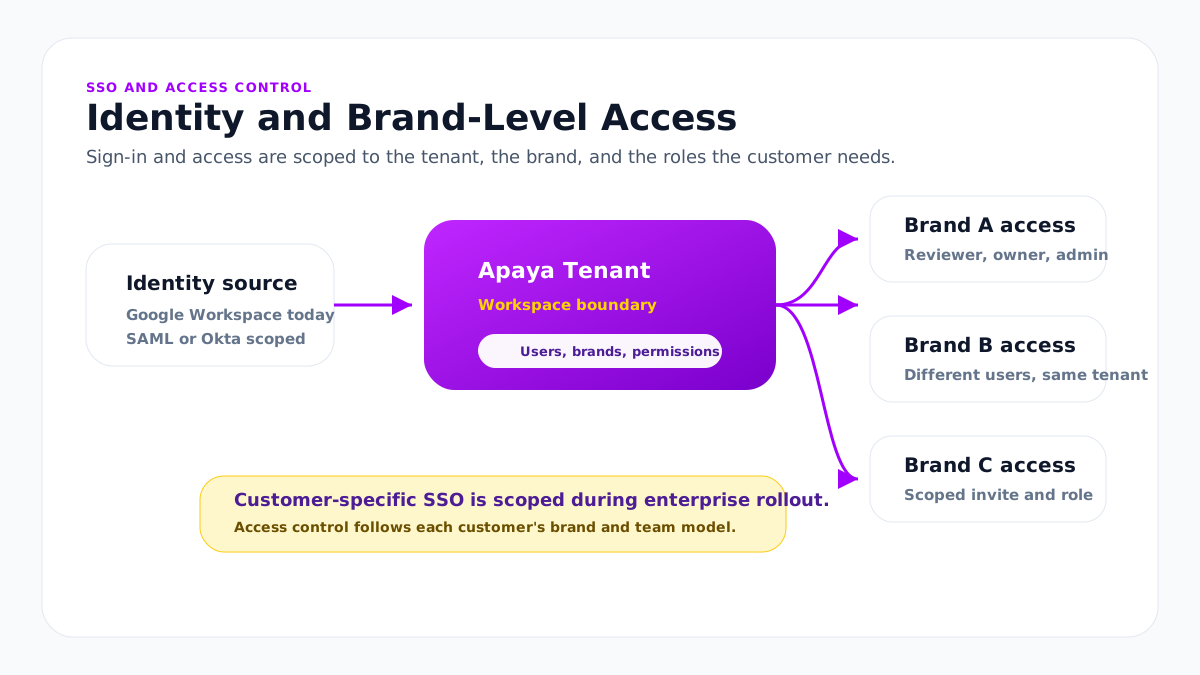
Roles and permissions: manage social media access without sharing passwords.
Apaya has role-based access control on the tenant side and user access at the brand level. The two together answer the question procurement asks first: who can do what, and where.
That matters because enterprise role design is rarely one-size-fits-all. One customer may have corporate marketing, brand managers, legal reviewers, and franchise owners. Another may have product-line teams, regional teams, and a central social team. The platform infrastructure supports tenant-level roles and brand-level invitations; enterprise mappings can be tailored during rollout.
The core model:
- Users are invited into the tenant or into specific brand access.
- Each brand has its own users and teammates.
- Corporate users can be granted broader access across brands.
- Billing and protected workspace settings are restricted to tenant-level admins.
- Approval access can be scoped around the enterprise customer’s social media approval workflow.
The practical effect for a marketing team: the social account passwords stop circulating. Social connections are made once per brand by the person who owns that account, and everyone else works through their own Apaya user with the permissions their role carries. Offboarding is removing that user, not a password reset and a re-share.
Tenant isolation and data model
Apaya is multi-tenant. The tenant is the outer boundary. Inside the tenant, brands are the operating units.
The data hierarchy:
- Tenant. The workspace, the subscription, the membership boundary.
- Brand (Company). Operating brand inside the tenant. Isolated data per brand.
- Campaign, Content, Platform Post, Analytics. All scoped to the brand they belong to.
A user needs access to the tenant or brand before they can see that workspace. Tenant admins can manage the tenant. Brand users operate inside the brands they have been invited into.
For deeper detail on the multi-brand workspace model, the multi-brand workspaces page covers the operating model.
Security and infrastructure
Apaya itself is not currently SOC 2 certified. Apaya runs on SOC 2 Type II-certified cloud infrastructure and maintains the policy set enterprise buyers usually ask for during vendor review.
The security and review posture:
- Cloud infrastructure. SOC 2 Type II-certified provider infrastructure.
- Encryption policy. Encryption in transit and at rest.
- Information security policy. Available for enterprise review.
- Incident response. Available for enterprise review.
- Disaster recovery. Available for enterprise review.
- Records retention. Available for enterprise review.
- SDLC. Available for enterprise review.
- Subprocessors. List available during procurement.
- Access controls. Tenant and brand-level access model.
Apaya also maintains platform-level audit records for support, troubleshooting, and enterprise review.
For deeper review by your security team, Apaya can provide vendor security questionnaire responses and the relevant security policies during procurement.
A note on certification language: Apaya runs on SOC 2 Type II-certified cloud infrastructure. Apaya itself is not currently SOC 2 certified.
Privacy, GDPR, and CCPA
Apaya supports GDPR and CCPA review through its terms, privacy posture, cookie policy, and Data Processing Addendum.
The privacy posture:
- Data ownership. Your content, Brand Framework, templates, analytics, and brand assets stay in your account.
- AI model usage. Apaya uses third-party frontier AI models to generate marketing content from the Brand Framework, campaign guidance, and other context the customer provides.
- Subject access and deletion. Requests are handled through the standard support and legal process.
- Subprocessors. A subprocessor list is available on request.
- Data location. Data lives in Apaya’s SaaS database and storage infrastructure. For the largest enterprise customers, a more isolated deployment can be scoped if required.
Frontier model providers such as OpenAI, Anthropic, Google Gemini, or other supported model providers may be used for generation. Enterprise customers can review model-provider usage, subprocessors, and data-handling requirements during procurement. The content-generation workflow is covered on the social media content production page.
Procurement support
Apaya supports the documents and processes most enterprise procurement teams need during onboarding:
- Custom MSA. Available for enterprise rollouts.
- Data Processing Addendum (DPA). Standard DPA available; custom DPA negotiated where the buyer requires it.
- Vendor security questionnaire. Apaya completes standard questionnaires during procurement.
- Subprocessor list. Available on request.
- Cloud infrastructure compliance documentation. Available during procurement where applicable.
- Invoicing and payment terms. Handled in the enterprise agreement.
- PO numbers and line-itemed invoicing. Supported where required.
Apaya enterprise engagements are contract-based. Renewal, termination, invoicing, and payment terms are handled in the agreement. Integration requirements that touch customer systems are covered on the enterprise social media API page. For the full checklist a marketing leader hands to IT before signing, including what each requirement protects against, see the social media software security requirements guide.
What Apaya does not handle
Apaya is built for marketing teams. The data customers normally put into Apaya is public marketing data: brand frameworks, websites, campaign briefs, social content, brand assets, social account connections, and analytics.
The product does not serve as a healthcare, financial, or government records system.
The platform is not designed for:
- Protected Health Information (PHI) unless covered by a written agreement.
- Payment card data (PCI) unless covered by a written agreement.
- Regulated medical data unless covered by a written agreement.
- Government classified or controlled unclassified data. Unsupported.
Buyers in regulated industries should review use cases with the Apaya team during procurement to confirm scope.
What’s in production
Apaya runs on SOC 2 Type II-certified cloud infrastructure. Google account sign-in is live. Tenant isolation, brand-level user access, role-based access infrastructure, platform-level audit records, and procurement support are in production.
How roles, permissions, and SSO get implemented.
SSO and access control are scoped around the enterprise customer’s identity provider, tenant structure, and brand access model. Apaya already separates tenants, brands, users, roles, and brand-level invitations. Enterprise SSO connects that access model to the customer’s identity requirements.
- Confirm the access model. Define the tenant, brands, admins, reviewers, brand managers, and any brand-level access boundaries.
- Scope the identity provider. Identify whether the customer needs Google Workspace sign-in, SAML, Okta, or another provider, and what the IT team requires for authentication, provisioning, and user mapping.
- Map identity to access. Connect sign-in requirements to tenant roles, brand invitations, approval access, billing access, and protected workspace settings.
- Implement and test. Build or configure the SSO flow against the customer’s requirements, then test login, invited-user access, restricted access, and brand-level visibility.
- Support procurement review. Share security documentation, subprocessors, DPA/MSA materials, infrastructure posture, and vendor questionnaire responses where the buyer requires them.
For simple brand access, setup can move quickly. Deeper enterprise SSO work depends on the customer’s identity-provider requirements and internal review process, but the implementation is scoped to the buyer’s actual environment instead of forcing every customer into the same generic SSO pattern.
Frequently asked questions
What sign-in and SSO options does Apaya support?
+
Is Apaya SOC 2 certified?
+
How is tenant data isolated?
+
How does Apaya use third-party AI models?
+
Can you provide a Data Processing Addendum?
+
Can you respond to a vendor security questionnaire?
+
What social media roles and permissions does Apaya support?
+
Can we restrict billing access?
+
Does Apaya support PHI or payment card data?
+
Related
-
Approval workflows
Social media approval software for AI-generated posts: a content approval tool with team roles, a brand-scoped asset library, regenerate-with-feedback review, and draft, scheduled, published, failed states. Nothing publishes unchecked.
-
Enterprise API
Enterprise social media platform with API access, exportable CSV and PDF reports, webhooks, brand-scoped client workspaces, and AI agent workflows.
-
Implementation plan
A practical Apaya Enterprise implementation plan for launching social content production across brands, assets, templates, approvals, publishing, reporting, API access, and support.
-
Financial services
Financial services social media management software for branches, advisors, and regions. Create approved posts with review workflows and reporting.
-
Healthcare groups
Healthcare social media management platform for medical and dental groups. Public marketing content with compliance review and approval before anything publishes.
-
Franchise networks
Franchise social media management software that creates on-brand posts for every location, routes franchisee approvals, and publishes from one workspace.
Schedule an Apaya Enterprise demo.
See how Apaya helps your team produce more on-brand social content across every brand without adding headcount.