Social media content production software for multiple brands.
Apaya Enterprise is social media content production software for marketing teams producing at scale across multiple brands and locations. It turns brand context, campaign briefs, uploaded photos, videos, graphics, asset folders, and Brand Framework rules into channel-ready social posts. Apaya can read images, extract video transcripts, generate captions and creative, route drafts through approval, schedule and publish posts, report on performance, and expose workflows through the Enterprise API.
The bottleneck for an enterprise social team sits upstream of the calendar. The work that fills the calendar is the constraint. Two people producing 30 posts a month do not get to 100 by working more hours. The math does not work. Hiring more people, signing an agency retainer, or letting quality drop are the usual answers. None of them fix the underlying problem: the work is hand-crafted in a tool that assumes a person will type the post.
Apaya Enterprise assumes the opposite. Production is the product, and AI does it. Brand context, campaign briefs, uploaded assets, image understanding, video transcripts, captions, hashtags, creative, approvals, scheduling, publishing, analytics, exports, and API access live in one workspace.
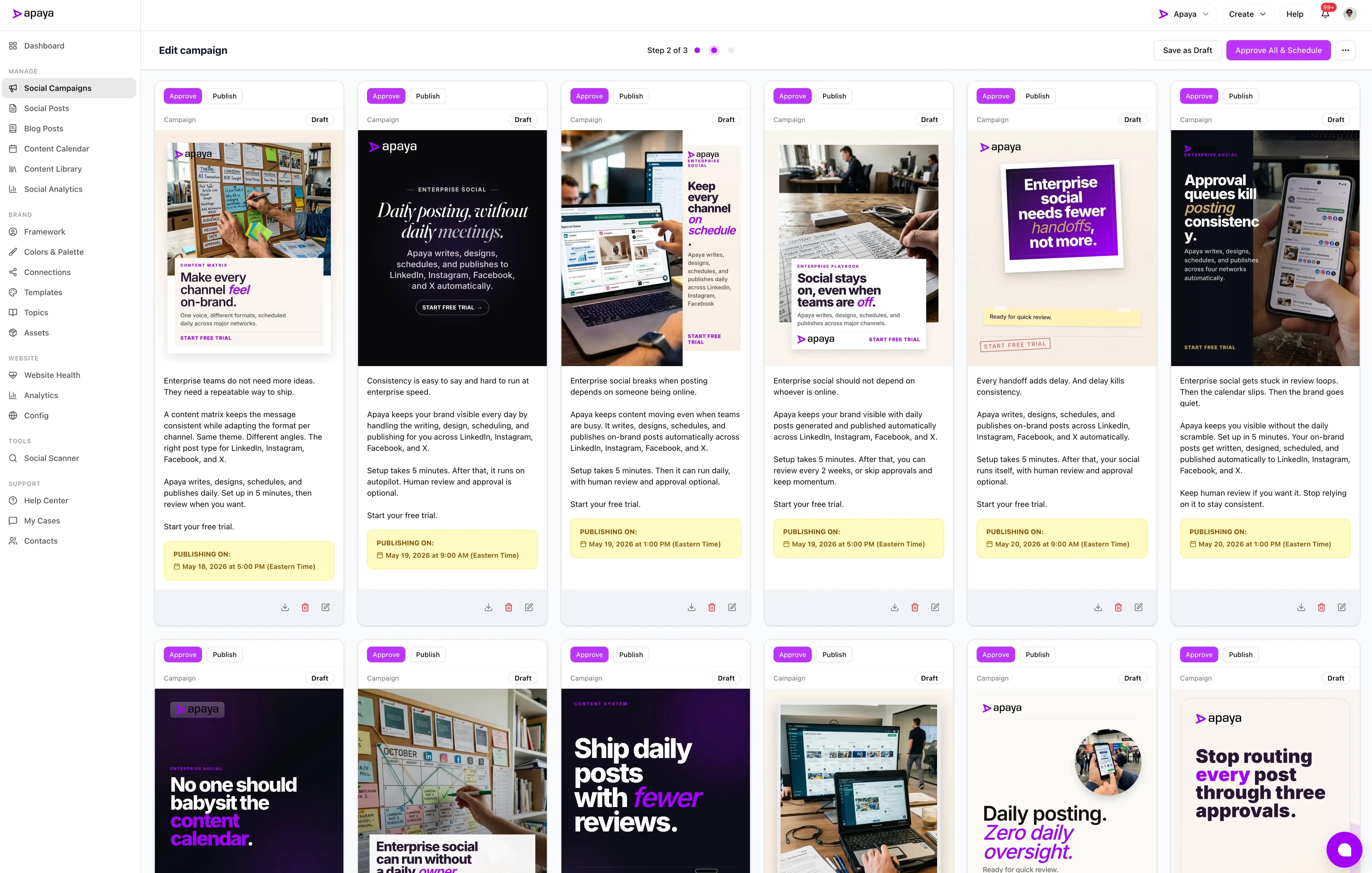
Content production at scale is the enterprise bottleneck.
Most enterprise marketing teams are good at strategy. They know what their audience wants. They know what their brand should sound like. They have campaigns approved and ideas backlogged. Where they get stuck is the production step. Writing the captions. Designing the images. Picking the hashtags. Adapting one message for five channels. Doing it. And next week. And the week after that.
This is the part that does not scale by adding tools. Adding a scheduling tool moves the bottleneck. Adding a design tool moves it. The content gets written by the same two people, who have a ceiling on what they can write in a week.
Generic AI writing tools make the typing faster. They do not understand the brand by default. They do not connect to social channels. They do not route drafts through approval. They produce text at the speed of a single prompt and stop at the prompt. The marketer becomes the integrator: write the prompt, paste the output, fix the voice, design the image, write the hashtags, paste it into the scheduler, schedule the post.
Apaya does the integration. Brand Framework, asset folders, image understanding, video transcript extraction, content generation, image generation, hashtag system, channel formatting, and the approval queue live in one workspace.
Produce social media content for multiple brands from one workspace.
Every Apaya brand has a Brand Framework, the structured set of voice, audience, USPs, calls to action, content rules, and writing samples that defines how the brand talks. Apaya can generate the framework from the brand’s website, selected pages, pasted guidance, existing content, or brand assets during onboarding. The brand team edits it. A company running 12 brands runs 12 frameworks, so producing for all of them does not mean flattening them into one voice.
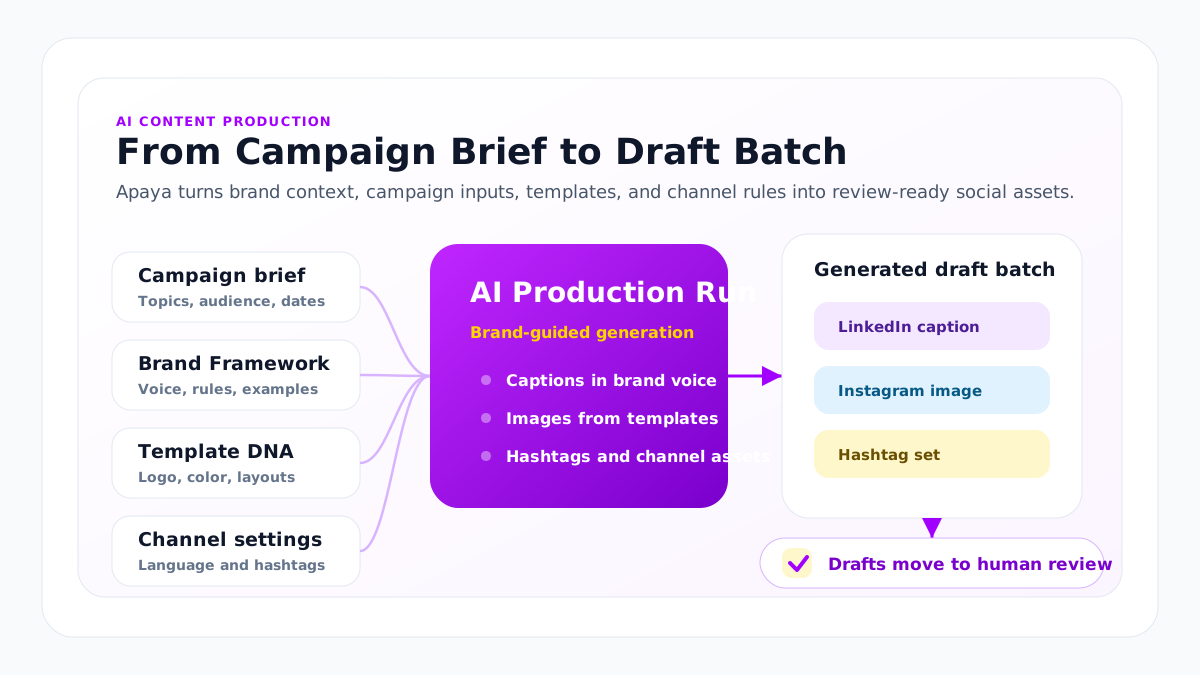
When a campaign starts, the marketer picks the campaign type, audience, channels, dates, and any asset folders the campaign should use. Apaya consumes the Brand Framework along with the campaign brief and selected assets, then generates an opening batch of content:
- Captions in the brand’s voice, formatted for each channel
- Branded images from your templates, logos, and color palette
- Template-ready headlines, subheadlines, calls to action, and supporting copy for social graphics
- Posts based on uploaded photos, graphics, and campaign assets
- Video-based posts using extracted transcripts and selected video media
- Hashtags from your approved pool, the campaign goal, and channel context
- Carousel and story posts where the channel supports them
- First-comment CTAs and call-to-action variants
The drafts arrive in the social media approval workflow. Reviewers edit, regenerate weak drafts with feedback, approve, or discard. Approved posts move to the social media calendar for that brand or location. The calendar publishes them on schedule.
The frontier models doing the generation read your Brand Framework as context. Apaya can use providers such as OpenAI, Anthropic, Google Gemini, or other supported model providers. The Brand Framework, campaign guidance, and account context guide the output.
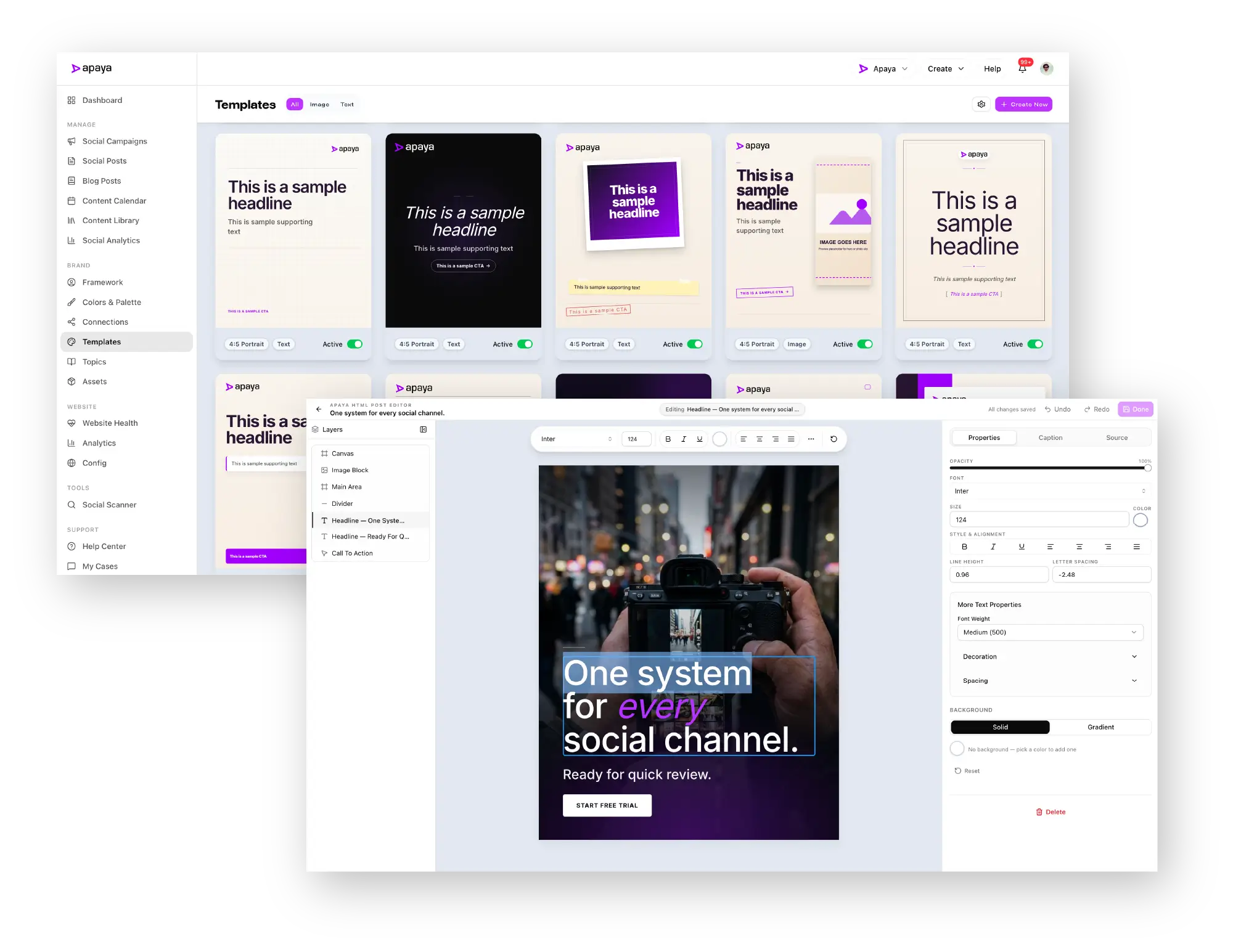
Branded social graphics from campaign copy
Apaya generates the structured copy that fills each brand’s social graphics. A campaign can produce the post caption, hashtags, headline, subheadline, call to action, first-comment CTA, and supporting copy for the creative asset.
Those elements connect to the brand’s Creative Template Studio. Templates are built with HTML and CSS and governed inside Apaya with brand colors, fonts, logos, imagery, layout rules, and copy constraints. During generation, Apaya uses the Brand Framework, campaign brief, selected assets, and template rules to fill the design with content that fits the layout.
The result is a campaign draft with the social caption, hashtags, selected or generated media, and a branded graphic that already contains the right headline, subheadline, and call to action. Reviewers can edit the caption, adjust the generated copy, change the image, regenerate with feedback, or approve the post for scheduling.
| Content element | Where Apaya uses it |
|---|---|
| Caption | The social post copy for LinkedIn, Instagram, Facebook, X, or TikTok. |
| Hashtags | The post hashtag set, generated from the campaign goal, channel context, and approved brand rules. |
| Headline | The primary text inside a branded social graphic or carousel slide. |
| Subheadline | Supporting text inside the graphic, tuned to the template’s available space. |
| Call to action | Button-style or closing copy inside the graphic and post caption. |
| Supporting copy | Short proof points, offer details, event information, or product context used in the creative layout. |
Inside an AI social media campaign
A 12-post product launch campaign across LinkedIn, Instagram, Facebook, X, and TikTok.
The marketing director opens the campaign builder. Selects the brand, the launch date, the channels, the audience, and the campaign type. Drops in a one-paragraph brief. Selects an asset folder with product photos, two customer clips, and brand graphics.
Apaya reads the images for visual context, extracts transcripts from the videos, and generates the opening batch inside a few minutes: 12 posts, five channels, selected media, caption variants, image variants, and hashtag sets. The drafts populate the review queue.
The director scans the captions. Two are off-tone for the brand. The director types feedback on each (“more punchy on the opener,” “lead with the customer outcome before the product feature”) and clicks regenerate. New drafts arrive. Approves both. Reads the next one. Wrong angle. Discards. Reads the LinkedIn long-form draft. Edits the closing line. Approves. Drops in approved brand photography on three posts where the AI-generated image was generic. Approves the rest.
12 drafts to 12 approved posts in under an hour.
Content production at scale, stage by stage.
Apaya is built for the full production run, not a single prompt. The work moves from brand input and assets to approved, scheduled, published, and reported social content. (For the category-level view of content pipeline automation and the build-versus-buy decision, see the enterprise AI content pipeline guide.)
| Production stage | What Apaya automates |
|---|---|
| Brand context | Brand Framework creation from websites, selected pages, pasted guidance, writing samples, brand assets, and team edits. |
| Asset intake | Photos, videos, images, graphics, product shots, event media, and campaign creative can be uploaded into asset folders. |
| Asset understanding | Apaya reads images to understand what is in them and extracts transcripts from videos so media context can shape captions and post angles. |
| Campaign generation | Apaya generates captions, graphics, hashtags, carousels, story posts, and channel-specific drafts from the brief, framework, and selected asset folders. |
| Human review | Drafts route into the approval workflow so reviewers can edit, regenerate, approve, discard, change media, or adjust schedules. |
| Scheduling and publishing | Approved posts move to the calendar and publish to LinkedIn, Instagram, Facebook, X, and TikTok with the selected media and approved captions. |
| Analytics and exports | Performance feeds the analytics layer, can be exported as PDF, CSV, or Markdown, and can be exposed through the Enterprise API for downstream systems when needed. |
| API and agents | Enterprise customers can expose approved API access so internal tools or AI agents can generate content, schedule posts, request reports, or pull analytics. |
What’s in the production stack
Apaya is built around content production. The capabilities behind that:
- Campaign-based post creation. Multi-step campaign builder. Topics, content strategy, audience, channels, dates.
- Asset folders. Upload photos, videos, images, graphics, and brand media into folders and select those folders for campaigns.
- Image understanding. Apaya can read uploaded images and use what it sees as context for captions and post angles.
- Video transcript extraction. Apaya can extract transcripts from uploaded videos and generate social posts around the transcript and selected video.
- Quick post creation. One-off social post generation outside the campaign flow.
- PASTE Mode. Bring your own copy. Apaya handles formatting, distribution, and scheduling for posts your team has written.
- AI image generation. Branded post images from your templates, logos, and brand colors.
- Creative Template Studio. Web-based HTML/CSS social post templates governed with brand colors, fonts, logos, imagery, layout rules, and copy constraints.
- Template-ready copy. Generate headlines, subheadlines, calls to action, supporting copy, captions, and hashtags that fit the selected social template.
- Template DNA system. Structured content formats include headline-only, headline-plus-subheadline, 3-slide stories, and 5-slide stories. Templates honor your brand identity per brand.
- Carousel and story posts. Multi-slide content for Instagram and channels that support story formats.
- Video Library Mode. Use Brand Video Library assets in campaigns for short-form video work.
- Hashtag system. AI, custom, hybrid, or none modes. Apaya can pick from your approved pool, generate fresh, blend the two, or skip hashtags by channel.
- Per-platform formatting. Captions and assets sized and formatted for each channel.
- Multi-language post settings. Post language and writing samples configurable per brand.
- Post regeneration with feedback. Reviewer types feedback. Apaya regenerates with the feedback as context.
- Draft review and editing. Drafts route to the queue before scheduling.
- Enterprise API control. Approved API access can expose generation, scheduling, publishing, analytics, and export workflows to internal systems or AI agents.
How this differs from a generic AI tool
Generic AI tools generate text. Apaya generates campaigns and runs the production work around them. The difference shows up in six places:
- Brand context. Apaya consumes your Brand Framework on every generation pass. Generic AI tools start from a blank prompt each time.
- Media context. Apaya can use uploaded photos, graphics, and video transcripts as campaign context. Generic AI tools often need the marketer to describe the asset manually.
- Channel awareness. Apaya formats and sizes content per channel. Generic AI tools produce one block of text.
- Image generation. Apaya generates branded images using your templates, logos, and colors. Generic image tools produce stock-feeling visuals.
- Approval workflow. Apaya routes drafts to a review queue. Generic AI tools have no concept of “approved.”
- Publishing connection. Apaya schedules and publishes the approved posts. Generic AI tools end at the prompt.
The marketing team using a generic AI tool becomes the integrator, pasting between systems, fixing voice, designing images, and scheduling. The marketing team using Apaya is the editor.
How this differs from a scheduling-first tool
Scheduling-first tools added AI features around the calendar. The AI writes a caption from a topic. The AI suggests hashtags. The AI tweaks tone. These are upgrades to a publishing tool.
Apaya is a production tool with a publishing tool attached. The starting point is the brand and the brief. The output is on-brand drafts ready for review. Scheduling, publishing, and social media reporting by location happen inside Apaya. The loop closes because the team that produces the content is the team that approves, ships, and measures it.
A scheduling-first team paying for production through an outside agency is paying for the same outcome in two places.
Operable by API and enterprise agents
Some enterprise teams will not want every workflow to start from a human clicking through the UI. They may have internal marketing systems, automation layers, or AI agents that need to create content, schedule posts, request reports, or pull analytics.
Apaya supports that pattern through the Enterprise API. Approved enterprise API access can expose content generation, campaign creation, asset use, scheduling, publishing, analytics, and export workflows around the customer’s use case. The API turns Apaya into a production engine that enterprise systems can control, while keeping brand context, tenant boundaries, roles, and approval workflows in place.
Governance and brand fit
Production speed is one half of the buying question. Brand integrity is the other half. The fear is real: a high-volume AI tool can ship a high volume of off-brand posts and burn the brand in a quarter.
Three controls protect the brand inside Apaya.
- The Brand Framework. Every generation pass references the framework, including voice rules, approved language, USPs, and banned phrases. The framework is the contract between the brand team and the AI.
- The review queue. No post publishes without human approval. Reviewers edit, regenerate with feedback, approve, or discard.
- Post regeneration with feedback. When a draft does not work, the reviewer’s feedback feeds the next generation pass for that post or campaign.
Apaya uses third-party AI providers to generate marketing content from your Brand Framework, campaign guidance, and account context. The full security and procurement story sits on the roles and permissions page.
What’s in production
A single Apaya brand produced 360+ posts in one month across Facebook, LinkedIn, Instagram, and X. Those posts were generated, reviewed, scheduled, and published through the platform. Customers can also upload photos, videos, images, and graphics into asset folders and use those assets in campaign generation. 60 customer brands run on Apaya.
Apaya is producing the volume of content my internal team could not produce on its own — and it reads like our brand wrote every word.
What the first rollout looks like
Apaya does not need a month to prove the workflow. The first usable version can happen in a working session when the team brings the right brand inputs. Enterprise rollout speed depends on review cycles, approvals, and internal governance, not on the platform’s ability to generate the content.
- Create or import the Brand Framework. Apaya can generate the framework from a website, selected web pages, brand documents, messaging guides, product pages, writing samples, or a combination of sources. The brand team reviews, edits, and refines it in Apaya.
- Generate the first campaign. Once the framework is ready, the team adds topics, content strategy, audience, channels, dates, frequency, and scheduling rules. Apaya generates the campaign drafts in minutes, including captions, images, hashtags, and per-platform formatting.
- Use approved asset folders. Teams can upload product photos, videos, event media, graphics, or customer-approved creative into folders and select those folders when generating a campaign.
- Review, edit, approve, and schedule. Drafts land in the review queue. Reviewers edit copy, regenerate with feedback, adjust creative, approve posts, and move approved content onto the calendar.
- Scale the cadence. After the first campaign, teams expand by adding brands, locations, divisions, channels, languages, review rules, and analytics tracking. The operating cadence is shaped by how the enterprise wants to review and govern the work.
A live demo can show the full loop from Brand Framework to generated campaign to approved draft. A production rollout can move quickly when the inputs and decision-makers are ready, while still giving enterprise teams the review time they need.
Frequently asked questions
Which AI models does Apaya use?
+
How does Apaya use third-party AI models?
+
Can the team paste in copy and skip generation?
+
Can Apaya generate social posts from uploaded photos and videos?
+
Can Apaya match an existing voice from past posts?
+
How does Apaya handle content for regulated industries?
+
Can the platform produce in multiple languages?
+
What stops AI from generating off-brand or unsafe content?
+
Can Apaya produce brand video posts for social media?
+
Related
-
Brand Framework
Keep social media on brand across locations with a Brand Framework per location: voice, audience, CTAs, banned phrases, approved language, assets, and visual identity.
-
Approval workflows
Social media approval software for AI-generated posts: a content approval tool with team roles, a brand-scoped asset library, regenerate-with-feedback review, and draft, scheduled, published, failed states. Nothing publishes unchecked.
-
Enterprise API
Enterprise social media platform with API access, exportable CSV and PDF reports, webhooks, brand-scoped client workspaces, and AI agent workflows.
-
Implementation plan
A practical Apaya Enterprise implementation plan for launching social content production across brands, assets, templates, approvals, publishing, reporting, API access, and support.
-
Franchise networks
Franchise social media management software that creates on-brand posts for every location, routes franchisee approvals, and publishes from one workspace.
-
Retail chains
Multi-location social media management software for retail chains. Store-level content, approval before anything publishes, and roll-up reporting by region.
-
Real estate brokerages
Real estate brokerage social media management software. Create approved posts across offices, agents, listings, recruiting, and market campaigns.
Schedule an Apaya Enterprise demo.
See how Apaya helps your team produce more on-brand social content across every brand without adding headcount.