Social media reporting software for multiple locations and brands.
Apaya Enterprise reports post-level, campaign-level, and channel-level performance across LinkedIn, Instagram, Facebook, X, and TikTok for every brand and location in the workspace. Social media reporting by location is the default: each location has its own reporting view for posts, campaigns, channels, and website activity where tracking is installed. Corporate teams can build roll-up reporting from PDF, CSV, and Markdown exports or scoped Enterprise API access, and a consolidated parent-company view can be scoped during enterprise rollout. Exportable executive reports support QBRs, board packets, BI work, and internal AI or LLM analysis.
Reporting on one account is a screenshot. Reporting on 40 locations is a week of copying numbers out of 40 dashboards into a spreadsheet nobody trusts by the time it reaches the executive team. Multi-location teams need social media reporting by location, plus a roll-up the corporate side can read in one pass.
Apaya Enterprise reports on what it produced and what happened after it shipped. Post, campaign, channel, and location performance live in the dashboard. Teams can export reports as PDF, CSV, and Markdown, and enterprise customers can expose reporting data through the Enterprise API when they want Apaya data in their own BI tools, internal systems, or AI workflows. Where campaign links and the Apaya tracker are installed on the location’s website, analytics extend to visitor behavior, source visibility, and conversions.
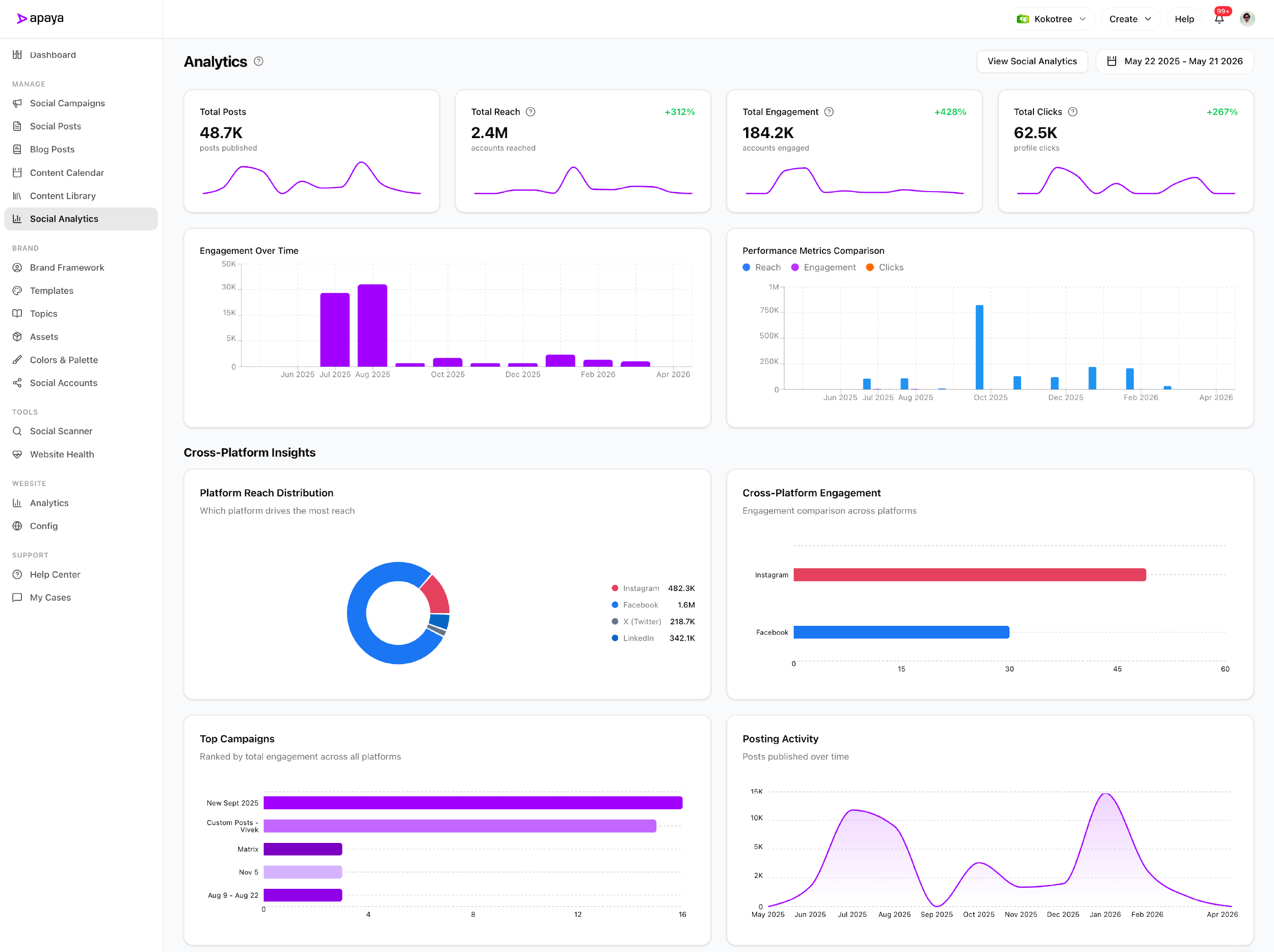
What multi-location teams need from social media reporting software.
Most multi-location and multi-brand marketing teams need four things from social media reporting software:
- Per-post performance. Which captions, images, hashtags, and formats worked. Engagement, reach, clicks per post.
- Per-campaign rollup. How an entire campaign performed across channels. Impressions, engagement, click-through, conversion where tracked.
- Reporting by location. How each location, brand, or region performed on its own, so a regional manager can see their numbers without reading the whole network’s.
- Outcome reporting. What happened after the click. Did the visitor land on the website. Did they convert. Which campaign links and tracked sources contributed to the outcome.
The first two are table stakes. Every social tool reports on them. The third is where per-account tools break down, because the numbers live in 40 places and the comparison happens in a spreadsheet. The fourth is the line from social content to website outcome, which is where most tools fall short because they end at the channel API.
Apaya covers all four for buyers who install the tracker on the location’s website. For buyers who do not, Apaya covers the first three and integrates with whatever conversion tracking is in place. The reporting starts with the scheduling and publishing layer because every published post already belongs to a location, campaign, channel, and lifecycle state.
How social media reporting by location works.
Reporting is scoped per brand and per location. Each one connects its own social accounts; Apaya pulls performance data from the channel APIs.
The data model:
- Post-level analytics. Engagement, reach, impressions, clicks per post.
- Campaign analytics. Aggregated performance across every post in a campaign. UTM tracking on campaign links for downstream attribution.
- Platform analytics. Performance per channel, with platform-specific metrics where the API exposes them.
- Follower statistics. Account-level follower counts and growth where the channel exposes them.
- Time filtering. Preset windows (last 7, 30, 90 days, last quarter, last year) and custom date ranges.
Where the Apaya tracker is installed on the brand’s website, analytics extend to:
- Visitor and session tracking. Pageviews, sessions, events from social-driven traffic.
- Known-user visibility. Anonymous visitors can connect to known users after login, signup, or form submission where the site is configured to pass that event.
- Acquisition reporting. Campaign links, UTMs, and tracked website events help connect social content to website outcomes.
- Behavior reporting. Activity, content, country, device, operating system, visitor-level views.
Reporting is location-scoped by default. Each brand or location has its own reporting view for posts, campaigns, channels, and website activity where tracking is installed. Corporate teams build the roll-up from exports or scoped API access today. If corporate marketing needs a consolidated executive view inside the product, that reporting layer can be scoped during enterprise rollout.
Inside a month-end roll-up reporting pass.
End of month. The CMO opens location A’s reporting view.
Filters to the corporate launch campaign. Sees per-post engagement, channel-level reach, and impressions across LinkedIn, Instagram, Facebook, X, and TikTok. The campaign produced 48 posts; 12 cleared 1,000+ engagements; 3 cleared 10,000.
Switches to the location with the tracker installed. Sees which campaign links drove website sessions, which pages those visitors viewed, and which tracked events followed the campaign.
Exports each location’s report to PDF for the executive packet, CSV for the analyst, and Markdown for the company’s internal AI assistant. The CSVs stack into the network roll-up. The exports capture the post-level numbers, the campaign rollup, and the attribution view in clean formats.
20 minutes for what used to be a half-day spreadsheet exercise.
What’s in the analytics layer
The capabilities behind the reporting:
- Analytics Overview. Brand-level performance summaries for each brand in the tenant.
- Time Filtering. Preset and custom date ranges.
- Campaign Analytics. Aggregated performance for every post in a campaign.
- Post-Level Analytics. Per-post engagement, reach, impressions, clicks.
- Platform Analytics. Per-channel performance with platform-specific metrics.
- Follower Statistics. Account-level follower counts and growth where the channel API exposes them.
- Per-location dashboards. Each brand and location has its own reporting interface for posts, campaigns, channels, website activity, and conversion visibility where tracking is installed.
- Scoped roll-up reporting. Consolidated or custom executive views can be scoped for customers that need a parent-company or network-level reporting layer.
- UTM Tracking. Campaigns can append UTM parameters for attribution and downstream analytics.
- Website Intelligence. Visitor and session tracking, attribution reporting, behavior reporting where the Apaya tracker is installed on the brand’s website.
- Known-User Visibility. Anonymous visitors can connect to known users after login, signup, or form submission where the site is configured to pass that event.
- Acquisition Reporting. Campaign links, UTMs, and tracked website events connect social activity to website outcomes.
- Exportable executive reports. PDF, CSV, and Markdown exports for QBRs, board decks, spreadsheet work, BI, and AI/LLM analysis.
- Enterprise API Export. Tenant-scoped API access can expose analytics and reporting endpoints for buyers who want data in their own warehouse, internal tools, or agent workflows.
Website Intelligence and conversion attribution
Most social analytics stop at the channel API. The reach number tells you the post showed up. The engagement number tells you someone reacted. The click number tells you someone left the channel. After that, the channel cannot help.
Website Intelligence extends the reporting past the click. Buyers who install the Apaya tracker on the brand’s website see:
- Visitor and session activity from social-driven traffic
- Pageview and event behavior per visitor
- Source and campaign visibility from tracked links
- Known-user visibility after login, signup, or form submission where the site is configured to pass that event
The tracker is per brand and per website. Install is a single script tag. Data starts populating from the moment the tracker fires.
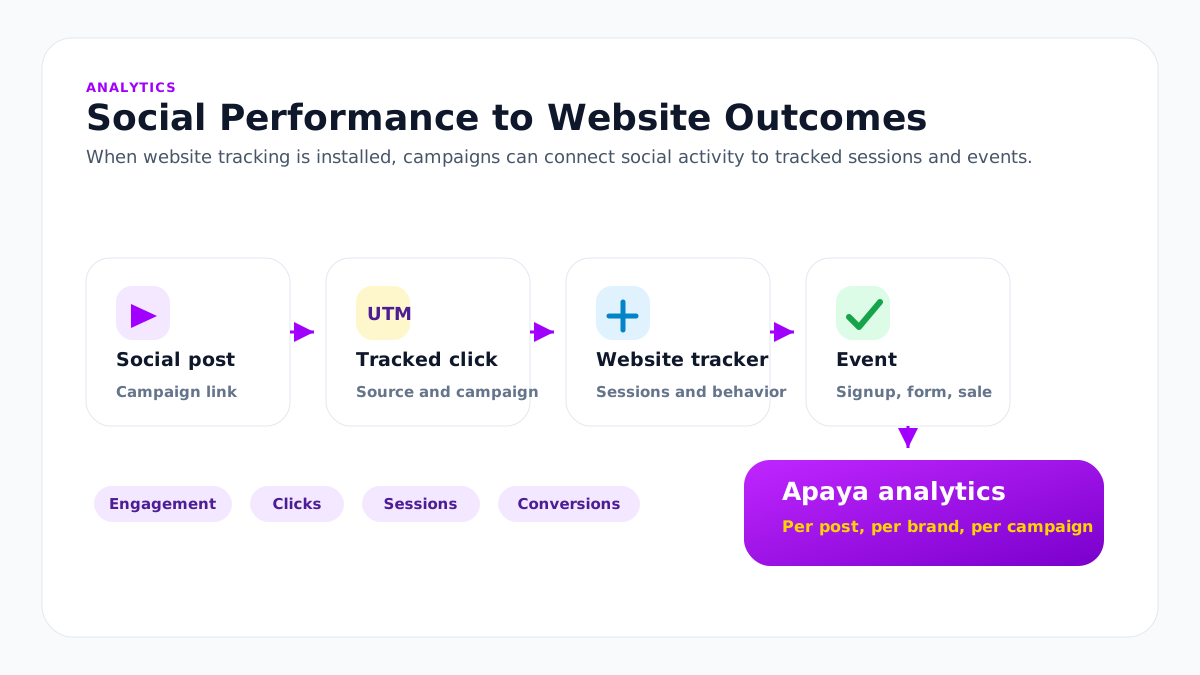
For buyers with an existing tracking and attribution stack, Apaya’s UTM tracking on every campaign feeds those systems through standard parameters. Apaya extends what the team can see from the social side while keeping social content, campaign, channel, post, and brand reporting inside the platform.
What Apaya reporting focuses on
Apaya reporting is built around the content production system. It shows what Apaya created, scheduled, published, and tracked for each brand. That keeps reporting tied to the same campaign, post, channel, brand, and website context the team used to create the work.
The point is not a disconnected analytics dashboard. The point is a reporting layer that stays attached to the brands, campaigns, posts, schedules, media, and website activity the enterprise team is already managing in Apaya.
Roll-up reporting across locations and brands.
Multi-location operations need two views that most tools force you to choose between: the clean per-location number and the network roll-up. Apaya treats each brand and location as its own reporting unit inside the tenant, which is what makes the roll-up trustworthy. The corporate number is the sum of units that were measured the same way, on the same campaigns, from the same platform.
Each location dashboard can show:
- Post, campaign, and channel performance for that location
- Website activity and conversion visibility where the tracker is installed
- Date range, channel, campaign, and status filters
- PDF, CSV, Markdown, and API exports for that location’s reporting data
Location owners see their own numbers. Corporate marketing can move between every location it has access to, and pull CSV or API data for the network view. When a customer needs a consolidated corporate dashboard inside the product, Apaya can scope that as an enterprise reporting layer during rollout.
For deeper coordination across brands, the multi-brand workspaces page covers the workspace model.
Exportable executive reports and downstream systems.
Reporting that stays inside the platform is reporting that is hard to use. Apaya supports clean exports:
- PDF export for executive summaries, QBRs, board packets, and shareable campaign reports.
- CSV export for spreadsheet work, BI import, and data warehouse workflows.
- Markdown export for reports, internal AI assistants, LLM analysis, agent workflows, and documentation.
- Enterprise API export for buyers who want analytics and reporting data in their own data warehouse, internal tooling, or automation layer.
Markdown is intentionally supported because enterprise teams increasingly analyze marketing performance with their own AI systems. Instead of copying a dashboard into a prompt, the team can export clean reporting text and feed it into the tools they already use.
For deeper integration patterns, the Enterprise API page covers brand-scoped API keys, webhooks, custom integrations, API-controlled workflows, and exportable reports.
What’s in production
Per-post, per-campaign, per-channel analytics live in the product. Website Intelligence is available for buyers who install the tracker and want campaign links, website activity, and conversion events connected inside the reporting view.
How analytics gets started
Analytics starts once social accounts are connected and approved posts begin publishing. Apaya pulls performance data from the connected social platforms on a daily cadence, so reporting begins after the first published posts have platform data available.
- Connect social accounts. Each brand connects the channels it publishes to, including LinkedIn, Instagram, Facebook, X, and TikTok.
- Publish approved posts. Once posts go live, Apaya reports performance by post, campaign, channel, brand, and location.
- Install website tracking during onboarding. Buyers who want conversion visibility can install the Apaya tracker while the brand is being set up, so website activity is ready to connect to campaign links and UTMs.
- Review what is working. Teams can see engagement, clicks, comments, likes, impressions, and other available platform metrics per post and per brand.
- Scope roll-up reporting where needed. Consolidated reporting and custom executive views can be scoped for enterprise customers that need a specific reporting layer across brands, divisions, or locations.
As publishing volume builds, analytics gives the team a clearer view of what worked by post, campaign, channel, and brand. Teams can use that information when planning the next campaign or updating brand guidance.
Frequently asked questions
What metrics does Apaya report?
+
How does Website Intelligence work?
+
Can we connect social content to website conversions?
+
Can we get roll-up reporting across multiple locations?
+
Why is LinkedIn Personal analytics limited?
+
Can we export analytics?
+
What does Apaya analytics focus on?
+
Related
-
Scheduling & publishing
Schedule social media posts across multiple locations, publish to multiple platforms at once, and keep timezone-aware publishing per location with retries and lifecycle states.
-
AI content production
Social media content production software for content production at scale: campaigns, captions, branded graphics, hashtags, approvals, scheduling, publishing, and reporting.
-
Enterprise API
Enterprise social media platform with API access, exportable CSV and PDF reports, webhooks, brand-scoped client workspaces, and AI agent workflows.
-
Implementation plan
A practical Apaya Enterprise implementation plan for launching social content production across brands, assets, templates, approvals, publishing, reporting, API access, and support.
-
Hotel groups
Hotel social media management software for hospitality groups. Create on-brand posts for properties, offers, destinations, events, and campaigns.
-
Restaurant groups
Restaurant group social media management for multi-concept chains: LTO and menu launch calendars, per-concept brands, and approvals across franchised and company-owned locations.
-
Retail chains
Multi-location social media management software for retail chains. Store-level content, approval before anything publishes, and roll-up reporting by region.
Schedule an Apaya Enterprise demo.
See how Apaya helps your team produce more on-brand social content across every brand without adding headcount.