Enterprise Social Media API, Exportable Reports, and Agent Workflows
Apaya is an API-backed enterprise social media platform. Enterprise customers can use tenant-scoped API access to generate content, schedule posts, publish campaigns, access analytics, export reports, trigger webhooks, and connect Apaya to internal tools or AI agents. Reports can be exported as PDF, CSV, and Markdown so teams can use the data in BI tools, board reporting, and their own AI or LLM analysis workflows.
Marketing tools that don’t talk to the rest of the stack create work for the marketing team and the engineering team. Social content, campaign data, analytics, reports, and brand assets may need to connect with internal systems, BI tools, procurement workflows, and internal AI agents. Without an integration path, the brand spends quarterly cycles building one-off exports.
Apaya Enterprise is built on an API-backed architecture. The user interface talks to the API. The API talks to the backend. That gives enterprise customers a clear path for integrations without inventing a second platform. The work is scoping and exposing the right approved endpoints for the customer’s use case.
Enterprise integration patterns, including content generation, campaign creation, post scheduling, publishing, analytics export, report generation, notification routing, custom endpoints, and asset import, are scoped to the customer’s requirement. API access is not positioned as a public developer marketplace. It is a customer integration and automation surface.
What enterprise teams use a social media management API for
The common integration patterns:
- Social content and campaign sync. Approved posts, campaign metadata, publishing status, and content history can be exposed to customer systems when the workflow requires it.
- API-controlled content generation. Internal tools or approved AI agents can generate content through Apaya using the same brand, campaign, and channel context the platform uses.
- API-controlled scheduling and publishing. Approved workflows can schedule, reschedule, or publish posts through tenant-scoped API access.
- Analytics export to BI. Enterprise social media analytics can be exposed through tenant-scoped exports or endpoints for customers who want Apaya data in their own reporting environment.
- Exportable reports for AI analysis. Reports can be exported as PDF, CSV, and Markdown. Markdown makes it easy for enterprise teams to feed campaign and performance reports into their own AI or LLM systems.
- Notifications to internal channels. Slack and Teams notifications can be scoped as part of an enterprise integration when customers need them.
- Storage integrations. Brand assets can be pulled into Apaya from systems such as Google Drive, Dropbox, OneDrive, Box, S3, or a customer DAM when the team wants those assets available for campaigns.
- Custom integrations. Customer-specific use cases can be handled as enterprise integration work, including pulling content into a custom marketing app, exporting Brand Framework history, or syncing campaigns with internal launch tooling.
The pattern: Apaya is the production system. Customer systems can consume Apaya data, feed approved assets into Apaya, or control Apaya workflows through scoped API access.
Enterprise social media management API architecture
The platform is already API-backed. Any customer-facing integration is scoped around tenant access, brand access, and the specific workflow the customer needs.
Current live surfaces and integration patterns:
- API-backed platform. Apaya’s interface runs on API endpoints, which gives enterprise customers a clear path for scoped integrations.
- API Keys. Brand-scoped API keys are generated by tenant admins for approved enterprise surfaces. Each key is tied to the brand and access pattern the customer approves.
- Agent-ready control surface. Enterprise teams can connect internal automation systems or AI agents to approved endpoints for content generation, scheduling, publishing, analytics, and exports.
- Webhooks. Outbound webhook events can be scoped around the customer’s workflow, such as campaign approval, post publishing, post failure, export completion, or notification routing.
- Exports. PDF, CSV, and Markdown exports for analytics, content, campaigns, and related reporting surfaces. Enterprise API exports can be scoped for approved use cases.
The API and webhook surface is positioned as a customer integration feature for enterprise plans, not a public developer platform open to every signup.
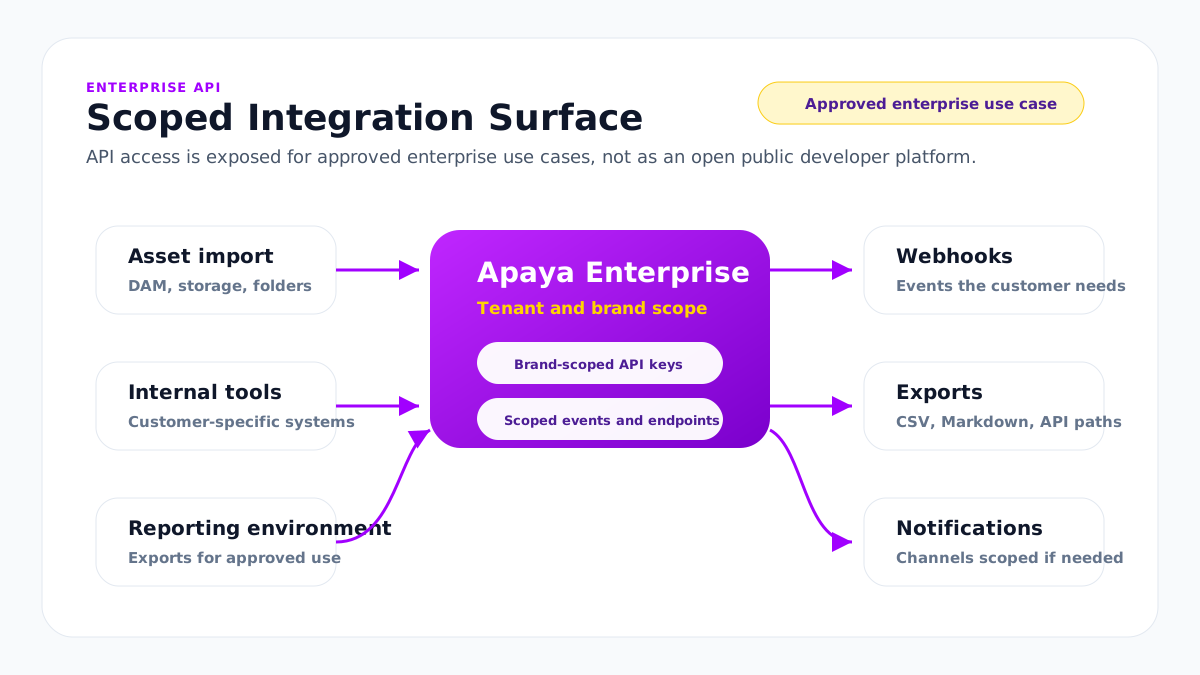
Tenant-scoped and brand-scoped API access
The multi-brand workspace model carries through to the API. Enterprise API access is scoped to the customer tenant, and can be narrowed to a specific brand when the integration only needs one brand’s data.
This matters for multi-brand operations. Some integrations need tenant-level access across brands. Others should only touch one brand. Apaya scopes the key, endpoint, or integration to the access pattern the customer approves.
API access is managed by tenant admins. Customer-facing access can include:
- Tenant scope. The customer workspace the integration belongs to.
- Brand scope. The brand or brands the integration can read from.
- Last-used timestamp. Visible in the key management view.
- Revoke action. Tenant admins can revoke a key in one click.
Key generation and use are captured in platform-level audit records.
Webhooks
Webhooks are how Apaya tells external systems something happened. For enterprise customers, webhook coverage is scoped around the events the customer needs.
Common webhook candidates include:
- Campaign generated
- Post approved
- Post scheduled
- Post published
- Post failed
- Export ready
- Review event
- Notification event
Webhook target URLs, retry behavior, and delivery logs are scoped as part of the enterprise integration.
API-controlled content, scheduling, and publishing
The API can be used for more than reading reports. Enterprise teams can use approved API access to operate Apaya from internal systems.
Common control patterns:
- Generate content. Create campaign drafts, post variants, captions, hashtags, or channel-specific content from approved brand and campaign context.
- Use uploaded assets. Reference brand asset folders so generated posts can use customer photos, graphics, or videos.
- Schedule posts. Place approved posts on the calendar with channel, brand, timezone, date, and posting-time rules.
- Publish or retry. Publish approved content through connected social accounts or retry failed posts when the workflow allows it.
- Pull status. Read draft, scheduled, published, failed, and export-ready statuses from customer systems.
- Trigger reporting. Request report generation and export the output as PDF, CSV, Markdown, or through an analytics endpoint.
This matters because enterprise marketing stacks are starting to include internal agents. Those agents need a governed way to act. Apaya gives them a controlled surface instead of forcing teams to automate browser clicks or rebuild the social workflow themselves.
Custom integrations
Apaya supports custom integrations for enterprise customers. High-level integration needs can be discussed before the agreement when they affect scope, pricing, or technical fit. Detailed technical scoping usually happens during onboarding, after the enterprise agreement is in place.
The pattern:
- Customer and Apaya confirm the integration use case: what data, in what direction, on what trigger, into what system.
- Apaya’s team reviews the use case for fit, scope, and security implications.
- Apaya delivers the integration as an enterprise plan deliverable, such as a webhook addition, analytics export, PDF/CSV/Markdown report export, asset import, internal tool sync, agent workflow, or custom endpoint.
- The integration runs against tenant-scoped or brand-scoped access with platform-level audit records.
Common custom integration requests Apaya supports:
- Asset import from storage. Pull approved brand assets into Apaya from Google Drive, Dropbox, OneDrive, Box, S3, or a customer DAM based on the customer’s requirement.
- Analytics and report export. Expose selected analytics data through tenant-scoped exports or endpoints for customer reporting workflows, including PDF, CSV, and Markdown report formats.
- Agent-controlled workflows. Let approved internal agents generate content, schedule posts, request reports, or pull performance data through scoped API access.
- Internal tool sync. Pull Apaya content into a customer’s internal marketing tool, CMS, or DAM.
- Slack and Teams notifications. Route Apaya notifications into the customer’s internal collaboration channels when that workflow is needed.
Custom integrations are scoped, quoted, and built as enterprise deliverables. They are not a self-serve API surface.
What sits behind a customer integration request
The mental model: Apaya is the production system. Customer integrations either pull from Apaya, notify external systems, or bring approved brand assets into Apaya.
Most customer integration requests fall into one of five categories:
- Read. Pulling Apaya content or analytics into a customer-controlled system. Tenant-scoped or brand-scoped API access, rate-limited.
- Notify. Webhooks fire on Apaya events. The customer’s system reacts.
- Import. Bring approved brand assets from customer-controlled storage into Apaya for campaigns, templates, and content production.
- Act. Generate content, schedule posts, publish approved posts, retry failed posts, or request exports from internal systems or AI agents.
- Export. Expose selected Apaya data for customer reporting, BI, internal systems, or AI/LLM analysis.
Inbound integrations where external systems push content into Apaya are reviewed for scope and security implications. They are scoped per customer.
Governance, rate limits, and security
The API runs against guardrails appropriate for an enterprise integration surface:
- Tenant-scoped and brand-scoped access. Every integration honors the multi-brand model.
- Rate limits. API endpoints are rate-limited to protect the platform.
- Platform-level audit records. Key generation, key use, and webhook events are captured for support and enterprise review.
- Tenant admin gating. Key generation and revocation are restricted to tenant admins.
- Security review. Custom integration patterns are reviewed during enterprise security review.
- Subprocessor model. Integrations that route data through subprocessors are noted in the subprocessor list.
For deeper IT and security review, the SSO and access control page covers tenant isolation, infrastructure, and procurement support.
Exportable reports
Apaya reports can leave the platform in formats enterprise teams can put to work:
| Format | Best fit |
|---|---|
| Executive reporting, board packets, QBRs, procurement records, and shareable campaign summaries. | |
| CSV | Spreadsheet analysis, BI import, data warehouses, and finance or operations reporting. |
| Markdown | AI and LLM analysis, internal agent workflows, narrative reports, documentation, and fast handoff into tools that consume clean text. |
| API | Programmatic access to reporting, analytics, content, campaign, schedule, and publishing data through scoped enterprise endpoints. |
The Markdown export matters for enterprise teams that already use AI internally. Instead of copying dashboard screenshots into a prompt, the team can feed clean campaign and performance data into its own models, agents, or analysis workflows.
What’s in production
Apaya’s user interface is backed by API endpoints. API keys are available for approved enterprise surfaces. PDF, CSV, and Markdown report exports are live. Tenant-scoped enterprise API access, webhooks, asset imports, analytics exports, content generation, scheduling, publishing, and custom integrations are scoped per customer use case. Security review and access control are covered on the SSO and access control page.
How API integrations get implemented
API integrations are scoped around the customer’s actual workflow, systems, data direction, and security requirements.
- Scope the use case. Define what the integration needs to do, what data it touches, which tenant or brands it can access, and whether data is being pulled from Apaya, imported into Apaya, or routed through notifications.
- Define the surface. Map the use case to an API endpoint, report export, webhook, asset import, content generation workflow, scheduling workflow, publishing workflow, or custom integration.
- Review access and security. Confirm tenant scope, brand scope, rate limits, audit records, and any subprocessors involved.
- Build and test. Configure the integration against the customer’s environment and test access, payloads, failures, retries, and handoff points.
- Move into production. Once approved, the integration runs as part of the enterprise account with the agreed scope and support model.
The API story is not a public marketplace of generic connectors. It is a customer integration, automation, and agent-control surface for enterprise teams that need Apaya connected to their own systems.
Frequently asked questions
What does the Apaya API include?
+
Can Apaya be controlled by internal AI agents?
+
What export formats does Apaya support?
+
Is API access scoped to our tenant?
+
What webhooks does Apaya support?
+
Does the API have rate limits?
+
Can we export analytics or content via the API?
+
Does Apaya support custom integrations?
+
Is the API public or scoped to customers?
+
Can agencies use the API with client workspaces and approval workflows?
+
Related
-
Roles & permissions
Social media roles and permissions with role-based access control, tenant and brand-level access, and a way to manage social media access without sharing passwords.
-
Analytics
Social media reporting software for multiple locations and brands, with social media reporting by location, roll-up reporting for corporate, and exportable executive reports.
-
AI content production
Social media content production software for content production at scale: campaigns, captions, branded graphics, hashtags, approvals, scheduling, publishing, and reporting.
-
Implementation plan
A practical Apaya Enterprise implementation plan for launching social content production across brands, assets, templates, approvals, publishing, reporting, API access, and support.
-
Auto dealer groups
Auto dealer social media management for dealer groups: OEM brand rules per franchise, inventory-driven campaigns, per-rooftop pages, and approval before anything publishes.
-
Real estate brokerages
Real estate brokerage social media management software. Create approved posts across offices, agents, listings, recruiting, and market campaigns.
Schedule an Apaya Enterprise demo.
See how Apaya helps your team produce more on-brand social content across every brand without adding headcount.