Social media approval software for AI-produced content.
Apaya Enterprise is social media approval software that routes every AI-generated post through a human review and approval workflow. Teams can upload photos, videos, images, and graphics into asset folders, use those folders when creating campaigns, and generate post drafts from that media. Drafts arrive in a review queue, where reviewers edit, regenerate with feedback, approve, or discard. Posts move through draft, scheduled, published, and failed states with full lifecycle visibility. Nothing publishes unchecked.
The single fear that stops enterprise marketing leaders from buying AI content tools is the bad post that ships under the brand’s name. The tool worked fast. The reviewer was looking at something else. The post went live. The CMO sees it on LinkedIn before the team does.
The fear is reasonable. The volume of AI-generated content makes manual review feel impossible, and a workflow that depends on someone catching every draft does not scale. The buyer wants confidence that nothing publishes without sign-off, plus a workflow that gives reviewers leverage in the queue.
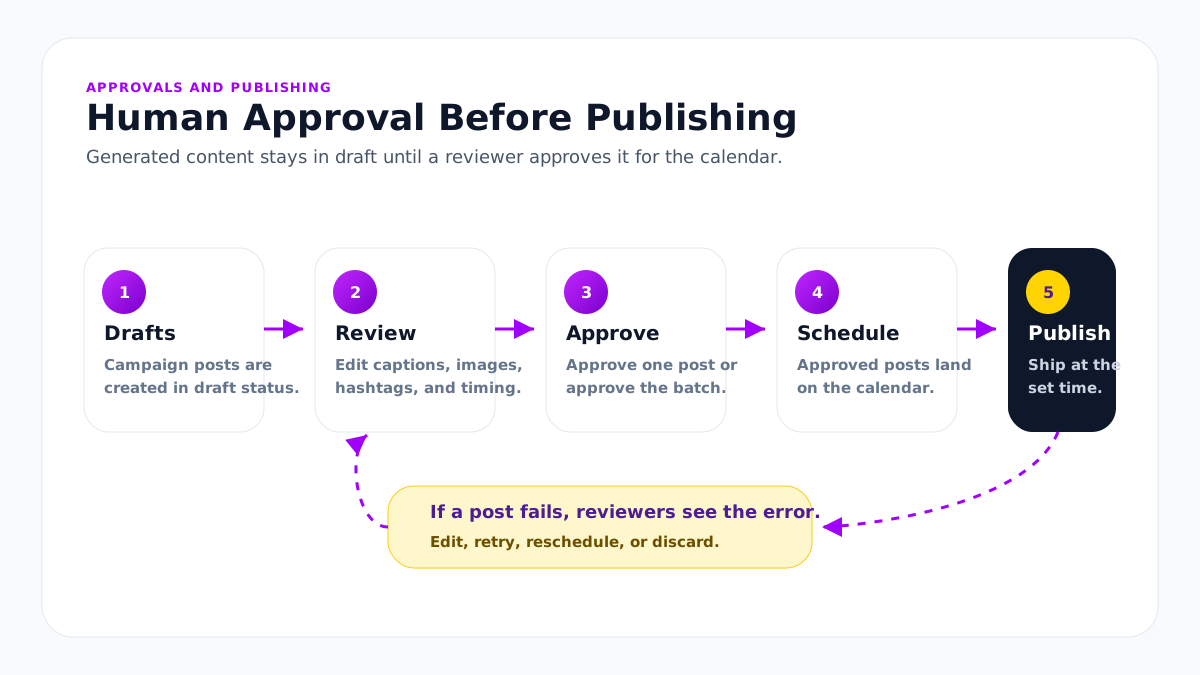
Apaya Enterprise is built around that workflow. Generated campaign posts land in draft status first. A reviewer can approve all, approve individual posts, edit, regenerate, adjust hashtags, update the schedule, open the generated image in the editor, or leave posts in draft. Nothing generated by the campaign workflow publishes until it is approved. That is the whole job of social media approval software: the queue, the roles, and the record.
The approval risk underneath every AI social media content tool
A high-volume AI tool is a high-volume risk surface. The math is straightforward: the more posts you generate, the higher the chance one off-brand or unsafe post reaches the channel. Buyers running compliance, brand, or comms know this. They ask the question that breaks most AI tools’ approval story: “What stops this from going live without us?”
A content approval tool bolted onto software designed for individual marketer use answers this question with “the user has to remember.” That answer fails enterprise.
The workflow needs three things to pass enterprise review:
- Default-to-draft. Generated campaign posts start as drafts.
- Iteration before approval. Reviewers can fix, regenerate, reschedule, or edit visuals before a post goes live.
- Lifecycle visibility. Every post’s state is visible as draft, scheduled, published, or failed.
How Apaya’s social media approval workflow runs
Campaign creation starts with the criteria the team provides: guidance, selected social accounts, timezone, campaign duration, exact days, posts per day, and specific posting times. The team can also select asset folders that contain approved photos, videos, images, graphics, product shots, event media, customer media, or brand creative.
Apaya uses that setup, the Brand Framework, campaign context, and selected assets to generate the posts. Images can be read for visual context. Videos can be transcribed so the transcript informs the caption, hook, angle, and channel adaptation. The output lands as a campaign in draft status. Reviewers open the campaign, filter by brand, channel, or post state, and work through the generated posts.
For each draft, the reviewer has five actions:
- Edit. Open the draft and edit the caption, hashtags, first comment, schedule date, timezone, or posting time.
- Regenerate with feedback. Type the feedback (“more punchy,” “lead with the customer outcome,” “swap to a quieter image”). Apaya regenerates the draft with the feedback as context.
- Edit the image. Open the generated image in Apaya’s canvas editor, move elements, add text, adjust the style, save the image, and return to the post.
- Approve. The draft moves into scheduled status, queued to ship at the campaign’s scheduled time.
- Discard. The draft is dropped from the campaign.
There is also an approve-all option for teams that have reviewed the campaign batch and want to approve the remaining posts together.
Approved posts schedule into the brand’s enterprise social media calendar. Auto-publishing handles the ship step at the scheduled time across LinkedIn, Instagram, Facebook, X, and TikTok.
Lifecycle states for every post: Draft, Scheduled, Published, Failed. Filterable from any post management view.
Asset-to-post content lifecycle
The lifecycle is the operational path from source media to published post. It is useful for buyers evaluating approval workflows because it shows where assets, AI generation, human review, scheduling, publishing, and reporting meet.
| Stage | What happens in Apaya |
|---|---|
| Asset upload | Teams upload photos, videos, images, graphics, product shots, event media, and brand creative into asset folders. |
| Asset understanding | Apaya reads images to identify what is in them and extracts transcripts from videos so the media context can shape the social posts. |
| Campaign creation | The team selects the brand, channels, campaign guidance, schedule, and asset folders. Apaya uses the Brand Framework, campaign context, and selected assets to generate drafts. |
| Draft review | Posts land in draft status with captions, hashtags, creative, channel, schedule, and media details visible for review. |
| Approval and editing | Reviewers approve, edit captions, adjust hashtags, change media, regenerate with feedback, edit visuals, discard drafts, or approve the batch. |
| Scheduling | Approved posts move to scheduled status on the brand calendar with channel, timezone, date, and posting-time rules. |
| Publishing | Apaya publishes the post, including the selected photo, graphic, or video plus the approved caption, to the connected social accounts. |
| Failed review | Failed posts stay visible in a failed state with the platform error logged so the team can fix and retry. |
| Reporting and export | Performance appears in Apaya analytics, can be exported for reporting, and can be exposed through the Enterprise API for downstream systems when needed. |
The post approval tool in practice.
A campaign batch lands in the queue. Reviewer opens the queue, filters to “awaiting review,” reads the first draft.
Caption is good. Image is on-brand. Hashtags fit the campaign. Approves.
Reads the next. Caption opens with corporate language. Reviewer types feedback (“opener reads as corporate, match the brand voice from the framework”) and clicks regenerate. New draft arrives in 30 seconds. Approves.
Reads the next. Wrong angle. Discards.
Reads the LinkedIn long-form draft. Edits the closing line. Approves.
Reads the next. Caption is fine, image is generic. Reviewer swaps the image to one from the brand’s asset library. Approves.
The reviewer clears 14 drafts in 25 minutes.
What’s in the social media approval tool.
The capabilities behind the approval flow:
- Asset folders. Photos, videos, images, graphics, and campaign assets can be organized into folders and selected during campaign creation.
- Image and video context. Apaya can read images and extract video transcripts so generated captions reflect the actual media attached to the post.
- Campaign Review Step. Reviewers see the full campaign, with every post in context, before approving individual posts or approving the batch.
- Draft Review and Editing. Editing for caption, image, hashtags, first comment, call-to-action, schedule date, timezone, and posting time.
- Post Regeneration with Feedback. Free-text feedback drives a fresh generation pass.
- Approval Workflow. Generated posts start as drafts. Approved posts schedule. Discarded posts drop from the campaign.
- Post Lifecycle Statuses. Draft, Scheduled, Published, Failed. Each status filterable across post management views.
- Failed Post Review and Retry. Posts that fail to publish surface with the platform error. Reviewers can edit and retry.
- Role-Based Access. Workspace roles gate review and approval rights.
- In-App Notifications. Real-time and historical notifications when content needs review or fails to publish.
- Help Desk Cases. Reviewers and brand owners can open support cases against specific content.
How this differs from a scheduling-first tool’s approval feature
Scheduling-first tools added approval features on top of human-created posts. The reviewer’s job in those tools is yes or no on a finished post. If the post needs work, the reviewer sends it to the marketer who wrote it for rework.
Apaya’s approval workflow is built for AI-produced content. The reviewer can fix, regenerate, reschedule, or edit the visual before approval. The work that would be a back-and-forth with a writer or designer happens inside the post. The reviewer is the final author with leverage on the draft, not a gatekeeper waiting on someone else.
The other difference: every Apaya post originated inside Apaya. The campaign brief, the Brand Framework, the writing samples, and the AI social media content production history are all in the same workspace. Reviewers see the full context of why a draft reads the way it does. Scheduling-first approvals lose that context the moment the post arrives from outside.
Approval history and lifecycle
Apaya maintains platform-level audit records for campaign and post activity. Campaigns created, posts generated, posts edited, posts approved, posts scheduled, posts published, failed publishes, and deletes are recorded for support, troubleshooting, and enterprise review.
Inside the product, reviewers and corporate marketing can see the operational lifecycle of each post: Draft, Scheduled, Published, Failed. Failed posts surface for follow-up with the platform error logged.
For deeper procurement and compliance review, the SSO and access control page covers the data model, retention, security review, and platform-level audit support.
Tailored approval models for enterprise teams
Enterprise teams do not all review content the same way. Some teams let the campaign creator approve the batch. Others want a brand owner to review each post. Some regulated teams need a stricter path. Approval tiers are one component of a larger system; the full picture is in the social media governance framework. Agencies that need client-facing sign-off should see client approval workflows for agencies, and the practical playbook lives in how agencies run social media approval workflows.
The core Apaya workflow is consistent:
- Generate campaign posts into draft.
- Edit, regenerate, reschedule, or edit visuals.
- Approve individually or approve the campaign batch.
- Schedule and publish approved posts.
For enterprise customers that need more structured approval rules, Apaya scopes that workflow during rollout around the customer’s brands, reviewers, and risk requirements.
Regulated buyers should note: Apaya is not designed for PHI, payment card data, or regulated medical data unless covered by a written agreement.
Role-based control
Workspace roles (Owner, Admin, TenantAdmin, Member) gate who can approve. The model:
- Owner has full tenant control including billing.
- Admin has broad workspace access including approval rights.
- TenantAdmin is an elevated tenant role for protected flows.
- Member is the standard workspace user with access scoped per brand.
Brand-level access can be configured per non-admin user. A reviewer scoped to one brand sees one brand’s queue. Corporate reviewers can be granted access across every brand in the tenant.
What’s in production
Generated campaign posts on Apaya start as drafts. Customers can upload photos, videos, images, and graphics into asset folders and use those folders during campaign creation. Apaya can read images, extract video transcripts, and use that asset context to generate posts. Reviewers can approve all, approve individually, edit, regenerate, adjust scheduling, change media, or edit visuals before posts move to scheduled or published status. That approval pattern is active in the platform today.
How approval gets started
Approval in Apaya does not require a long implementation timeline. The default model is simple: generated campaign posts land as drafts, the team reviews them, and approved posts move to the calendar. For many brands, the person managing the brand may also be the person approving the content.
- Start with the default review queue. Campaign posts are created as drafts before anything is scheduled or published.
- Assign the right people. For a single brand, this can be as simple as adding the brand manager or marketing lead with access to review and approve.
- Run the first campaign through review. Reviewers inspect captions, images, videos, hashtags, first comments, schedule dates, and posting times. They can edit, approve, discard, change media, or regenerate with feedback.
- Add structure only where needed. Multi-brand teams can configure brand-level access, reviewer permissions, notifications, and support paths around the way their team works.
The point is speed with control. Apaya can launch a campaign quickly while still keeping posts in draft until a human approves them.
Frequently asked questions
What is social media approval software?
+
What should a social media post approval tool include?
+
Who can approve content on Apaya?
+
Can different brands have different reviewers?
+
Does Apaya keep audit records?
+
Can approval rules be tailored for enterprise customers?
+
What happens if a post fails to publish?
+
Can reviewers regenerate a draft with feedback?
+
Can Apaya create posts from uploaded photos and videos?
+
Are notifications sent when something needs review?
+
Does the approval workflow include team roles and a content library?
+
Related
-
AI content production
Social media content production software for content production at scale: campaigns, captions, branded graphics, hashtags, approvals, scheduling, publishing, and reporting.
-
Roles & permissions
Social media roles and permissions with role-based access control, tenant and brand-level access, and a way to manage social media access without sharing passwords.
-
Enterprise API
Enterprise social media platform with API access, exportable CSV and PDF reports, webhooks, brand-scoped client workspaces, and AI agent workflows.
-
Implementation plan
A practical Apaya Enterprise implementation plan for launching social content production across brands, assets, templates, approvals, publishing, reporting, API access, and support.
Schedule an Apaya Enterprise demo.
See how Apaya helps your team produce more on-brand social content across every brand without adding headcount.