Schedule social media posts across multiple locations and platforms at once.
Apaya Enterprise schedules and publishes social posts across multiple locations and brands from one tenant. A corporate campaign can roll out to every location in scope, reviewers approve the batch in one pass, and each location's approved posts land on that location's calendar with its own connected channels and timezone. Publishing is timezone-aware per location, so a workspace running locations in New York, London, and Tokyo schedules each one in local time without manual offset math. Apaya publishes to multiple platforms at once across LinkedIn, Instagram, Facebook, X, TikTok, Pinterest, and Google Business Profile, with retry and failure review for posts that did not ship.
Scheduling one brand’s week is a calendar task. Scheduling 40 locations across five channels and three timezones is an operations problem, and the volume is the whole point. The team needs to schedule social media posts across multiple locations in one pass instead of opening 40 accounts and pasting the same post 40 times.
Apaya Enterprise is built for that pass. A corporate campaign rolls out to every location in scope, reviewers approve the batch, and each location’s posts land on that location’s calendar with its own channels, timezone, and posting times already applied. The posts filling those calendars were produced, reviewed, and approved inside the same tenant, so scheduling Mondays stop being a content scramble and start being a review pass.
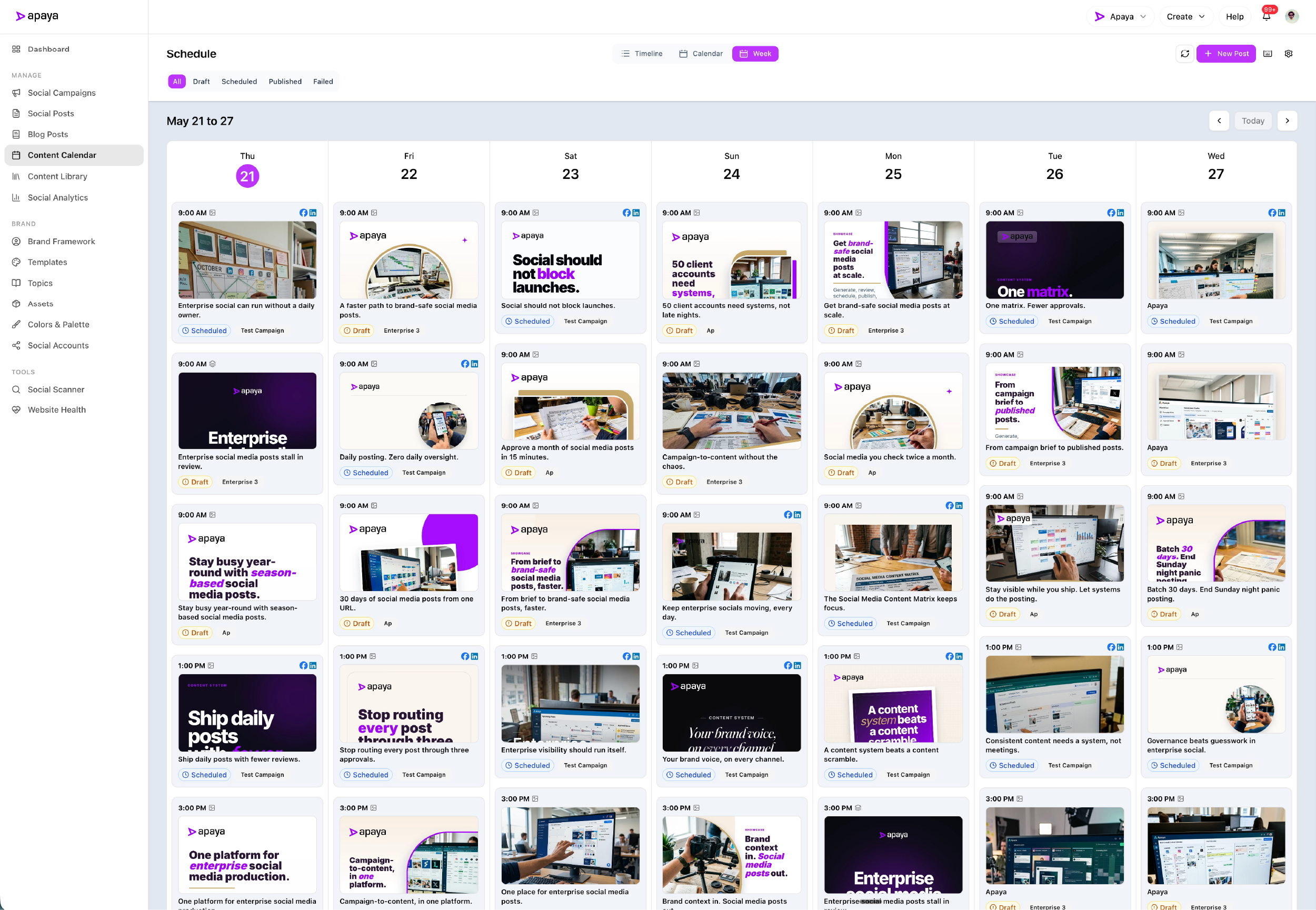
Post to all locations at once instead of location by location.
The manual version of multi-location publishing is one person logging into every location account, pasting the same post, then adjusting the time for each region. That is where multi-location social teams lose their week, and it gets worse with every location added.
Apaya replaces the repetition. A campaign generates posts for the locations in scope, reviewers approve individually or approve the batch, and approved posts land on each location’s calendar with that location’s channels, timezone, and posting times applied. One approval pass, every location scheduled.
Buyers who pay for production through one tool and scheduling through another pay for the work in two places. The handoff between tools means exporting drafts, importing into the scheduler, and reformatting for each channel. That tax repeats on every campaign and multiplies by every location.
Apaya’s scheduling and publishing layer is part of the same brand workspace that produced the posts. Drafts come from social media content production. Approval happens in the brand’s review queue. Approved posts move to that brand’s calendar. Auto-publishing handles the ship step at the scheduled time across LinkedIn, Instagram, Facebook, X, and TikTok.
One tenant, a dedicated interface per brand or location, scoped queues, and scoped calendars.
Publish to multiple platforms at once from each location’s calendar.
Each brand and location inside the tenant has its own content calendar in timeline, week, or month views. Filters at the top control which channel, status, or campaign is visible.
Each post on the calendar shows the channel, the scheduled time, and the lifecycle state: Draft, Scheduled, Published, or Failed. Click into a post to see the full caption, image, hashtags, and first comment.
One approved post can publish to multiple platforms at once. Apaya handles the platform-specific publish flow for LinkedIn long-form posts, Instagram carousels, Facebook stories, X threads, and TikTok posts, so a single approval covers every channel that location publishes to. Auto-publishing ships approved posts at the scheduled time. Failed posts surface in the queue for review and retry.
For posts that need to ship outside the schedule, Publish Now triggers an immediate publish from the post management view.
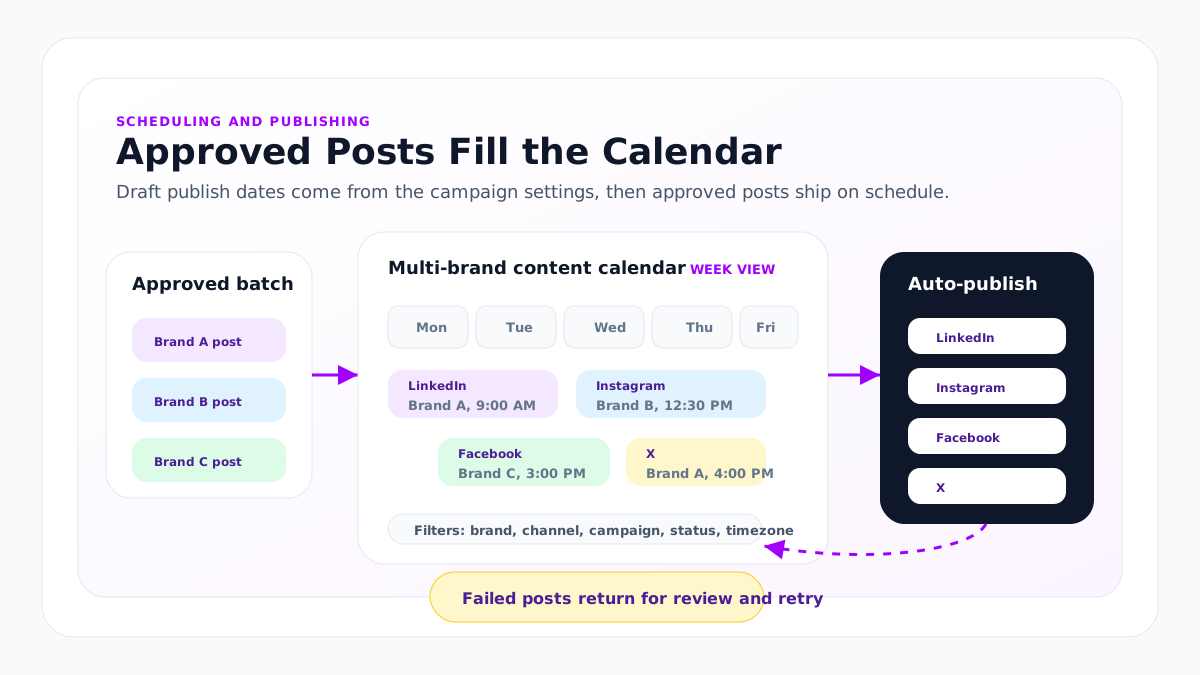
Timezone-aware publishing per location.
Every location has its own timezone configuration, and scheduling honors it. A location in New York schedules in Eastern. A location in London schedules in GMT. A location in Tokyo schedules in JST. The same tenant can run all three from one corporate campaign without manual offset math and without a spreadsheet of converted posting times.
That matters most on a national campaign. Corporate picks the local posting time it wants, 11:30 a.m. before the lunch rush or 4:00 p.m. before the evening browse, and every location publishes at that local moment rather than all at the same absolute hour.
The timezone belongs to the location, not the person scheduling. A corporate marketer in Chicago can schedule a Pacific location’s week without doing the math, and the calendar shows the post at the location’s local time.
Inside a Monday scheduling pass across locations.
The director opens location A Monday morning. That location’s calendar shows the week’s scheduled posts on LinkedIn, Instagram, Facebook, X, and TikTok.
A Wednesday post is going to land too close to a customer announcement. The director drags it to Thursday. Saves the change.
Switches to location B without leaving the tenant. Location B has its own social accounts, calendar, approval queue, and analytics. The director reviews that schedule independently and adjusts two posts.
A Tuesday post on location C failed to publish overnight. Instagram returned a media format error. The director opens that post, swaps the image to one from the brand’s asset library, and clicks retry. The post ships within a few minutes.
The whole pass takes 20 minutes. No platform switching. No logging in to four social tools.
What’s in the multi-location scheduling and publishing layer.
The capabilities behind scheduling and publishing:
- Brand and location content calendar. Timeline, week, and month views inside each brand or location. Filterable by channel, status, and campaign.
- Auto-Publishing. Approved posts ship at the scheduled time across LinkedIn, Instagram, Facebook, X, and TikTok.
- Publish Now. Immediate publish from the post management view for posts that need to ship outside the schedule.
- Lifecycle statuses. Draft, Scheduled, Published, Failed. Filterable across every post management surface.
- Platform-specific publish flows. Apaya handles channel-specific compliance and metadata steps where required.
- Timezone-aware publishing per location. Each brand and location calendar respects its own configured timezone.
- Retry and failure review. Failed posts surface with the platform error. Reviewers can edit and retry, or discard.
- Dedicated calendars per brand and location. Each one has its own calendar, social connections, timezone, queue, and publishing workflow inside the tenant.
- Per-platform formatting and asset sizing. Captions and assets sized per channel.
- Bulk scheduling and campaign queues. Approve and schedule a campaign batch in one pass so the team can post to all locations at once.
- Consistent cadence controls. Choose campaign duration, exact days, posts per day, timezone, and specific posting times so publishing stays consistent across channels.
Publish to multiple platforms at once across these channels.
Apaya publishes to:
- LinkedIn Personal. Connection and publishing supported. Analytics are limited by the LinkedIn Personal API.
- LinkedIn Business. Connection, publishing, and analytics supported.
- Instagram. Connection, publishing, and analytics supported.
- Facebook Page. Connection, publishing, and analytics supported.
- X (Twitter). Connection, publishing, and analytics supported.
- TikTok. Live. Apaya publishes to connected TikTok accounts per brand.
- Pinterest. Live. Apaya publishes Pins to connected Pinterest accounts per brand.
- Google Business Profile. Live. Apaya writes, schedules, and publishes updates to one or many locations.
YouTube is on the roadmap.
Schedule posts across multiple locations inside one tenant.
Multi-location and multi-brand operations need local control without forcing the company into separate tools. Apaya uses one tenant for the company, with dedicated brand and location interfaces inside that tenant.
Each brand or location has its own calendar, Brand Framework, social account connections, approval queue, publishing workflow, and analytics. A user with access to several of them can move between those interfaces without logging in and out of separate tools. A location owner can manage one location independently. Corporate marketing can access every location it is responsible for.
When an enterprise rollout needs a consolidated operational or reporting view, Apaya can scope that during the enterprise agreement. The default operating model stays clean: each brand is managed from its own calendar.
For deeper coordination across brands, the multi-brand workspaces page covers the workspace model.
Failure handling and retry
Posts that fail to publish do not disappear. They sit in the Failed lifecycle state with the platform error logged.
Common failure causes Apaya surfaces:
- Platform rejected the media format
- Channel-specific character or asset limit exceeded
- Connection token expired
- Platform API outage
The reviewer opens the failed post, fixes the issue (swap image, edit caption, reconnect the account), and clicks retry. The post ships on retry, or surfaces with the next error if the issue persists.
Failed posts are visible from any post management view. Notifications fire when a post enters the Failed state.
How this differs from a scheduling-first tool
A scheduling-first tool is the calendar. Production happens elsewhere, in a content brief, a writer’s doc, an AI tool, or an agency Slack. The marketer’s job is the handoff: writing in one tool, editing in another, scheduling in a third. The calendar shows what someone uploaded.
Apaya’s brand calendar shows what Apaya produced for that brand. The campaign brief, the AI generation pass, the review queue, the calendar, and the publish step live in the same brand interface. The handoff disappears. Performance data then rolls into that brand’s social media reporting by location.
Buyers paying for a scheduling tool plus an agency for production are paying for the same outcome in two places. Buyers paying for a scheduling tool plus a generic AI tool are doing the integration by hand inside their own marketing team.
What’s in production
60 customer brands publish through Apaya. One brand produced and shipped 360+ posts in one month across Facebook, LinkedIn, Instagram, X, and TikTok. That is a real example of production volume, not the platform ceiling.
How scheduling and publishing gets started
Scheduling and publishing can move quickly once the brand inputs and social account permissions are ready. The timing depends more on the customer’s internal access and review process than on calendar setup.
- Connect social accounts. LinkedIn, Instagram, Facebook, X, and TikTok can be connected per brand once the right account owner has permission.
- Confirm the Brand Framework and campaign settings. If the Brand Framework is ready, the team chooses the campaign duration, exact days, posts per day, timezone, channels, and posting times.
- Generate the campaign. Apaya creates the posts and assigns draft publish dates from the campaign settings. Drafts appear on the brand calendar as part of the generation flow.
- Review and approve. The team edits, regenerates, approves, discards, or adjusts scheduled dates and times before anything publishes.
- Publish approved posts. Approved posts auto-publish at their scheduled times, or the team can use Publish Now when a post needs to go live immediately.
For a single brand with access and framework inputs ready, the first approved posts can be scheduled the same day. Multi-brand teams scale the same workflow across brands, locations, divisions, or social accounts by giving each brand its own calendar, social connections, review flow, and analytics inside the tenant.
Frequently asked questions
Which channels does Apaya publish to?
+
Does Apaya publish to TikTok?
+
How does timezone scheduling work for multi-location brands?
+
What happens when a post fails to publish?
+
Can we bulk schedule a campaign?
+
Can we choose exact posting days and times?
+
Can we publish on demand?
+
Related
-
AI content production
Social media content production software for content production at scale: campaigns, captions, branded graphics, hashtags, approvals, scheduling, publishing, and reporting.
-
Analytics
Social media reporting software for multiple locations and brands, with social media reporting by location, roll-up reporting for corporate, and exportable executive reports.
-
Implementation plan
A practical Apaya Enterprise implementation plan for launching social content production across brands, assets, templates, approvals, publishing, reporting, API access, and support.
-
Franchise networks
Franchise social media management software that creates on-brand posts for every location, routes franchisee approvals, and publishes from one workspace.
-
Retail chains
Multi-location social media management software for retail chains. Store-level content, approval before anything publishes, and roll-up reporting by region.
-
Restaurant groups
Restaurant group social media management for multi-concept chains: LTO and menu launch calendars, per-concept brands, and approvals across franchised and company-owned locations.
Schedule an Apaya Enterprise demo.
See how Apaya helps your team produce more on-brand social content across every brand without adding headcount.