Social Media Calendar Template: Free Download, No Email Gate
Written by: Tim Eisenhauer
Last updated:

The easiest way to keep your social media profiles active.
Learn more about Apaya →
What makes a good social media calendar template?
Eight columns, dropdowns where your hands repeat, an idea bank so slots never start blank, and cadence guidance per platform. That’s the whole machine, and the template below has all of it. Download it now, no email required:
Download the free template (.xlsx) It works in Excel, Google Sheets, and Apple Numbers. Yours to keep, edit, and share.
Before you fill the calendar, read why good social media repeats the message, not the post. It explains what should stay consistent across a month and what should change from one post to the next.
Prefer it on autopilot?
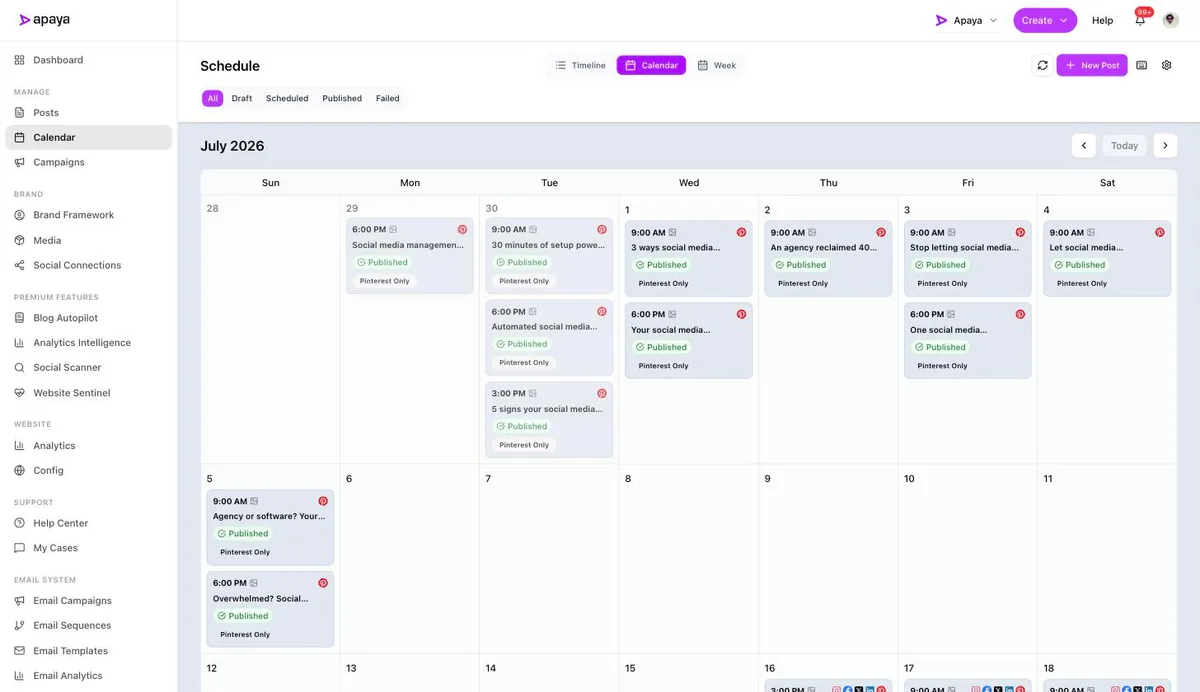
This template is the manual version of what Apaya does automatically: it creates the posts in your brand voice with designed visuals, fills the calendar, publishes to every platform, and tracks results, from $55/mo. Love Excel? Take the file and go. Deliberately planning a larger run? Use Advanced Campaigns.
Worth saying plainly, because of what ranks for this search: most “free social media calendar templates” from the big marketing brands are either an email gate with a spreadsheet behind it or a template that only works inside their app, which makes them onboarding flows wearing a template costume. This one is a file. You own it thirty seconds from now.
What’s inside
Four tabs, built to be filled fast:
- Monthly calendar. Thirty-one rows, eight columns: date, day, platform, content job, post idea, visual, status, posted link. Dropdowns on platform (Instagram through TikTok), content job, and status (Idea to Posted), so tracking a month is clicking, not typing. Duplicate the tab for each new month.
- Content bank. Fifty starter ideas organized by the five jobs a business feed does: proof, faces, education, offers, and community. When a slot is empty, you shop this tab instead of staring at the ceiling.
- Cadence cheat sheet. Posts-per-week guidance for seven platforms with the caveat attached to each, drawn from the benchmark data: Instagram 3 to 5, LinkedIn 2 with one as a document, TikTok only if someone likes being on camera.
- Start here. The five-step method for using it, which is short because the method is the point: seasonal dates first, rotate the jobs, leave a fifth of slots open, fill the month in one sitting.
Using it in Google Sheets
Download the file, then in Google Sheets: File → Import → Upload, and choose “Insert new sheet(s)” or “Replace spreadsheet.” The tabs, dropdowns, and formatting come along. From there it lives in your Drive like any other Sheet and shares with your team the usual way.
Using it in Excel or Numbers
It’s a native .xlsx, so Excel opens it directly and Apple Numbers converts it on open. The dropdowns and frozen header rows work in both. No macros, no plugins, nothing to enable.
Prefer Notion? Build it in five minutes
We’re not going to pretend a spreadsheet file becomes a Notion template, so here’s the recipe instead: create a board or table database with the same eight properties (date, platform as select, content job as select with the five jobs, idea, visual, status as select, link), then group by status for a kanban view or by date for the calendar view. The five content jobs and the cadence sheet transfer as-is. Ten properties of setup, and you’ve recreated the system in the tool you’ll open.
The five content jobs, briefly
The dropdown in the template isn’t arbitrary. Every post a business publishes is doing one of five jobs: proof that the work is good, faces that make strangers comfortable, education that answers real customer questions, offers stated plainly, and community presence that makes you local. Rotate those five and the feed stays balanced without a strategy meeting. The full idea lists behind the bank tab are in our Instagram and LinkedIn what-to-post guides.
Fill it in one sitting
A calendar template’s failure mode is becoming a beautifully formatted empty document. The fix is the method, not the file: block one session, put seasonal moments on their dates, rotate the jobs through the remaining slots, write everything in one pass, and batch the whole month instead of negotiating with the calendar daily. Then move the finished posts into whatever scheduling method you use, and close the file until next month. Want the month pre-decided? The 30-day Facebook calendar is the filled-in version of this rhythm.
When the spreadsheet stops being enough
A template organizes the plan. It doesn’t write the captions, design the graphics, or publish anything, and at some point the copying between spreadsheet, design tool, and scheduler becomes its own weekly job. That handoff is the hard boundary of every calendar template, including this one, and it’s the point of the screenshot up top: same five jobs, same monthly rhythm, with the production and scheduling layers running themselves. The template above is how we’d run a month manually, because we did, right up until we built the version that doesn’t need us to.
What else people ask
How detailed should each calendar entry be?
One line of idea is enough at planning time (“before/after of the Hendersons’ deck, mention spring slots”). The entry’s job is to kill the blank page on writing day, not to be the caption. Write captions in the batching session, not the planning session.
Should I plan every platform on one calendar or separate ones?
One calendar, platform column. Most posts are one idea adapted across two or three platforms, and separate calendars hide that reuse. The platform dropdown includes “Multiple” for exactly that reason.
What about tracking performance in the template?
The posted-link column is there so you can find posts later, and that’s as far as a spreadsheet should go. Real numbers live in each platform’s analytics or one combined dashboard; duplicating them into cells by hand is the first template habit people abandon, so we didn’t build a tab you’d abandon.
Is there a version for agencies managing multiple clients?
Duplicate the file per client rather than per month, and duplicate the month tab inside each. Past three or four clients, the spreadsheet era ends; that’s approval workflow territory, where clients review a calendar you didn’t have to email them.
The calendar is the decision, made once
Every business that posts consistently has made one move: they stopped deciding daily and started deciding monthly. The template is that decision with gridlines. Download it, block one sitting, fill a month, and let the feed run on a plan instead of on memory.
Sources
- SERP review of ranking calendar templates, July 2026 (Canva, HubSpot, Buffer, Asana, Notion, Monday, cited unlinked)
- Cadence figures: Rival IQ (Quid) and Socialinsider 2026 benchmark reports, as documented in our benchmarks series
- Template built and tested in Excel, Google Sheets, and Numbers, July 2026
The easiest way to keep your social media profiles active.
Apaya writes the posts, designs the graphics, and publishes them for you. You approve.
See how Apaya worksThe easiest way to keep your social media profiles active.
Apaya writes your posts, designs your graphics, and publishes everywhere — automatically.