Social media scheduling AI that auto-publishes for you.
The Publishing Engine is an AI scheduler for social media that chooses the best times, formats for every platform, and posts automatically. No manual calendars or late-night uploads.
Try it for 3 days • $0 today • Cancel anytime
Plans from $69/month, billed monthly. Annual billing available. See plans and billing details.
Publishes everywhere your customers go
Scheduling shouldn't take you 10 hours a week.
Your posting schedule last month
- 5 platforms. 5 logins.
- Same time. Every day.
- Gaps when you're busy.
- Zero when you forget.
Inconsistent posting. Lost opportunities.
Intelligent social media scheduling AI that runs itself.
The Scheduling Engine combines AI-powered scheduling optimization with automated multi-platform publishing. Set your preferences once and let this social media scheduler AI handle posting times, frequency, and distribution—or take full control with flexible scheduling tools.
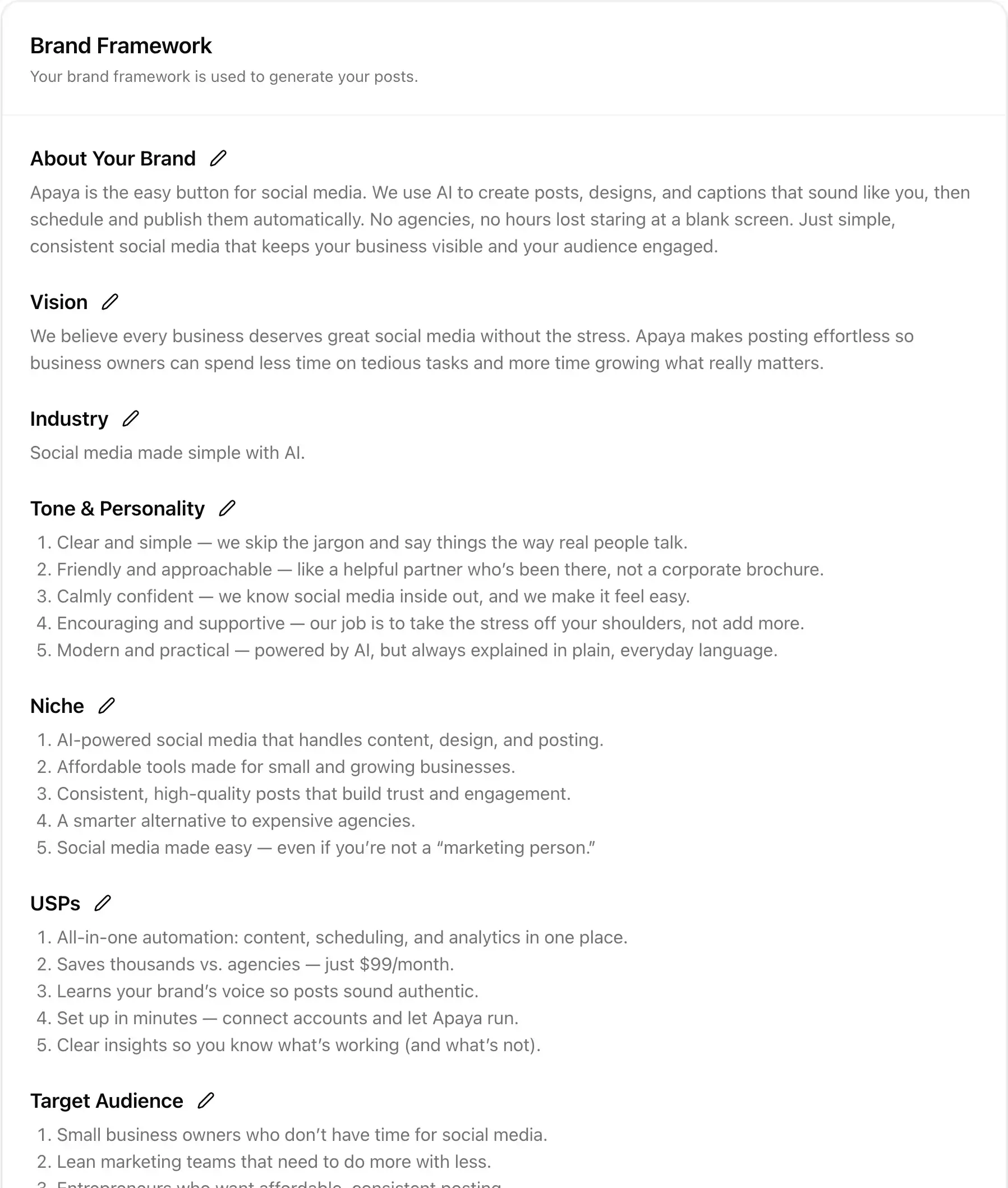
AI Brand Intelligence
First, it becomes an expert on your business.
- Analyzes your website to understand your brand
- Builds comprehensive brand framework automatically
- Generates strategic topics and content categories
Before scheduling a single post, the AI learns everything about your business. This AI social media scheduling tool starts by analyzing your website—extracting brand values, identifying target audiences, and understanding your unique selling propositions. This deep brand analysis ensures every scheduled post aligns with your business goals.
The social media scheduler AI builds your Brand Framework: voice, tone, messaging pillars, and content themes. It suggests strategic topic categories and campaign ideas based on your industry and audience. This intelligent foundation means your publishing calendar reflects actual business strategy, not random content.
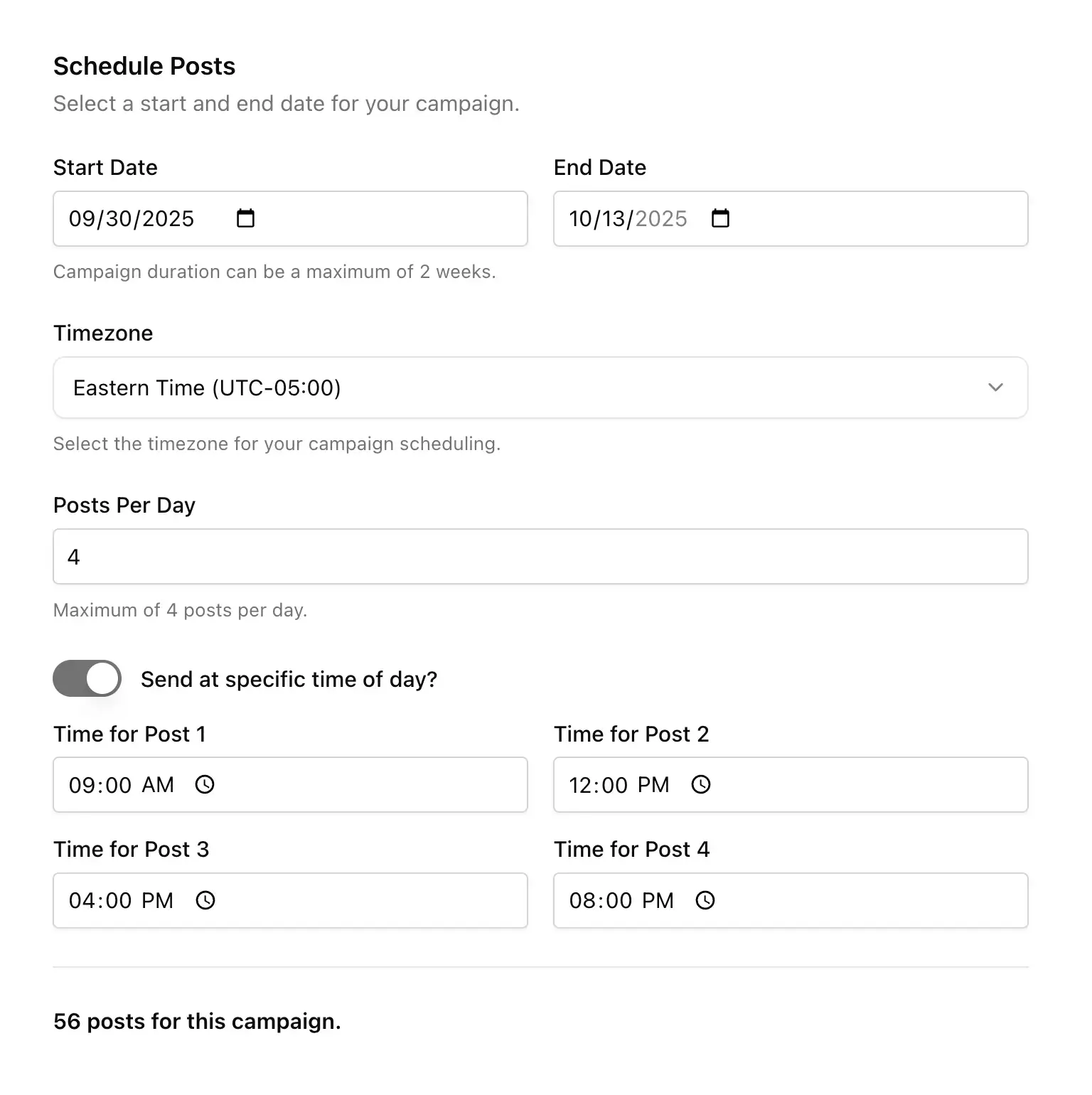
Smart Campaign Scheduler
Then you choose how posts get scheduled.
- Set posting frequency and time preferences
- Choose specific publish times or AI optimization
- Configure timezone and platform-specific rules
Take control with flexible scheduling options or let AI handle everything. The campaign scheduler lets you set start/end dates, choose posting frequency (1-10 posts daily), and specify exact publish times. Select your timezone, pick which days to post, and set platform-specific rules—or enable AI scheduling optimization to pick the times for you.
The intelligent scheduling algorithm learns optimal posting times from your audience engagement patterns. It analyzes when followers are most active, tracks performance by time slot, and continuously refines the publishing schedule. Smart scheduling automation ensures maximum reach without manual time slot testing.
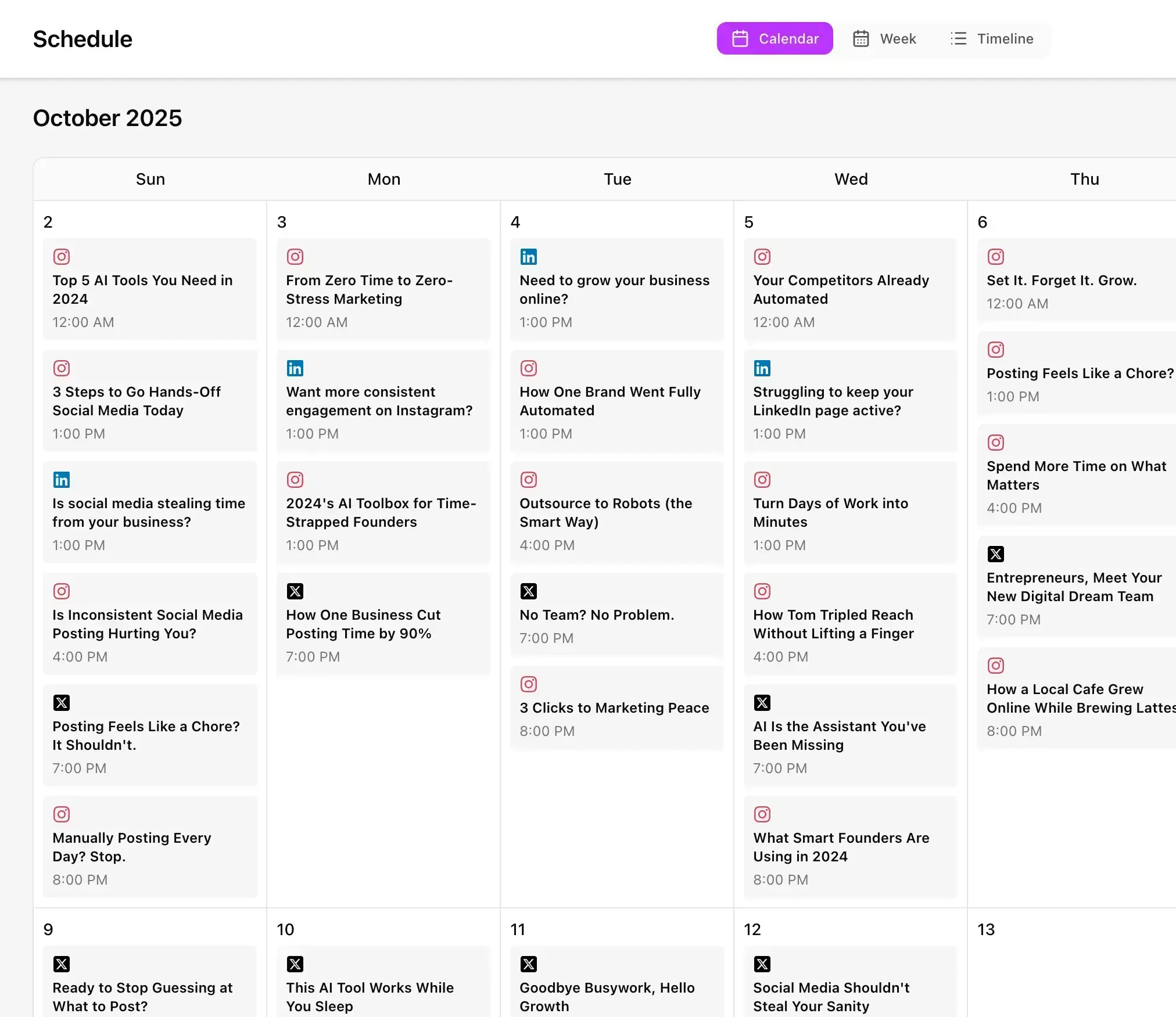
Visual Calendar Management
View your entire publishing calendar at a glance.
- Monthly calendar view of scheduled posts
- Drag-and-drop rescheduling capability
- Color-coded campaigns and platforms
The social media calendar view transforms your publishing schedule into a visual command center. See every scheduled post across all platforms in a familiar monthly layout. Color coding identifies different campaigns, platform icons show distribution, and post previews appear on hover—giving you complete visibility of your content pipeline.
Interactive calendar controls make schedule management effortless. Drag posts to new dates, batch-edit multiple selections, or reschedule entire campaigns. The automated posting schedule updates instantly across all platforms. Gap detection highlights content-light periods while the AI suggests optimal fill-in posts to maintain consistency.
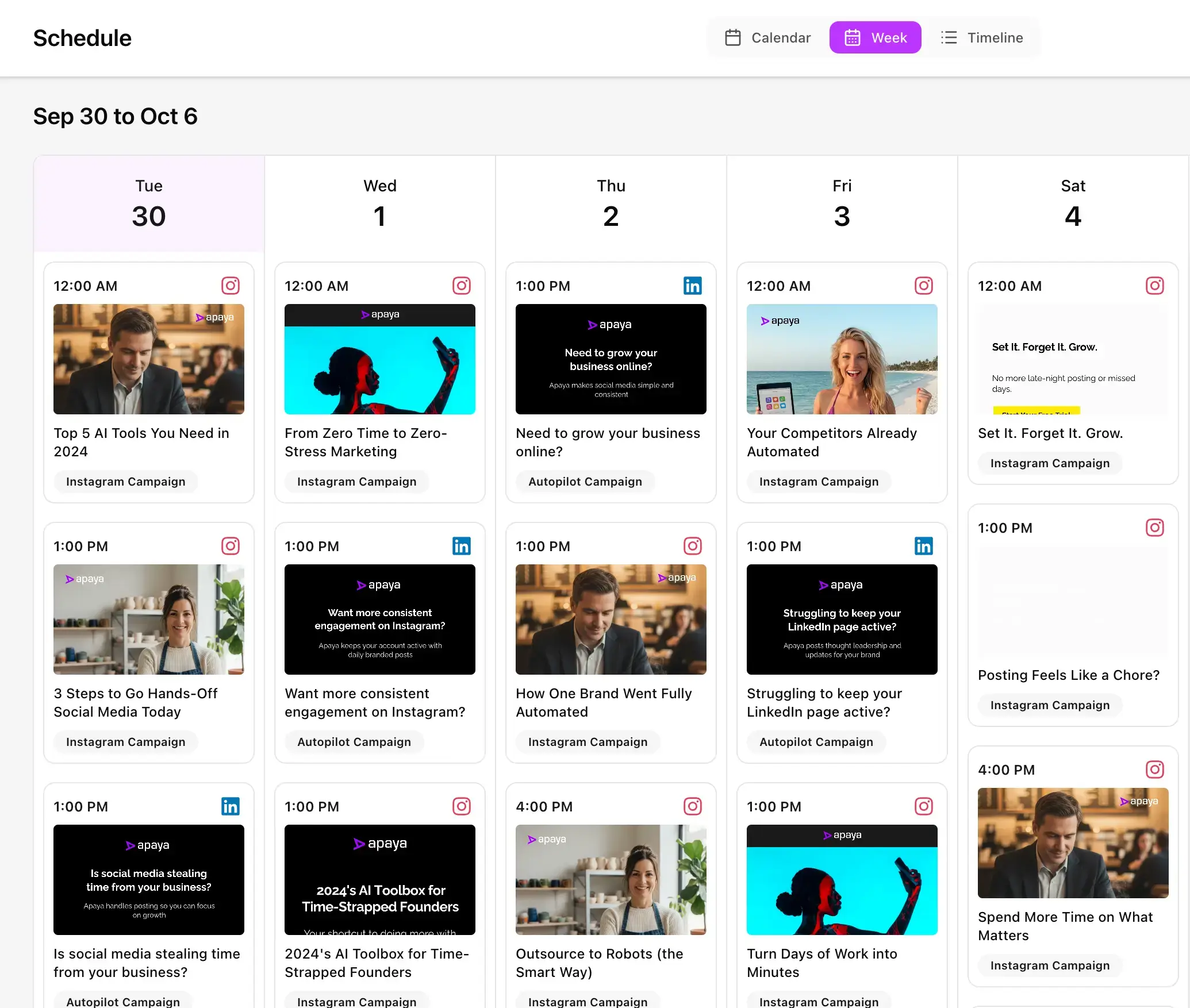
Detailed Week Planner
Zoom into weekly publishing details.
- Hour-by-hour posting schedule visualization
- Platform distribution across the week
- Quick edits and approval workflows
The week view provides granular control over your immediate publishing schedule. See exactly when posts go live each day, which platforms receive content, and how messaging flows throughout the week. This detailed social media planner view helps maintain content variety and prevents repetitive posting patterns.
Smart scheduling insights surface directly in week view. The AI highlights optimal time slots based on historical engagement, suggests content gaps to fill, and warns about posting conflicts. Bulk actions let you approve entire weeks, adjust timing across multiple posts, or pause campaigns instantly.
Timeline Stream Visualization
Track posts in real-time timeline view.
- Chronological stream of upcoming posts
- Live status updates and publishing confirmation
- Historical view of published content
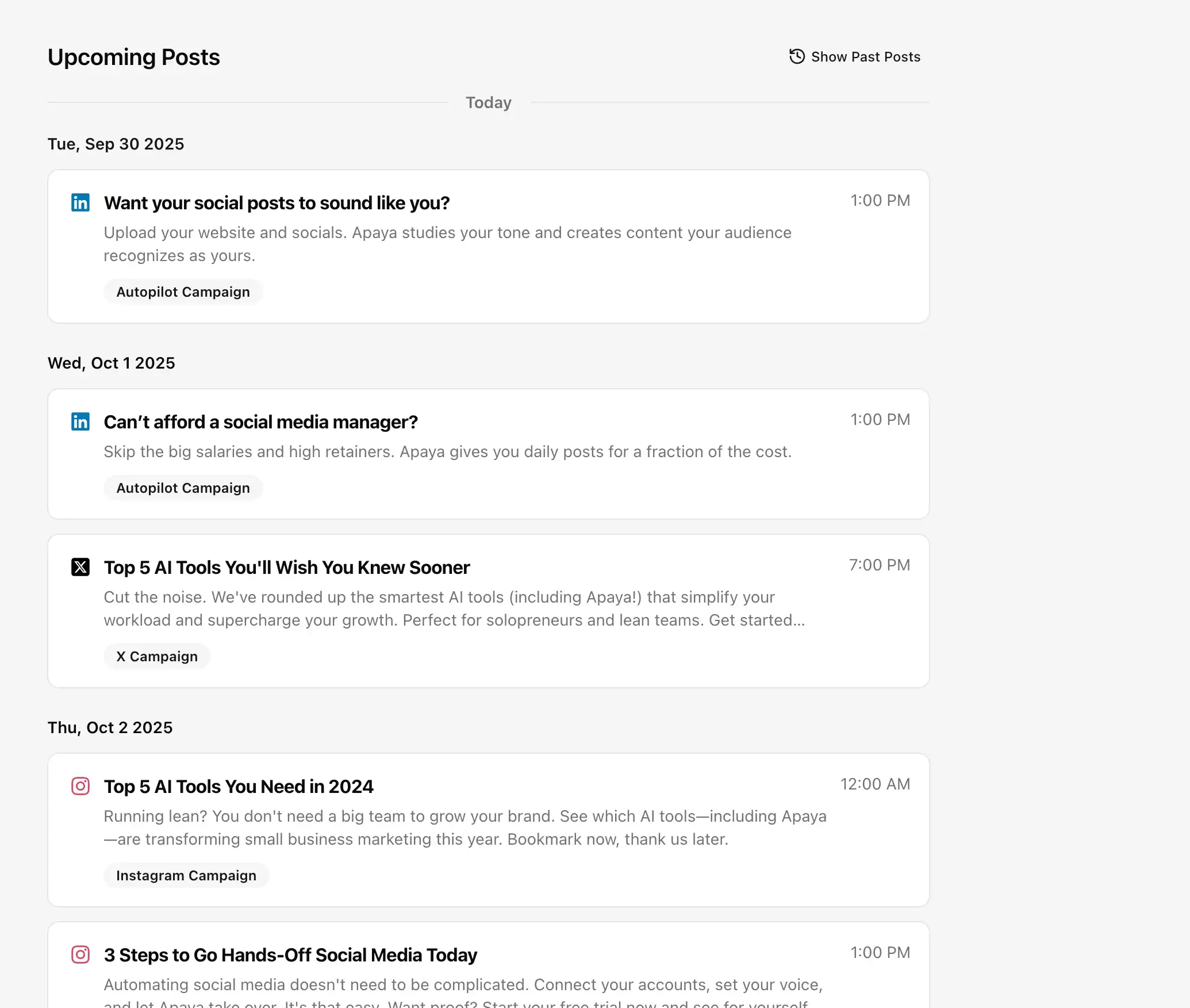
Timeline view presents your content schedule as a continuous stream. Watch posts flow from scheduled to published status in real-time. Each entry shows full post preview, targeted platforms, and exact publish times. This streaming view makes it easy to spot patterns, ensure variety, and track campaign progression.
The intelligent timeline includes predictive scheduling features. See AI-suggested posts ready for approval, review auto-scheduled content before it goes live, and track performance metrics inline. Historical timeline data helps identify successful posting patterns that the automated scheduler can replicate.
Multi-Platform Auto-Publishing
Publishes everywhere, automatically.
- Simultaneous posting to all connected accounts
- Platform-specific optimization for each network
- Error handling and retry mechanisms
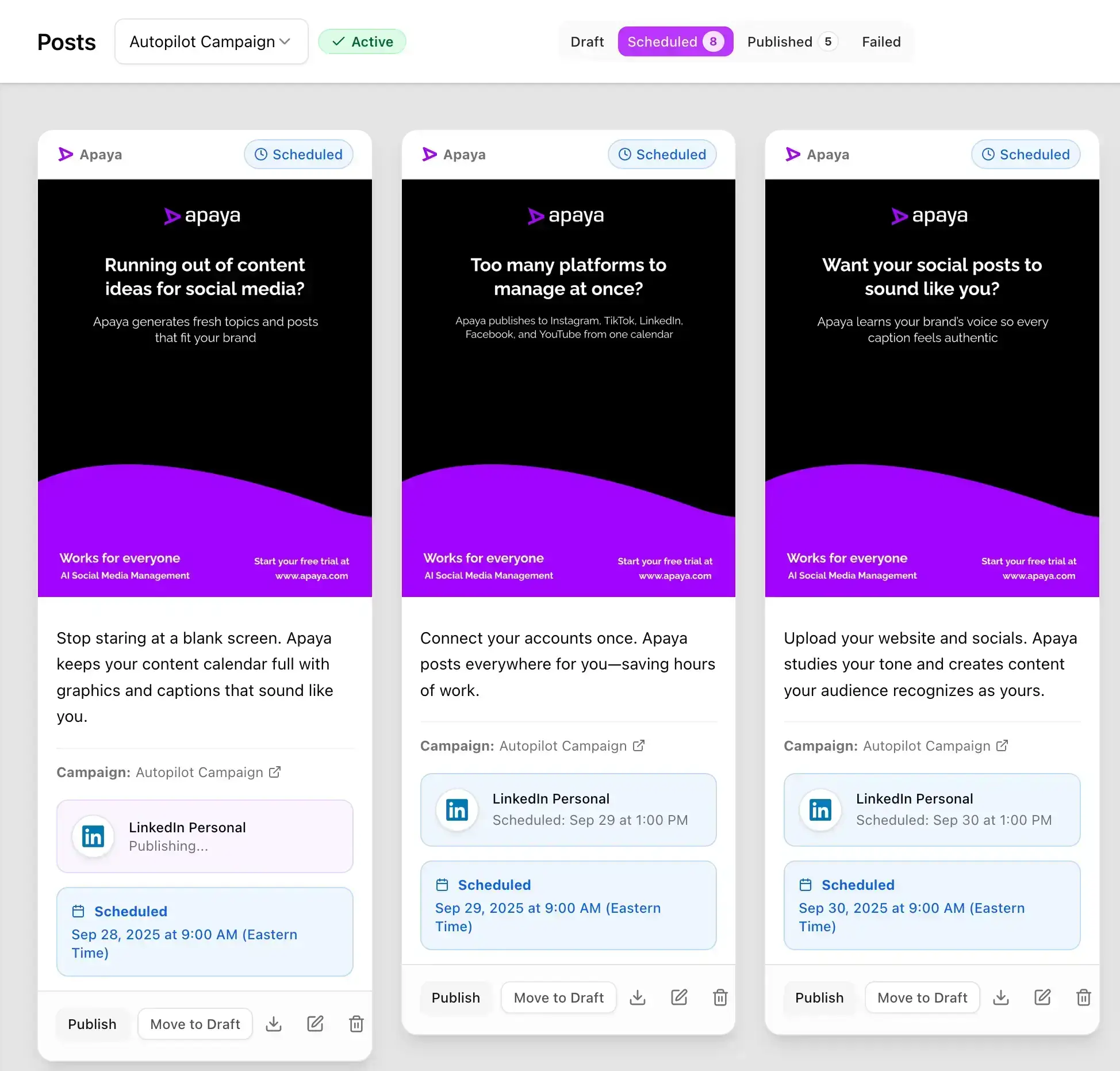
Once scheduled, the publishing automation takes over completely. The AI social media publisher sends posts live at exact scheduled times across Instagram, Facebook, LinkedIn, X/Twitter, and TikTok. Each platform receives optimized content—proper hashtags, formatted captions, and platform-specific features like Instagram carousels or LinkedIn polls.
Intelligent publishing tools handle technical complexities automatically. The system manages API rate limits, queues posts during high-traffic periods, and retries failed publishes. Real-time publishing status updates confirm successful posts while error notifications enable quick fixes. Your social media posting tool runs 24/7 without manual intervention.
Performance Analytics & AI Learning
Finally, it learns and improves your schedule.
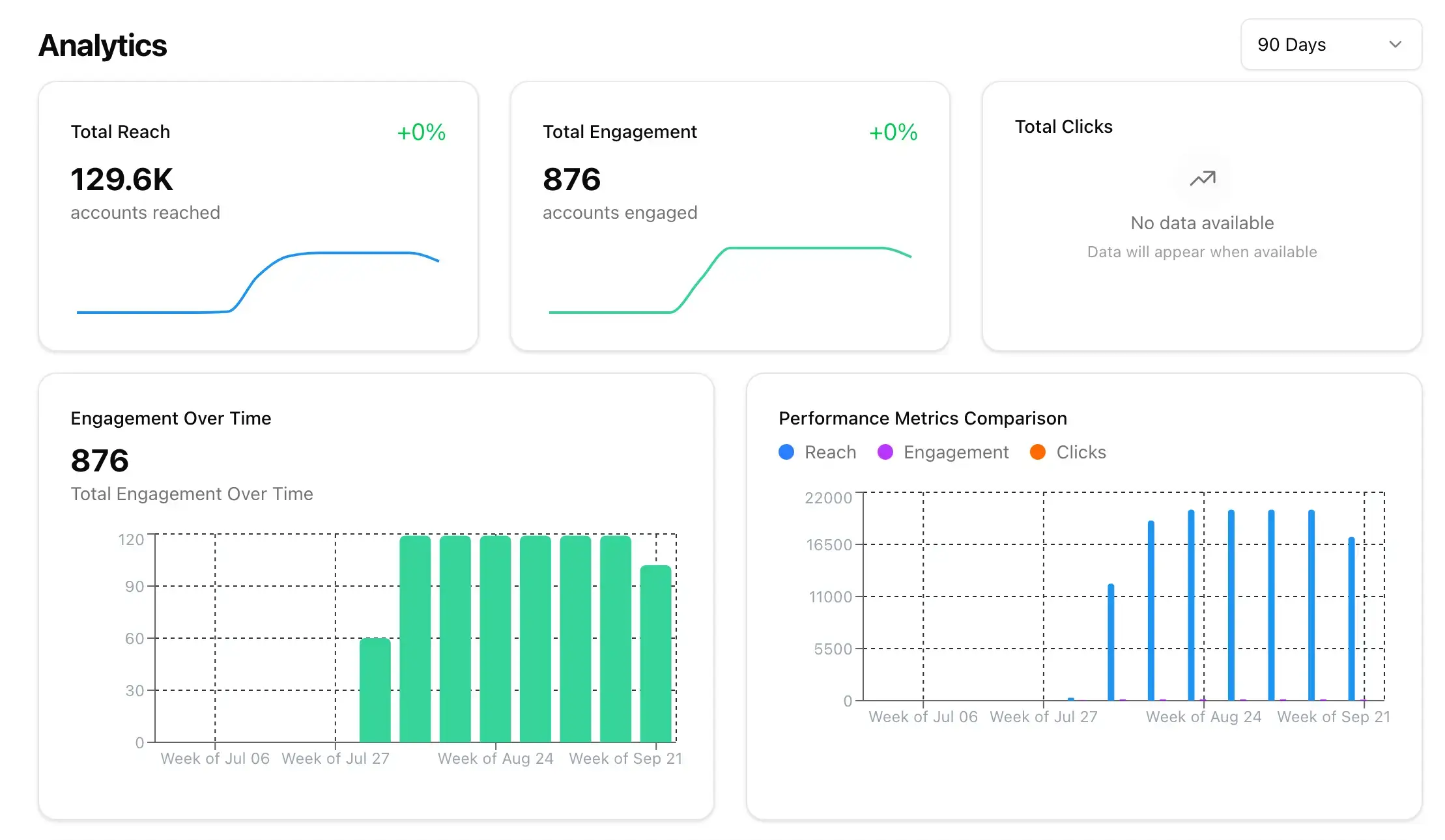
- Tracks engagement metrics across all posts
- Identifies optimal posting times and frequency
- Continuously refines scheduling strategy
Every published post provides scheduling intelligence. The AI tracks engagement rates by time slot, day of week, and posting frequency. It identifies when your audience is most active, which scheduling patterns drive highest engagement, and what posting cadence maintains optimal reach without overwhelming followers.
This performance data creates a self-improving scheduling system. The AI social media automation adjusts future scheduling based on proven patterns, tests new time slots to discover opportunities, and adapts to changing audience behavior. Your content scheduling software gets smarter with every post, automatically optimizing the publishing calendar for maximum impact.
Why teams switch to Apaya.
Automated social media scheduling AI software that handles timing, formatting, and publishing so you don't have to.
| Apaya | Schedulers (Hootsuite/Buffer/Later) | Generic AI (ChatGPT) | Canva / Adobe | |
|---|---|---|---|---|
| AI social media scheduler | Manual rules | No scheduling | No scheduling | |
| Best-time optimization | Basic/Manual | — | — | |
| Unified multi-platform calendar | Yes | — | Design only | |
| Per-platform formatting | Basic/Manual | — | Design only | |
| AI content calendar (auto-slots) | Queues/Manual | — | — | |
| Auto repost / recycle top performers | Manual | — | — | |
| Bulk scheduling & CSV import | CSV/Manual | — | Export then upload | |
| One-click from Design Studio → schedule | Import required | Copy/paste | Export then upload | |
| Retries & fail-safes (token refresh, alerts) | Limited | — | — | |
| Typical monthly cost | From $55/mo | $19–$149+ | $20–$60 | $0–$60+ |
Results from businesses like yours.
Your social media could look like this too.
"We went from posting once a week — when we remembered — to daily thought leadership on LinkedIn and Instagram."
 Abhisek Sharma Owner at SCP Technologies
"I used to spend my Sunday nights writing posts for the week. Now Apaya handles our customer stories and promotions automatically."
 Sarah Chen Owner at BerksConnect
"Now the AI drafts everything and my team just refines."
 Mike Patel Director at Resultris Agency
"The posts are consistent and sound like us."
 Emma Lopez Manager at Toperty
"I'm a one-person marketing team. Before Apaya, I'd go weeks without posting. Now we publish daily across three platforms."
 Jordan Kim Director at Doors4Jobs
Ready to see it work for you?
Start Your 3-Day Free TrialTry it for 3 days • $0 today • Cancel anytime
Get started with Apaya.
Plans from $55/month. Start with a 3-day free trial — cancel anytime.
- AI content generation in your brand voice
- Automated scheduling and publishing
- Brand framework + social analytics
- Choose review or automatic publishing for each campaign
Self-serve plans
From $55/mo
Billed annually. Monthly billing available.
Start Your Free TrialTry it for 3 days • $0 today • Cancel anytime
See all plans and compare →Publishing Engine FAQs
Everything about Apaya's AI social media scheduling tool and social media scheduler AI.
What is the Publishing Engine in Apaya?
Does it choose the best time to post automatically?
Which platforms can I schedule to?
Can I bulk schedule content?
What happens if a post fails to publish?
Can I send posts directly from the Design Studio to the scheduler?
Schedule once. Grow daily.
An AI social media scheduling tool that posts at the perfect time—on every platform—automatically.
Start Your Free TrialTry it for 3 days • $0 today • Cancel anytime