AI social media automation that runs on autopilot.
Apaya acts as your content strategist, copywriter, and campaign manager. It learns your brand voice from your website, then generates original posts that sound like your best marketing day — every day. Content gets smarter over time as the AI learns what works.
The AI Brain learns your brand voice, generates fresh posts daily, and publishes them at the best time — so you never worry about your feed again.
Key capabilities:
Dynamic content creation based on topics
Context-aware hashtag generation
Automated A/B testing for content
Industry-specific content optimization
THE DESIGN STUDIO
AI social media post generator for on-brand visuals & captions.
Stop spending hours in Canva. Apaya's Design Studio generates scroll-stopping graphics using your brand colors, logo, and fonts — automatically. Every image is sized for every platform.
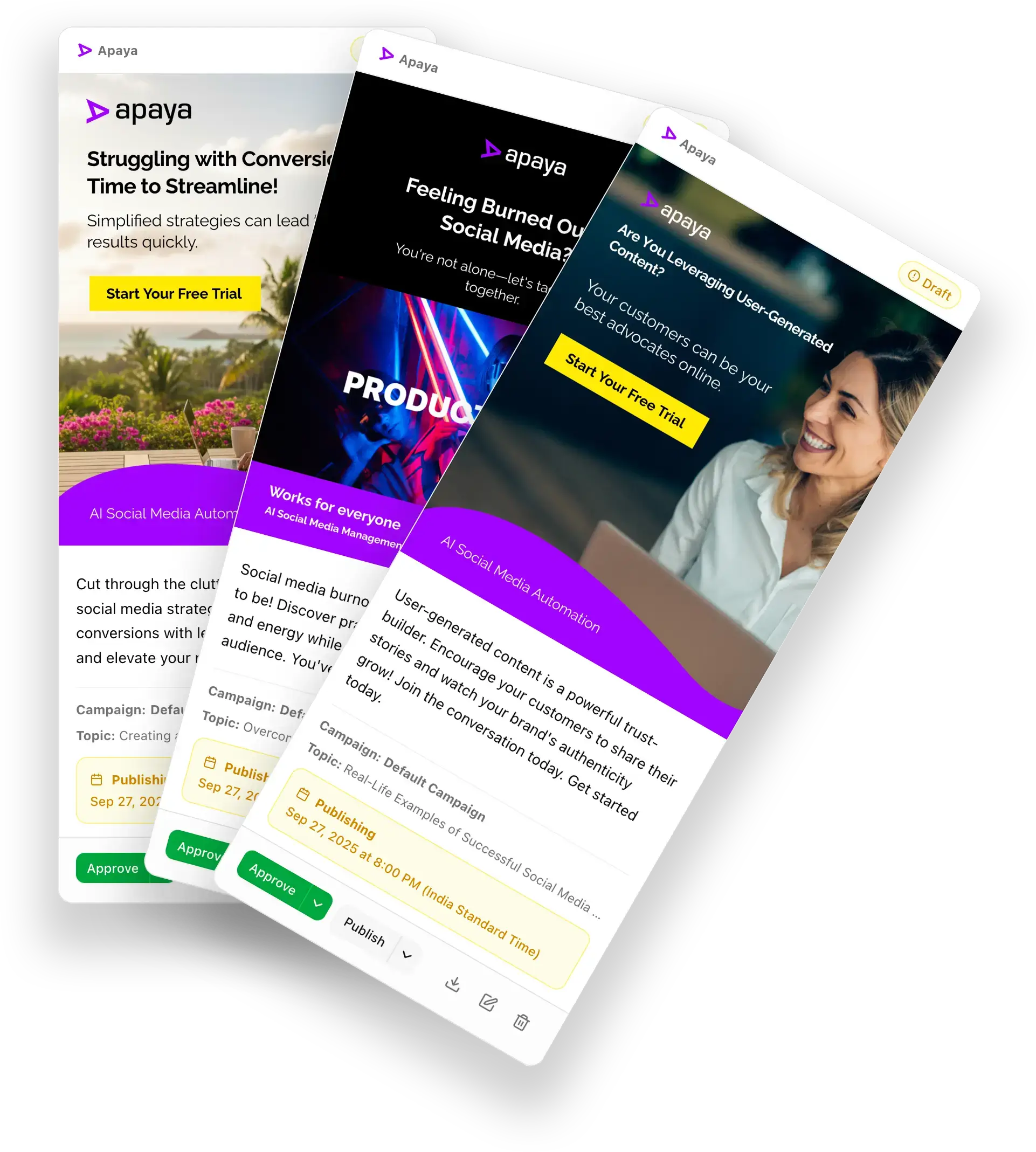
The Design Studio turns your brand kit into scroll-stopping posts—auto-branded templates, perfectly sized images, and ready-to-publish captions for every platform.
AI Social Media Scheduling Tool that auto-publishes for you.
No more manual posting or spreadsheet calendars. Apaya analyzes when your audience is most active, then publishes your content at the right time on every platform — automatically.
Cross-platform distribution that works while you sleep.
The Publishing Engine picks the best times and formats for every platform, posting automatically so you never have to log in late at night.
Key capabilities:
Optimal timing based on audience data
Platform-specific content formatting
Bulk scheduling and evergreen content recycling
Direct API integrations with all major platforms
Queue management and priority posting
THE ANALYTICS ENGINE
AI social media analytics tool that learns what works.
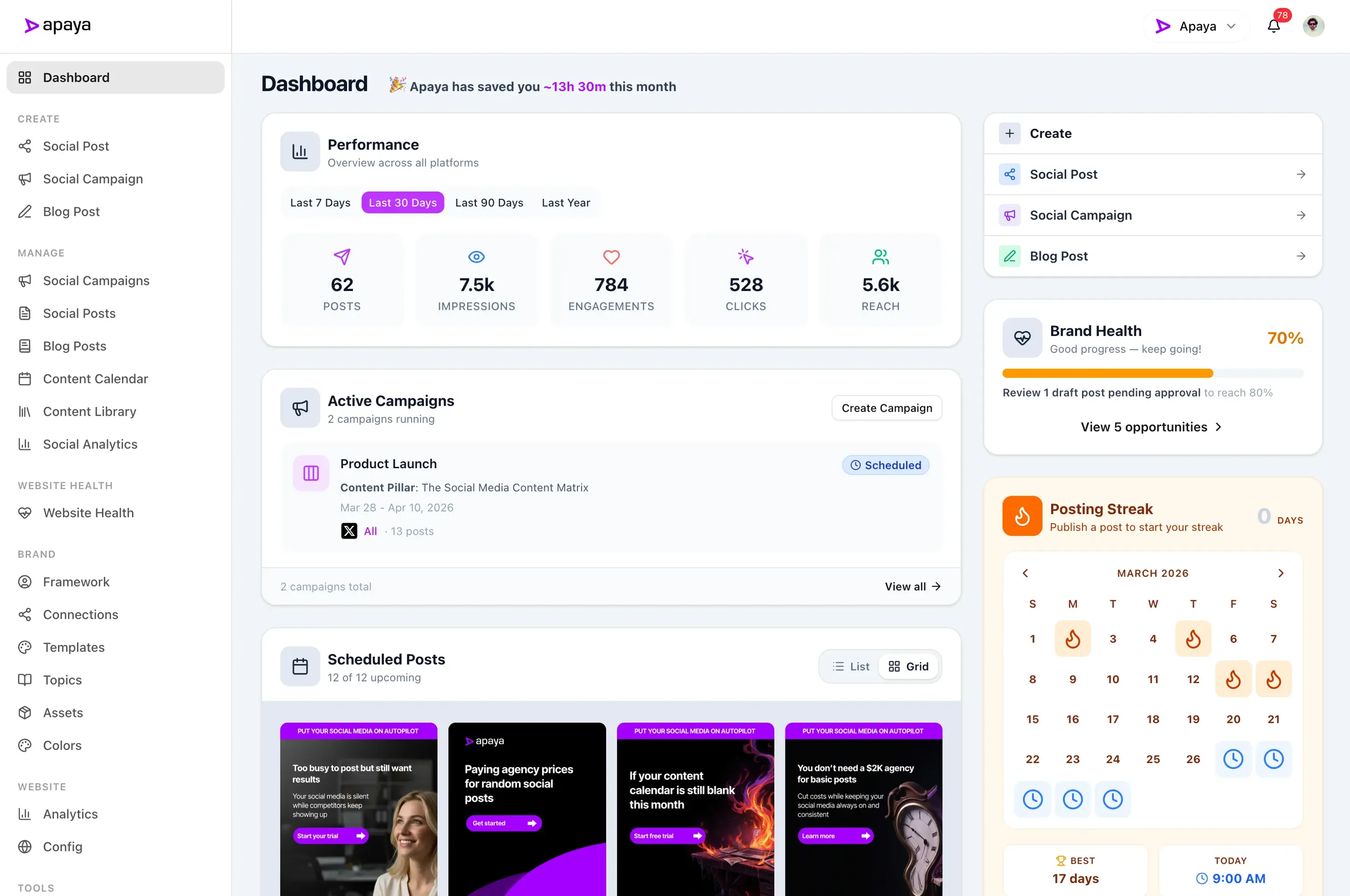
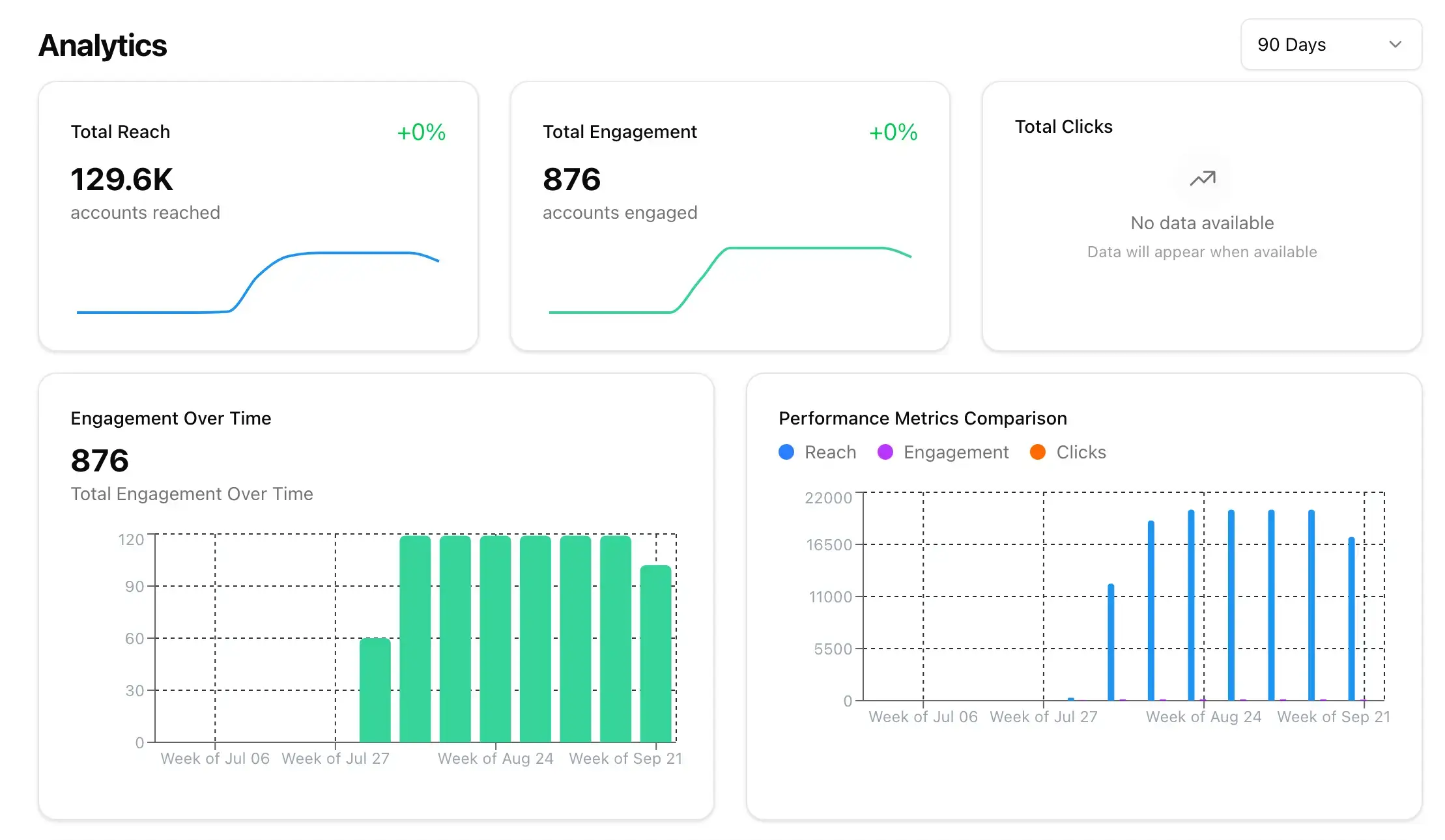
See how your content performs across every platform in one dashboard. Apaya tracks reach, engagement, clicks, and follower growth — then uses that data to make your next posts even better.
Data-driven insights that actually improve performance.
Measure reach, engagement, clicks, and conversions across platforms — then let AI surface the exact steps needed to grow faster.
Key capabilities:
Real-time performance monitoring across all platforms
Engagement and reach tracking
Competitor analysis and benchmarking
Automated performance reporting
Content optimization recommendations
THE SOCIAL SCANNER
AI social media monitoring tool that finds leads for you.
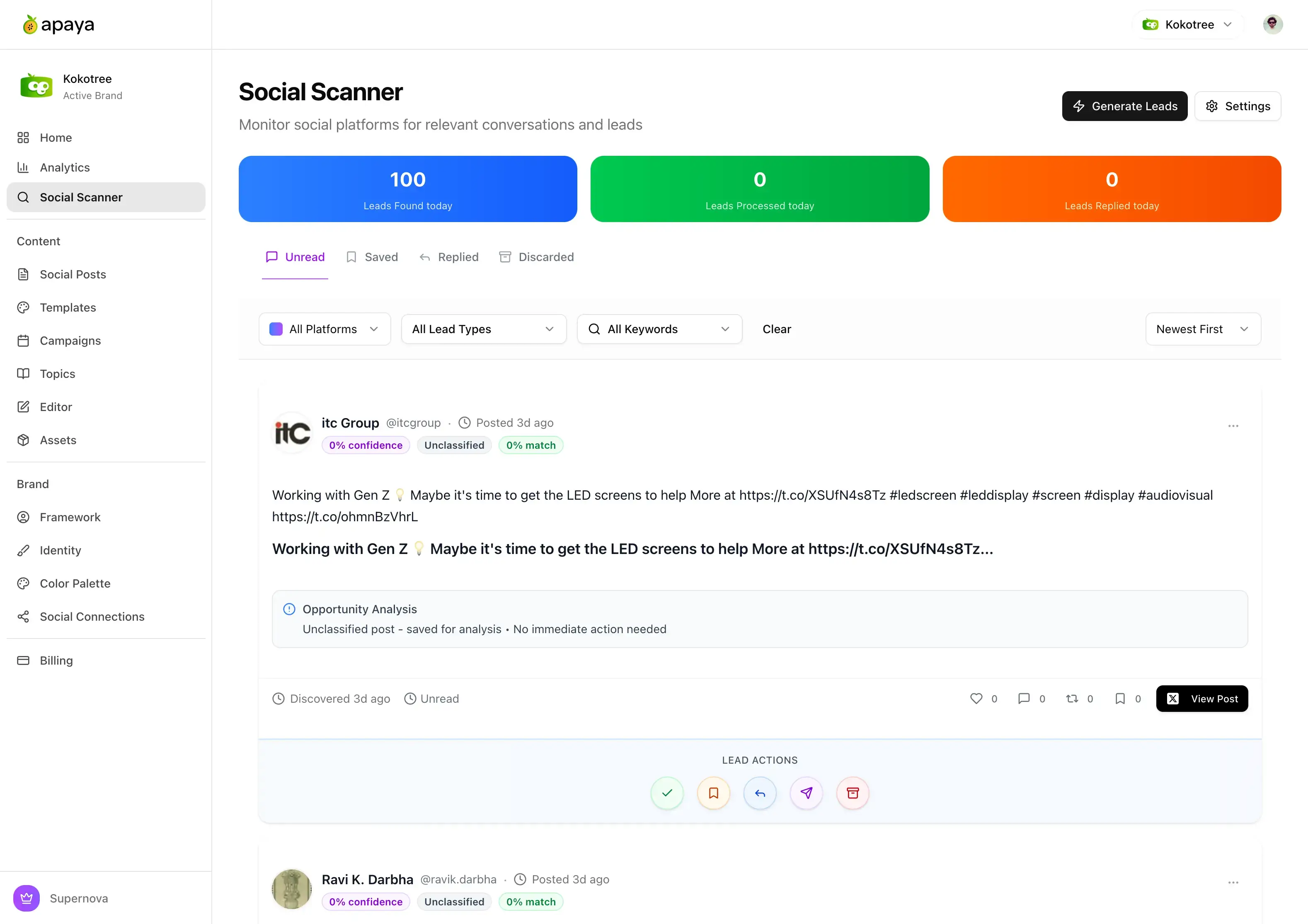
Apaya monitors Reddit, X, LinkedIn, and forums for conversations relevant to your business. When someone mentions a pain point you solve, you'll know — and you can respond before your competitors do.
Turn social conversations into business opportunities.
Track conversations across the web, identify buyer intent, and engage with AI-recommended replies — all without manual scanning.
Key capabilities:
Real-time monitoring across 5+ platforms
Buyer intent detection
Competitive mention tracking and alerts
Community engagement opportunities
AI-driven response recommendations
One AI social media manager. All platforms. Zero hassle.
AI & Brand Intelligence
This is where Apaya stops feeling like a scheduler and starts feeling like a real marketing engine. Instead of giving you generic AI output, it learns your brand, understands your positioning, and helps create content that sounds aligned, strategic, and built for how your business actually communicates.
Brand Voice Learning
The AI learns your tone, terminology, and personality from your website so generated posts sound like your brand instead of generic AI copy.
Regenerate copy when something feels off without starting over from scratch, making refinement fast and low-friction.
Dual Content Modes
Choose AI mode when you want Apaya to generate the content or paste mode when you already have the copy and just need execution.
Automated Brand Framework
Apaya builds a usable brand profile from your site, including positioning, audience, differentiators, and messaging cues that feed every post.
AI Guidance & Instructions
Guide the AI with plain-language instructions like audience notes, tone rules, offer emphasis, or style constraints across an entire batch.
Content Variety Guarantee
Cycle through topics and templates intelligently so your content mix stays fresh and your audience does not see the same pattern repeatedly.
Topic-to-Template Matching
Match the right topic to the right visual format so your content feels more intentional than repeating the same layout every time.
AI Content Generation
Generate full batches of original social posts with headlines, captions, calls to action, and hashtags in seconds.
AI Topic Generation
Generate topic ideas and content angles automatically so you are never stuck wondering what to post next.
Continuous Learning
Use performance feedback loops to improve future messaging, timing, and content mix instead of treating every post like a blank slate.
Brand Context Injection
Feed company context directly into generation so calls to action, positioning, tone, and messaging stay grounded in the business.
Campaigns & Planning
Apaya is built for running social media as a system, not as a pile of one-off posts. Plan campaigns, organize themes, control timing, extend winners, and keep your content pipeline moving so you always know what is publishing, why it is publishing, and what comes next.
Evergreen Campaigns
Keep your schedule full with campaigns that continue generating fresh content until you intentionally pause or stop them.
Topic-Based Campaign Planning
Build campaigns around selected topics so your posting strategy stays focused and intentional instead of random.
Template Selection Modes
Choose automatic template selection for speed or manual template selection for tighter creative control over your campaign output.
Campaign Timezone Sync
Update a campaign timezone and automatically keep draft and pending posts aligned with the new schedule rules.
Campaign AI Guidance
Apply campaign-specific AI instructions so one campaign can sound educational, another promotional, and another authority-driven.
Allowed Day Scheduling
Decide which days posts are allowed to go live so campaigns follow your preferred operating rhythm.
Auto-Generated Campaigns
When one campaign wraps, Apaya can prepare the next one in draft based on prior performance patterns so your feed never goes quiet.
Paste Mode Campaigns
Bring your own copy when you want full control over the words, then let Apaya handle scheduling, publishing, and tracking.
Campaign Pause & Resume
Pause a campaign to hold publishing, then resume it when you are ready without losing the work already created.
Campaign Status Tracking
Track whether campaigns are draft, active, paused, scheduled, completed, or archived so operations stay clean at scale.
Campaign Date Windows
Control when a campaign starts and stops so your posting timeline matches product launches, promotions, seasons, and business priorities.
Campaign Post Count Planning
Plan how much content a campaign should generate before publishing begins so you can shape scope instead of reacting later.
Guided Campaign Builder
Set up campaigns with a structured flow for platforms, topics, timing, templates, and content strategy instead of juggling scattered settings.
Additional Post Generation
Add more posts to an existing campaign without rebuilding the whole thing, which makes it easy to extend winners or fill gaps.
Campaign Archive & History
Archive finished or inactive campaigns while preserving posts and analytics history for future reference.
Campaign-Level Platform Selection
Choose exactly which social channels belong to a campaign so each publishing strategy is built for the right platforms from the start.
Posting Cadence Control
Choose how often posts should publish so your schedule matches your brand capacity and audience expectations.
Publishing & Scheduling
Every publishing feature you'd expect from a serious social media platform — plus the automation to make it hands-off. Schedule intelligently, publish across platforms, and keep your calendar organized without platform-by-platform busywork.
Social Account Connections
Connect Instagram, Facebook, LinkedIn, X, and TikTok from one place, with each brand keeping its own social publishing setup.
Publish Now
Push a post live immediately when timing matters, whether you are reacting to a trend, event, launch, or announcement.
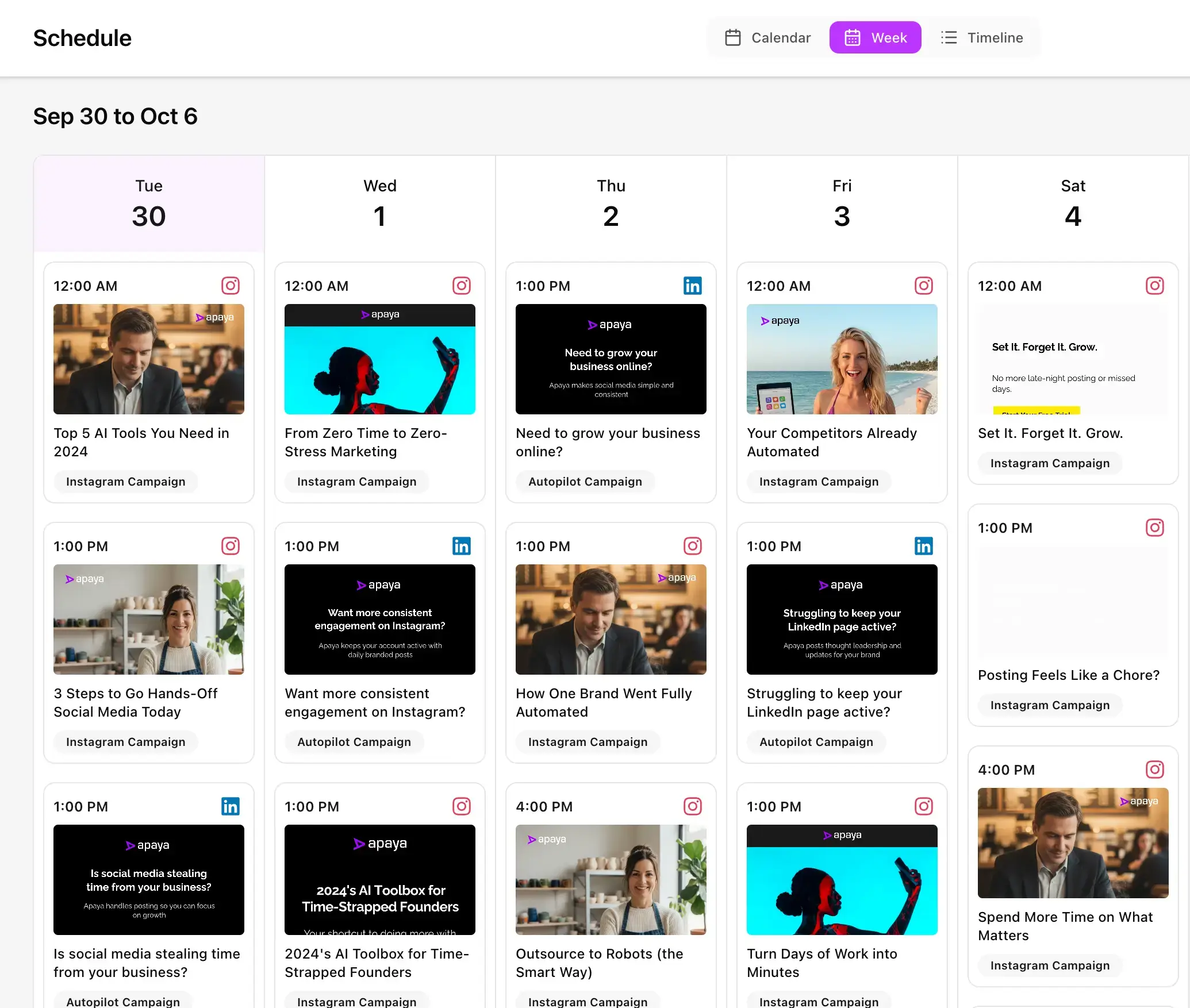
Calendar, Week & Timeline Views
Switch between multiple schedule views to spot gaps, overlaps, publishing density, and campaign rhythm at a glance.
Posting Slot Planning
Plan posting cadence and slot distribution across a campaign so your content is paced strategically instead of bunched together.
One-Click Schedule Updates
Adjust timing quickly without rebuilding content so your team can respond to shifting priorities without workflow drag.
Schedule-Level Platform Filtering
Narrow the calendar by platform when you want to inspect just Instagram, LinkedIn, Facebook, X, or TikTok activity.
Multi-Platform Publishing
Publish across major social channels from one workflow while Apaya handles platform-specific delivery requirements in the background.
Predictive Scheduling
Use audience-aware posting windows and campaign timing controls to publish when your content has the best chance to perform.
Drag-and-Drop Rescheduling
Move posts visually to new dates and times instead of editing them one by one whenever plans change.
Retry Failed Posts
Retry publishing failures without rebuilding the content, which makes operational cleanup faster when a platform hiccups.
Platform-Aware Posting Rules
Respect channel-specific publishing logic so content is prepared for the destination instead of pushed through a one-size-fits-all pipeline.
Past, Present & Upcoming Visibility
View previously published posts, live scheduled items, and upcoming content from the same scheduling experience.
Draft, Scheduled, Published & Failed States
Track every post through a clear lifecycle so your team can instantly see what is being created, queued, published, or needs attention.
Timezone-Aware Scheduling
Schedule in the right local timezone so posting windows and analytics line up with real business hours instead of server time.
Campaign & Status Filters
Filter your schedule and post lists by campaign, platform, and workflow status so large content libraries stay manageable.
Scheduled Publishing Queue
See what is queued to publish next so you always have a live view of upcoming activity across the brand.
Connected Platform Validation
Validate that campaigns only use actively connected platforms so no one builds content for channels that cannot publish.
Review & Post Management
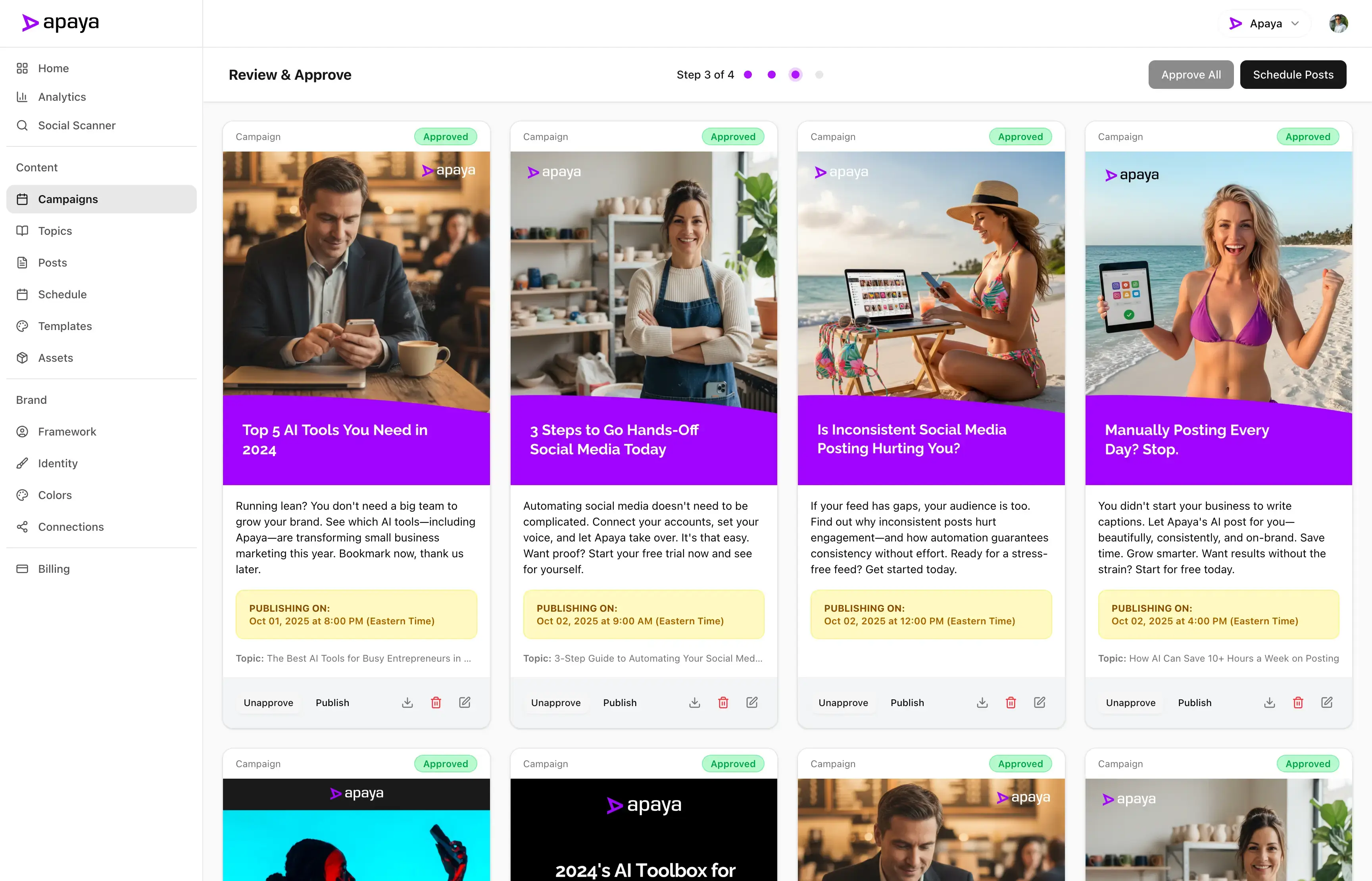
Creating content is only half the job. Apaya gives you the controls to review, approve, refine, and bulk-manage posts so your team stays fast without sacrificing quality or brand consistency.
Approval Workflow
Approve and unapprove content before it goes live so teams can maintain quality control and brand safety.
Bulk Draft Cleanup
Delete draft posts in bulk when you want to clear stale content and keep your workspace tidy.
Platform-Specific Previews
See how posts will appear across different social platforms so formatting decisions are made with the final experience in mind.
Publish-Type Flexibility
Create photo posts, carousel posts, reels, and other short-form publishing formats so your content mix matches how platforms are used.
Manual Refresh Controls
Refresh content and status views on demand when your team wants the latest state immediately.
Approval-to-Schedule Handoff
Move content cleanly from review into the publishing pipeline so the transition from draft to live workflow feels seamless.
Bulk Approvals
Approve large groups of draft posts at once when you want to move a full batch into the publishing pipeline quickly.
Move Scheduled Posts Back to Draft
Send scheduled posts back to draft in bulk when a campaign needs to be reworked before anything else goes live.
Post Detail View
Open a deeper post view to inspect content, media, analytics, publishing status, and platform-specific outcomes in one place.
Inline Post Editing
Update captions, timing, media, and post details without leaving the workflow you are already using.
Post Retry Controls
Retry individual failures instead of rebuilding the asset or recreating the entire post from scratch.
Bulk Approval Safety Checks
Run approval preflight checks before bulk actions so you can catch scheduling edge cases before they create operational problems.
Live Post Preview
Preview the post before publishing, including media, caption, hashtags, and timing, so changes happen before anything goes public.
Quick Post Creation
Create one-off posts quickly without building a full campaign, which is perfect for timely updates and reactive content.
Status Tabs for Workflow Control
Jump between draft, scheduled, published, and failed views instantly so post management stays fast even at higher volume.
Selection Mode for Bulk Actions
Select multiple posts at once so review and cleanup tasks can happen at platform scale instead of one card at a time.
Creative System & Formats
Great social content is not just about words. It is about presentation, format, timing, and repeatable creative systems. Apaya helps you manage captions, comments, hashtags, templates, visuals, and multi-format publishing so your content looks intentional everywhere it appears.
Smart Hashtag System
Run AI-only, custom-only, hybrid, or no-hashtag strategies while the system cleans, formats, and de-duplicates everything automatically.
Choose whether extra promotional info belongs in the caption or in the first comment based on the platform and strategy.
Visual Content Editor
Edit layouts, text overlays, colors, and design elements inside the platform without bouncing to another creative tool.
Template Swapping
Change the template on a draft post without throwing away the underlying content, making creative iteration much faster.
Carousel Support
Create multi-slide social content so your posts can educate, tell stories, break down ideas, and increase dwell time.
Brand Color Application
Apply brand palette logic across generated and edited visuals so your creative looks cohesive without manual color work every time.
Custom Hashtag Library
Store your brand hashtags and use them consistently across campaigns instead of retyping them on every post.
CTA Link Toggle
Turn the website CTA link on or off so you can control exactly how promotional your caption or first comment feels.
Image Regeneration
Regenerate a post image when you want a new visual direction without rewriting the post itself.
X Thread Publishing
Turn longer content into properly sequenced X threads instead of forcing strong ideas into a single short post.
Single-Image Post Support
Support classic single-image content for fast, clear, high-frequency posting without overcomplicating the format.
Media Downloading
Download post images when your team needs a local copy for reuse, review, presentation, or backup.
First Comment CTA
Automatically place your call to action in the first comment so you can keep captions cleaner while still driving clicks.
Template DNA System
Match content to the right format automatically, whether that is a single-image post, a headline layout, or a carousel structure.
Caption Regeneration
Generate a new caption variation when the message is close but not quite right.
Live Post Permalinks
Jump directly to the live social post after publication so you can verify placement, view it in context, and share it easily.
Headline-Driven Templates
Use layouts designed for punchy hooks and clean messaging so key ideas land faster in the feed.
Additional Post Info Settings
Control reusable extra text that can be added to captions or first comments so recurring promotional context does not need to be re-entered.
Video & Media Publishing
Modern social media is increasingly visual, and Apaya is built for that reality. From short-form video workflows to reusable media libraries and video-specific publishing controls, this section covers the tools that help you turn raw media into consistent, on-brand social content at scale.
Short-Form Video Publishing
Publish short-form video content across supported platforms so your strategy is not limited to static images and carousels.
AI Video Caption Generation
Generate captions and hashtags from uploaded videos so existing media can become publish-ready content faster.
Video Template Support
Use video-ready templates and workflows so motion content can be created with the same structure as the rest of your system.
Reels-Style Publishing Workflows
Support reel-style content planning so your short-form strategy is not treated as an afterthought inside a static-post system.
Platform-Specific Media Handling
Handle channel differences in media publishing so teams do not have to memorize every platform rule themselves.
Brand Video Library Campaigns
Build campaigns directly from your brand video library using either automatic selection or hand-picked clips.
Video Caption Regeneration
Generate fresh caption variations for a video post when you want to test a different hook, angle, or CTA.
Mixed Media Campaigns
Combine image, carousel, and video content in the same broader strategy so your publishing calendar feels balanced and modern.
Media Preview in Publish Flow
Preview media before finalizing publication so teams can confirm the right visual is paired with the right caption.
Media Library Reuse
Reuse approved visual assets across campaigns so great media keeps delivering value instead of getting used once and forgotten.
Upload Your Own Video
Upload existing video files and turn them into scheduled social posts without leaving the platform.
TikTok Publishing Settings
Set TikTok-specific publish options at the post level so short-form video publishing stays compliant and intentional.
Video Selection Modes
Choose automatic use of your full video library or manually select which brand videos a campaign should pull from.
Image and Video Post Creation
Create both image-based and video-based posts from the same workspace so your content system stays centralized.
Analytics & Optimization
Publishing is important, but learning what actually works is what compounds results over time. Apaya brings your post, campaign, platform, and audience data together so you can measure performance clearly, spot trends faster, and make smarter decisions about what to create next.
Performance Intelligence
Track reach, impressions, engagement, clicks, and follower growth from one unified social analytics experience.
Post-Level Analytics
Drill into individual posts to see exactly what earned the reach, clicks, saves, and engagement you want to repeat.
Time-Series Performance Charts
Watch performance over time with charts that reveal momentum, spikes, slowdowns, and trendlines across your social activity.
Analytics Refresh Jobs
Refresh analytics when you need updated numbers instead of waiting passively for the next background sync.
Impression Tracking
Track total post views across platforms so you can see how often content is being surfaced and consumed.
Save Metrics
Track how often content gets saved so you can identify the posts people find useful enough to come back to later.
Connected-Account Visibility
Only show account-level results for connected social profiles so analytics stay tied to real publishing infrastructure.
Cross-Platform Analytics
Compare performance across networks in one dashboard instead of piecing together metrics platform by platform.
Social Account Analytics
Break performance down by connected social account so you can see which channels and profiles are actually carrying results.
Follower Growth Tracking
Track total followers and growth over time so you can see whether your content strategy is building audience, not just engagement.
Historical Metric Preservation
Preserve analytics history intelligently so temporary platform fluctuations do not make your performance appear to move backward.
Click Tracking
See which posts actually drive action so you can separate passive engagement from real traffic-generating content.
Top Content Identification
Surface your best-performing posts faster so strong ideas can be reused, extended, and turned into future campaigns.
Campaign Analytics
Measure how entire campaigns perform over time so you can evaluate themes, timing, and content strategy at a higher level.
Platform Metrics Breakdown
Review channel-specific metrics like reactions, comments, shares, saves, clicks, and engagement rate in a cleaner, more actionable format.
Audience Demographics
Explore follower audience breakdowns like country, industry, seniority, function, and company size where platforms support that data.
Reach Tracking
Measure how many unique people your content is actually getting in front of so visibility is never a guess.
Engagement Rate Tracking
Measure engagement rate so performance can be judged relative to visibility, not just raw totals.
Campaign Comparison Views
Compare campaigns against each other to understand which themes, structures, and timeframes are creating the strongest outcomes.
Listening & Opportunity Discovery
Social media is not just a publishing channel. It is also a discovery channel. Apaya helps you monitor conversations, identify intent signals, surface relevant opportunities, and organize what you find so your team can turn social activity into real pipeline and business momentum.
Social Intent Listening
Monitor social conversations for buyer-intent signals so your team can find relevant opportunities before competitors do.
Hot, Warm & Cold Classification
Classify leads by urgency so reps and marketers can prioritize follow-up based on likely buying intent.
Scanner Performance Stats
Track how many leads were found, processed, and replied to so your listening workflow has measurable output.
Saved Opportunity Management
Save promising social opportunities for later so useful discoveries are not lost in a constantly moving feed.
Keyword Monitoring
Track selected keywords and phrases across supported social sources so you can surface relevant conversations faster.
Unread, Saved & Replied Queues
Work opportunity discovery through clear queues so social prospecting becomes a repeatable process instead of a messy feed.
Lead Type Filtering
Sort opportunities by lead type so teams can separate categories of buyer intent and work them differently.
Reply Workflow Tracking
Track what your team has already responded to so prospecting and conversation follow-up stay organized.
Lead Quality Scoring
Score discovered posts for relevance, buying intent, and overall fit so your team focuses on the best opportunities first.
Platform & Match Filters
Filter discovered conversations by platform, keyword, temperature, and lead type to narrow in on the highest-value opportunities.
Temperature Filtering
Filter by hot, warm, and cold signals when you want to focus only on the most urgent or conversion-ready opportunities.
Sort by Best Match
Sort discovered opportunities by best-fit relevance when speed matters and you want the strongest leads at the top.
Team, Brands & Workspace Control
As your operation grows, social media gets more complex. More brands, more people, more approvals, more assets, more moving parts. Apaya gives you the structure to manage that complexity cleanly so teams can collaborate, stay accountable, and operate multiple brands from one organized platform.
Team Collaboration & Roles
Support owners, admins, editors, and viewers with role-based access so the right people can create, review, publish, and analyze safely.
Digital Asset Library
Store reusable brand visuals and media in one place so campaigns can pull from the same approved creative system.
Reconnect & Recovery Flows
Reconnect social accounts cleanly when tokens expire or a platform disconnects so publishing continuity is easier to maintain.
Centralized Social Connections Page
Manage all account connection, reconnection, and disconnection actions from one dedicated social setup area.
Approval-Friendly Team Operations
Support collaboration without chaos by making it clear who creates, who reviews, and who publishes.
Enterprise Multi-Brand Hub
Manage multiple brands from one workspace while keeping social accounts, campaigns, assets, analytics, and permissions separated cleanly.
Brand Color Palettes
Keep brand color systems organized and reusable so generated and edited content stays visually consistent.
Connected Platform Validation
Build campaigns against actually connected social platforms so you do not waste time planning posts for accounts that cannot publish.
Asset Reuse Across Campaigns
Reuse approved media and creative building blocks across multiple campaigns so high-quality assets keep paying off.
Brand-Specific Publishing Infrastructure
Each brand can maintain its own publishing setup, content system, and connected profiles without contaminating another brand’s workflow.
Activity & Audit Trail
Track who changed what across content, publishing, and settings so teams have accountability and operational visibility.
Reusable Brand Elements
Save reusable creative elements and building blocks so your team can produce faster without rebuilding the same visuals every time.
Brand-Level Social Isolation
Keep each brand’s social accounts, content, settings, assets, and analytics separated so agencies and multi-brand teams stay organized.
Workspace-Level Visibility
Give teams a central operating layer where planning, publishing, analytics, listening, and brand management connect cleanly.
Operational Accountability
Keep an auditable record of important social actions so managers can trace publishing, approval, and settings decisions over time.
How it works
How Apaya automates your social media.
1
Add your website. AI builds your brand framework.
2
Connect your social media accounts.
3
We generate posts. You review, edit, and publish. Or let it run automatically.
From our customers
Results from businesses like yours.
Your social media could look like this too.
"We went from posting once a week — when we remembered — to daily thought leadership on LinkedIn and Instagram. Engagement doubled in weeks, and nobody on our dev team had to touch it."
Vivek ThakurCEO at Kokotree
"I used to spend my Sunday nights writing posts for the week. Now Apaya handles our customer stories and promotions automatically. Inquiries are up 25% and I got my weekends back."
Sarah ChenOwner at BerksConnect
"We manage social for 50+ clients. Before Apaya, that meant 50+ content calendars built by hand. Now the AI drafts everything and my team just refines. We cut production time by 40% and our clients are getting better results."
Mike PatelDirector at Resultris Agency
"Our social traffic was flat for a year. We switched to Apaya and within two months, social traffic was up 20% and sales from social channels grew 15%. The posts are consistent and sound like us."
Emma LopezManager at Toperty
"I'm a one-person marketing team. Before Apaya, I'd go weeks without posting. Now we publish daily across three platforms. Followers grew 25% in three months and I spend maybe 20 minutes a week reviewing posts."
Everything you need to know about Apaya. If you don't find your answer here, our support team is ready to help—just reach out.
What is Apaya?
Apaya is AI social media management software that automates every part of your social media presence, from generating posts and graphics to scheduling, publishing, and tracking performance across Instagram, LinkedIn, Facebook, and X. Our intelligent system learns your brand, generates engaging content, creates professional graphics, handles multi-platform scheduling, and continuously optimizes performance across Instagram, LinkedIn, Facebook. Unlike traditional social media management tools that require constant manual input, Apaya uses advanced AI and machine learning to run your entire social media strategy on autopilot. It's designed to save you 20+ hours per week while reducing marketing costs by up to 80% and increasing engagement rates by an average of 3x.
How is Apaya different from other social media tools?
Hootsuite and Buffer are social media scheduling tools, They help you publish content you've already created. Apaya is a complete AI social media management platform that creates the content for you. Point Apaya at your website and it learns your brand voice, writes posts in your style, generates graphics in your brand colors, and publishes on schedule automatically. The key difference: tools like Hootsuite and Sprout Social assume you have a marketing team writing copy and a designer making graphics. Apaya is built for businesses that want social media management without a social media team. For agencies, Apaya also offers white-label management across 10 to 25+ client brands at a fraction of the per-brand cost of enterprise platforms.
How does Apaya learn my brand voice?
Simply connect your website and existing social accounts during our 5-minute setup process. Apaya's AI immediately analyzes your content history, brand messaging, visual identity, and audience interactions to build a comprehensive brand profile. Using natural language processing and sentiment analysis, it identifies your unique tone, industry terminology, content themes, and communication style. Within 24 hours, the AI can generate content that matches your brand voice perfectly. The system continues learning from every post's performance, refining its understanding to ensure authentic content creation that resonates with your specific target audience.
Which social platforms does Apaya support?
Apaya provides comprehensive multi-platform support for Instagram, LinkedIn, Facebook, Twitter/X, and emerging platforms. Our cross-platform posting system handles all technical requirements automatically: optimal image dimensions, video specifications, character limits, hashtag strategies, and platform-specific best practices. Whether you need LinkedIn articles, Instagram carousels, TikTok videos, or YouTube Shorts, Apaya formats and optimizes content for maximum reach and engagement on each network. We continuously add new platform integrations based on user demand.
Is the content generated by Apaya original?
Yes, every piece of content is 100% original, AI-generated specifically for your brand using advanced content generation technology. Apaya creates unique posts, captions, hashtag sets, and graphics that pass all plagiarism checks and avoid duplicate content penalties. Our AI doesn't recycle generic templates or copy existing content. Instead, it combines your brand guidelines, industry insights, trending topics, and performance data to create fresh, relevant content that aligns with your marketing goals. Each post is crafted to drive engagement while maintaining your authentic brand voice and messaging consistency.
What if I don't like the generated content?
You maintain complete creative control with flexible approval workflows and content customization options. Preview all scheduled posts in advance through our content calendar, edit any element (text, images, hashtags, timing), or regenerate entirely new versions with one click. Set up approval rules for team collaboration, requiring sign-off before publishing. The AI learns from every edit you make, using machine learning to understand your preferences and improve future content generation. Most users find that after the first week of feedback, the AI produces content they approve 95% of the time without modifications.
What social media analytics and metrics does Apaya track?
Apaya tracks all the metrics that matter for growing your social media presence: reach, impressions, engagement rate, click-through rate, follower growth, and website traffic driven from social media. You can view performance by individual post, by campaign, or aggregated across all platforms. The AI uses this performance data to continuously improve the content it creates, posts that generate more engagement inform the style and topics of future posts.
How secure is my data with Apaya?
We implement enterprise-grade security measures including 256-bit SSL encryption, OAuth 2.0 authentication, and secure API integrations with all social platforms. Our infrastructure is SOC 2 compliant, with data centers that meet GDPR, CCPA, and international privacy regulations. Your content, analytics, and account credentials are encrypted at rest and in transit. We never share, sell, or use your data for training other AI models. Regular security audits, penetration testing, and real-time threat monitoring ensure your brand's digital assets remain protected. All data is backed up hourly with point-in-time recovery options.
Can I cancel my subscription anytime?
Absolutely. We believe in earning your business every month with no lock-in contracts or cancellation fees. Cancel directly from your dashboard with one click, and you'll retain full access to all features until the end of your current billing period. Download your content history, analytics reports, and generated assets before leaving. If you change your mind, reactivate anytime and pick up where you left off. Our transparent billing means no surprise charges or complicated cancellation processes. We also offer plan changes, payment pauses for seasonal businesses, and flexible billing options.
Do you offer a free trial?
Yes! Every plan includes a risk-free 3-day trial with instant access to all features. During your trial, you can connect unlimited social accounts, generate hundreds of posts, access our full template library, and see real engagement results. The AI begins learning your brand immediately, so you'll experience the full power of automation from day one. Most users see their first automated posts go live within hours. If you're not completely satisfied, simply don't upgrade. There's zero obligation and no hidden charges. View our pricing plans to get started.
What kind of support do you provide?
We offer comprehensive customer support across all plans. Get help via live chat, email support, and access to our knowledge base with tutorials, best practices, and strategy guides. Higher-tier support plans include priority support queues, dedicated account managers, monthly strategy calls, and custom onboarding sessions. Our support team includes social media experts who provide not just technical assistance but strategic advice on content optimization, engagement tactics, and growth strategies.
How does pricing work for multiple companies?
Our pricing grows with your needs. Spark ($59/month billed annually, or $69 month-to-month) covers one brand with 2 social accounts. Blaze ($109/month billed annually, or $129 month-to-month) covers one brand with up to 4 social accounts. Need to manage multiple brands? Supernova supports up to 10 brands, and Galaxy supports up to 25 brands with agency-friendly features like white-labeling, branded reporting, and approval workflows. Every plan includes full automation and all core features. Need more than 25 brands? Contact us for Enterprise pricing.